

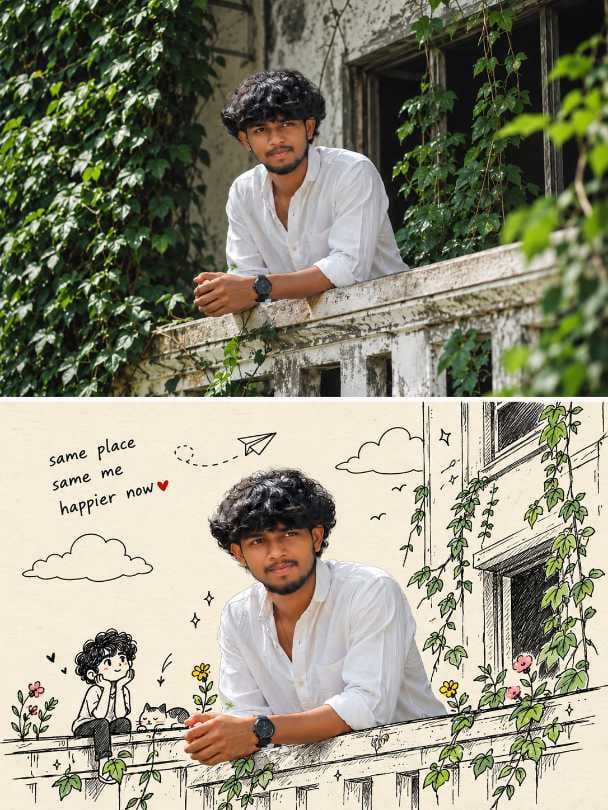
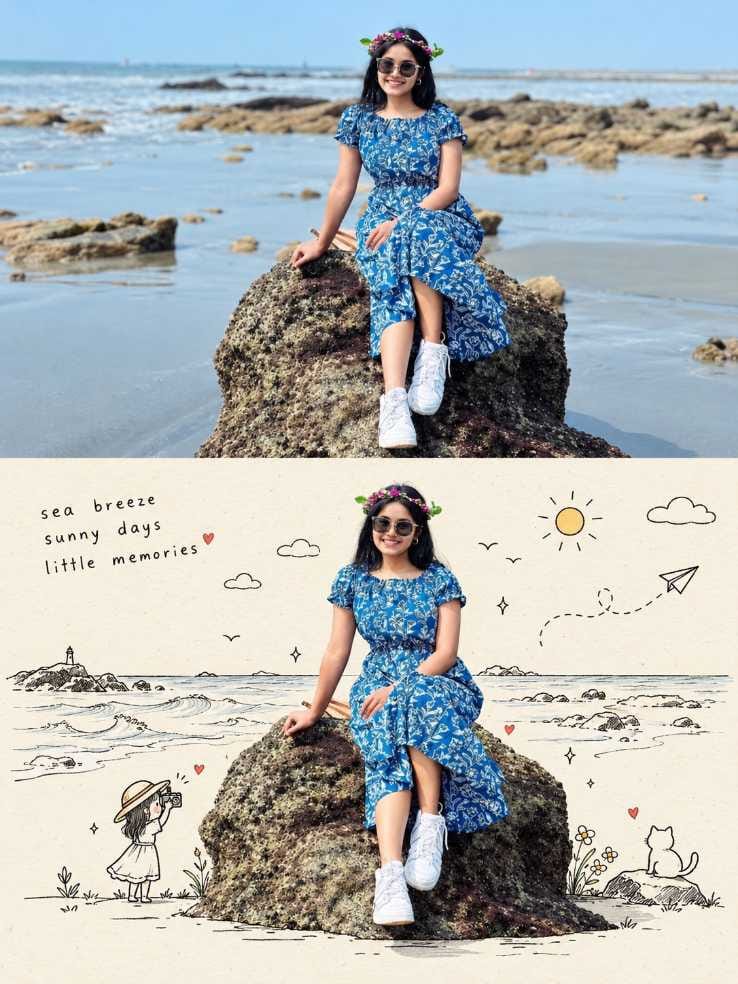
A plain photo on top, the same person on a doodle sketchbook page below. That’s the whole idea. Here is the first one.
IMAGE 1: Young man with curly hair and short beard leaning on an old ledge in a white shirt, ivy photo on top, same man on cream paper with black line-art ivy, window, paper plane, cat and a handwritten caption with a red heart below
IMAGE 2: Smiling young woman with sunglasses and a flower crown on a beach rock, real photo on top, same woman on cream paper with line-art waves, lighthouse, sun, cat and a small girl with a camera below
The first one is a city-ledge look with ivy and a window. The second is a beach look with waves and a lighthouse. Both use the same stacked layout, so you can use either as a base for your own photo.
Why Before-and-After Posts Get Attention
People stop on these because the top and bottom tell a small story. The real photo shows the place. The doodle panel shows how it felt. Many people like to compare the two, and that gives them a reason to look a bit longer.
For this kind of image, I’d pick a single feed post first. A carousel works too, if you want to add a close-up as a second slide. A reel is a good extra, and I’ll cover it below.
Pick the Photo and Run the Prompt
Use a photo where your face is clear and the light is even. A plain or simple background is better, because the tool has to cut you out and place you on paper. Skip heavy filters and very small, blurry images.
1) Open ChatGPT and start a new chat.
2) Upload your photo.
3) Paste the prompt from the box above.
4) Wait for the result and look at the face, the hair edges and the clothes.
5) If something is off, ask for one small fix at a time.
Sizes for Post, Story and Reel
A stacked image is tall, so a portrait size suits it well.
- Feed post on Instagram or Facebook: 4:5 portrait, 1080×1350.
- Story or reel cover: 9:16, 1080×1920.
Save the final image at the size you need before you upload. Don’t let the app crop it for you, because the caption on the paper can get cut off.
Caption Ideas Without Copying
Write your own line, and match it to the photo. Here are three in different voices.
Calm : “Some days just feel like a page in a diary.”
Funny : “Real me on top. Cartoon me with a cat below.”
Short : “Same day, two ways.”
Put a few plain words in the caption so people can find the post: doodle diary, AI photo prompt, before and after, sketchbook photo.
Hashtags you can try : #DoodleDiary #DoodleDiaryPhoto #SketchbookPortrait #BeforeAndAfterPhoto #LineArtDoodle #PaperDoodleLook #CuteDoodleArt #AIPhotoPrompt #ChatGPTPhotoPrompt #DiaryPageAesthetic
Turn the Two Panels into a Reel
This is where a still image becomes something more. A reel can show the real photo first and then the doodle page, so the viewer feels the change.
- Crop the top panel and the bottom panel into two separate images. Keep both at 9:16, 1080×1920, with the person centred.
- Put them in Google Flow or any video editor app. Show the real photo for a second or two, then switch to the doodle page. If your tool can add a soft slide or fade between them, use it.
- Add a light, calm sound. Keep the whole reel short, so the viewer sees the doodle page before they scroll away.
You can also ask a video tool to move the paper plane or the clouds a little. Keep the motion gentle. Too much movement makes the face look strange.
If you only want a quick version, show the full stacked image for a few seconds, then zoom slowly into the doodle half.
What to change, and what you get
| Change this | What usually happens |
|---|---|
| Paper colour (light grey, soft pink) | The page feels softer or cooler |
| Doodle theme (space, city, forest) | The story of the page changes |
| Accent colour on flowers and hearts | The image gets a small pop of colour |
| Caption words and place | The post feels more personal |
| Tiny characters (dog, kid with a kite) | The page gets more playful |
Mistakes That Hurt Reach
The cutout can drift. The face and hair may not match the original exactly. Curly hair edges can look rough against the paper. On the beach photo, check the sunglasses, the flower crown, the rock edge and the legs. If you see a problem, fix it or choose another result. Don’t post it as it is.
Other things to avoid : a tiny caption nobody can read, a crowded page with too many doodles, and a file saved at the wrong size.
Before you post, check these five things :
1) The face looks like you.
2) Hair and clothing edges look clean.
3) The caption on the paper is readable.
4) The size is 1080×1350 or 1080×1920.
5) Your own caption and hashtags are ready.
Frequently Asked Questions (FAQ)
It is made for one person. A group may give uneven cutouts, so try one person first.
This prompt was made for ChatGPT, so start there.
Yes. Use a short line about the day or the place. Keep it small and in lowercase for the diary feel.
A single image is the simplest. Use a carousel if you want to add a close-up or the original photo as another slide.

Gana DON