Soft portraits with a butterfly resting on the face are everywhere on Instagram and Facebook right now. Many people love them because the mood is calm and dreamy. The dark background makes the skin and the butterfly colours stand out. And you don’t need a studio or a real butterfly. One AI prompt and one clear selfie are enough.
The two prompts below are my own modified version of a trending butterfly prompt. One is for a girl and one is for a boy. Both keep the person’s look and add two small butterflies. Let’s start with the prompts.
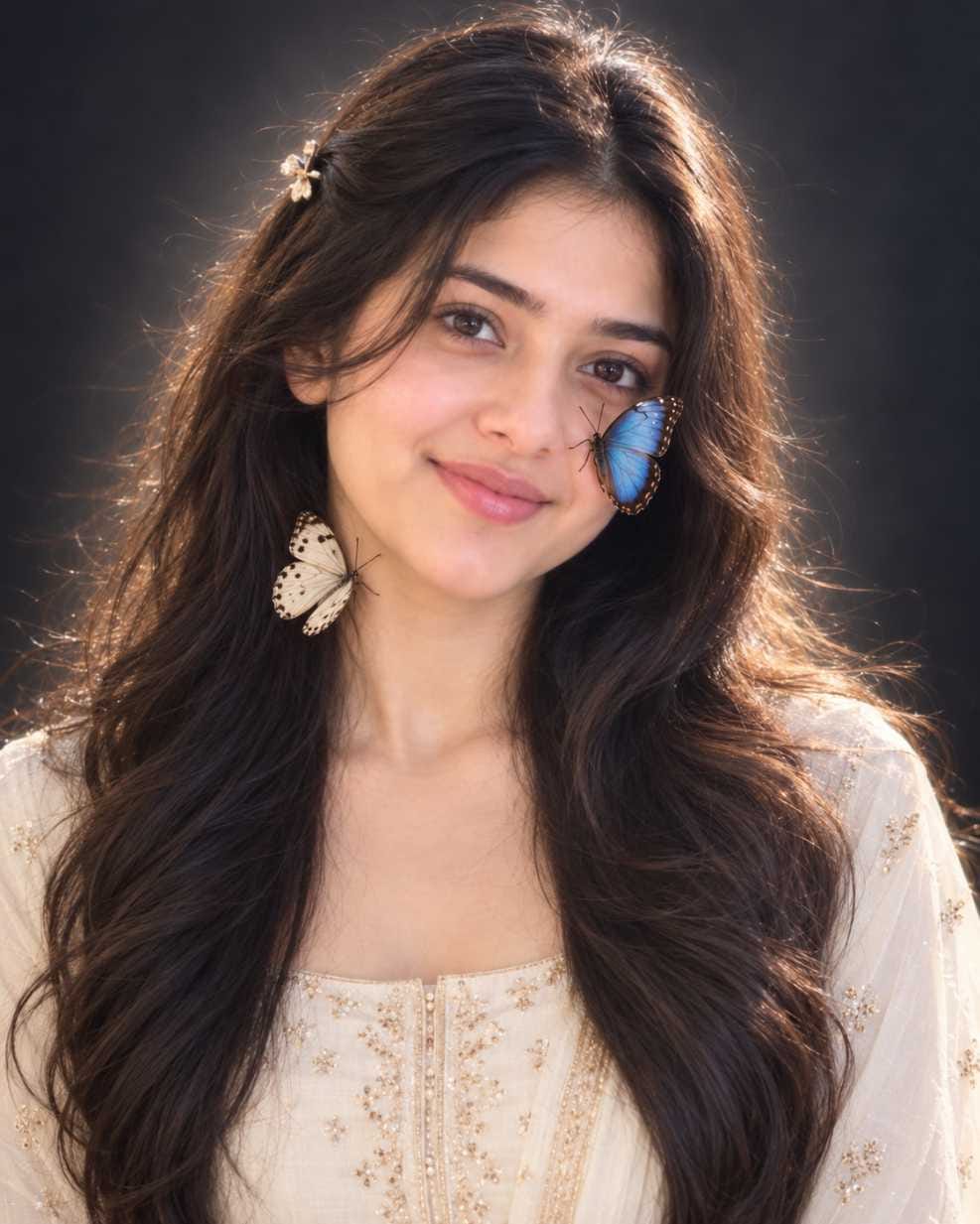
IMAGE 1 : Young woman with long wavy dark brown hair, cream outfit with gold embroidery, blue butterfly on cheek, white spotted butterfly near hair and neck, warm soft light on dark background
The first one is softer and warmer. It has a gentle smile and a glowing edge around the hair.
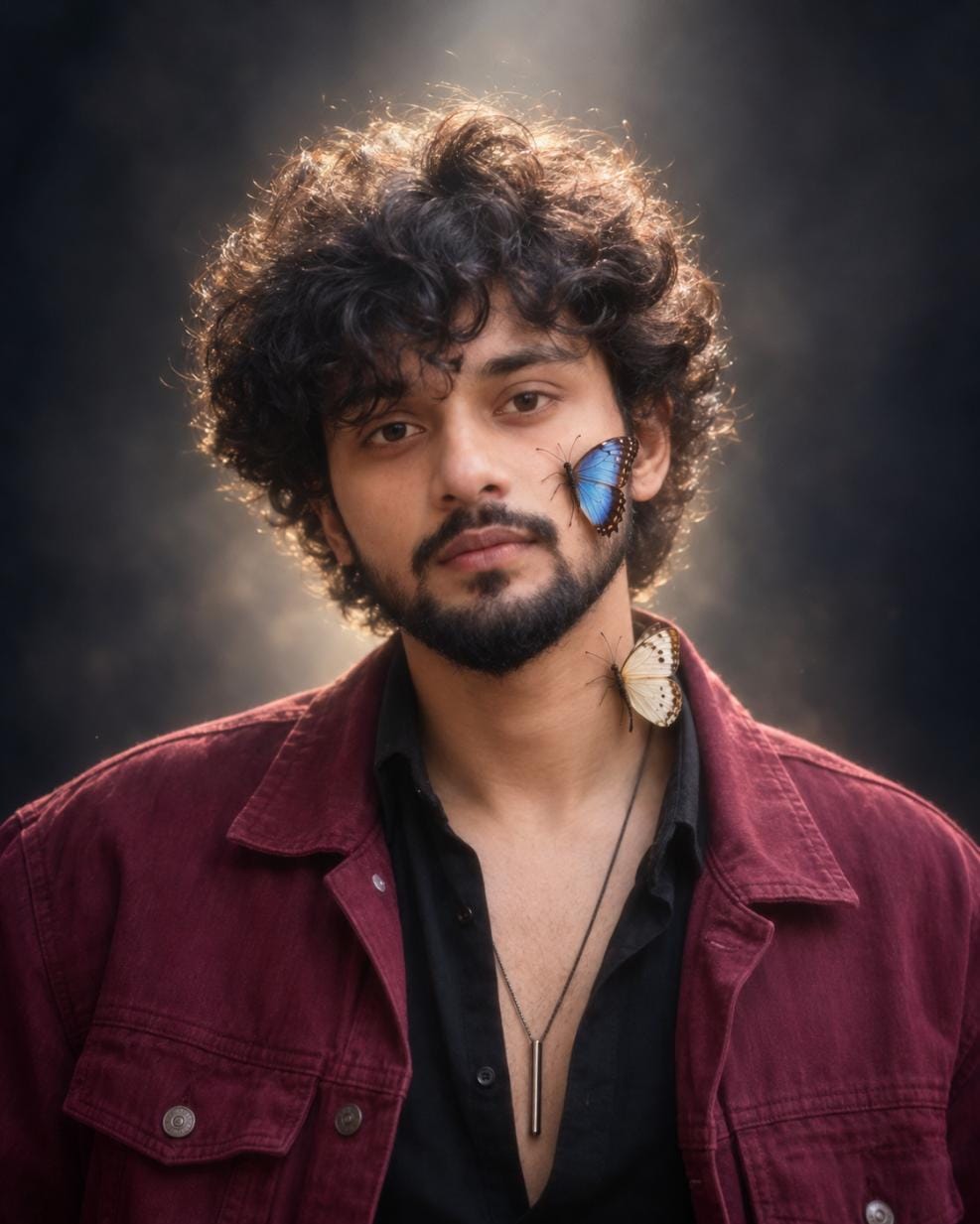
IMAGE 2 : Young man with curly dark hair and short beard, maroon denim jacket, blue butterfly on cheek, cream butterfly near neck, soft haze glow behind head, dark background
The second one is moodier. It has a no-smile face, a faint glow behind the head and a list of things to avoid.
What the Prompt Locks In
Both prompts tell the AI to keep your face, hair, clothes and jewellery the same as your upload. They also fix the pose, the frame, the soft light, the plain dark backdrop and the hazy film finish. So you don’t need to touch these parts. Change only the things in the next sections.
Butterfly Colour and Type
Blue is the starting colour in both photos. Swap it for yellow, red, green or orange and the whole mood shifts. A bright butterfly on a dark backdrop pops more. A pale one stays quiet. Pick a colour that either matches your outfit or clearly contrasts with it. Don’t mix too many colours. Two butterflies is enough.
⫷RonyTica Prompt Box
Create an ultra-soft, dreamy, cinematic studio portrait of the woman in the uploaded subject photo, featuring two delicate, realistic butterflies naturally resting on her skin.
IDENTITY PRESERVATION: Use the uploaded female subject photo as the only identity reference. Preserve her exact facial features, face shape, skin tone, hairstyle, hair colour, hair length, makeup, eyebrows, eyelashes, facial details, jewellery, earrings, piercings, accessories, and original outfit. Do not change her identity or add artificial beauty enhancements.
POSE & EXPRESSION: Head upright and naturally positioned, facing directly toward the camera. Eyes open, softly looking into the lens. Calm, graceful, serene expression with a natural, subtle look. Shoulders relaxed and hands out of frame.
BUTTERFLY PLACEMENT:
A beautiful Blue Morpho butterfly resting on the left cheekbone, just below the eye, with open iridescent blue wings and dark brown borders.
A delicate cream-white butterfly resting on the right side of the neck, just below the jawline, with soft white wings and delicate dark markings.
Both butterflies must look photorealistic, with delicate antennae, thin legs, natural wing textures, and subtle contact shadows.
COMPOSITION: Elegant, centred head-and-shoulders female portrait with the upper chest visible. Vertical 4:5 aspect ratio.
LIGHTING: Extremely diffused softbox lighting from above and slightly in front, gentle hair backlighting, and a subtle, soft glow behind the head.
BACKGROUND: Seamless dark grey-to-black studio backdrop with no objects or visible textures.
COLOUR GRADING: Natural, slightly desaturated, cool-neutral tones with low contrast, soft luminous shadows, and delicate highlights.
MAXIMUM SOFTNESS: Extremely dreamy soft-focus appearance, gentle diffusion, soft edges, gradual shadows, subtle highlight bloom, reduced micro-contrast, and delicate film grain. No sharpening, clarity boost, or harsh contrast.
REALISM: Photorealistic natural female skin texture with visible pores and fine facial details. Preserve the original makeup and natural appearance. Butterflies must look naturally landed on the skin.
NEGATIVE PROMPT: Changed identity, altered face, different hairstyle, changed hair colour, artificial makeup, excessive beauty filters, changed jewellery, changed outfit, oversized butterflies, artificial butterflies, hard halo, harsh shadows, high contrast, orange skin tones, visible hands, extra butterflies, text, logos, watermark.
FINAL INSTRUCTION: Create an ultra-soft, dreamy, elegant, luminous cinematic female portrait while maintaining 100% identity fidelity to the uploaded subject photo. Maximum softness and photorealism are more important than sharpness.
⫷RonyTica Prompt Box
{
“aspect_ratio”: “4:5”,
“style”: “Soft, dreamy, cinematic studio portrait”,
“identity”: {
“reference”: “Use the uploaded subject photo.”,
“preserve”: “Exact face, skin tone, hairstyle, hair colour, facial hair, tattoos, piercings, jewellery, accessories and original outfit.”,
“restriction”: “No beautification, face alteration or identity changes.”
},
“pose”: {
“head”: “Upright, level, facing camera.”,
“eyes”: “Open, calmly looking into the lens.”,
“expression”: “Serene, natural, no smile.”,
“shoulders”: “Relaxed and square.”,
“hands”: “Out of frame.”
},
“butterflies”: [
{
“type”: “Blue Morpho”,
“position”: “Left cheekbone, below the eye”,
“wings”: “Open, iridescent blue with dark brown borders.”
},
{
“type”: “White Butterfly”,
“position”: “Right side of neck, below the jaw”,
“wings”: “Soft cream-white with delicate dark markings.”
}
],
“framing”: “Centred head-and-shoulders portrait, upper chest visible, vertical 4:5.”,
“lighting”: “Extremely diffused softbox lighting from above and slightly in front, gentle hair backlight and subtle formless glow behind the head.”,
“background”: “Seamless dark grey-to-black studio backdrop with no objects or visible texture.”,
“colour_grade”: “Natural, slightly desaturated, cool-neutral tones, low contrast, soft luminous shadows and gentle highlights.”,
“softness”: {
“priority”: “MAXIMUM”,
“effect”: “Dreamy diffusion, soft edges, gradual shadows, subtle highlight bloom, reduced micro-contrast and delicate film grain.”,
“restriction”: “No sharpening, clarity boost, hard edges or harsh contrast.”
},
“realism”: “Photorealistic skin texture with visible pores and fine hairs. Butterflies must look naturally landed on the skin with delicate antennae, thin legs and subtle shadows.”,
“style_reference”: “Use only for lighting, background, glow and colour grading. Never copy its person, pose or butterfly placement.”,
“avoid”: [
“Changed identity or outfit”,
“Oversized or artificial butterflies”,
“Hard halo or glowing ring”,
“Sharp digital appearance”,
“Harsh shadows or high contrast”,
“Orange skin tones”,
“Visible hands”,
“Text, logos or watermark”
],
“final_instruction”: “Create an ultra-soft, dreamy, luminous cinematic portrait while maintaining 100% identity fidelity to the subject photo. Softness is more important than sharpness.”
}
Where the Butterflies Land
This is where you can change the photo the most. In both prompts the butterflies sit on the cheek and near the neck. Move them and the eye follows a different path.
Cheek : the face becomes the focus. This is the most popular spot. Hair : looks soft and pretty, good for long or wavy hair. Shoulder : keeps the face clean. Good if you want a calmer photo. Jacket collar : works well for the boy look, since the jacket gets attention. Hand : adds a story, but only if your hand is visible in the upload.
Change only one spot at a time. If you move both butterflies and the AI puts one in the wrong place, you won’t know which change caused it. Also, a butterfly near the hair or neck may land somewhere else than you asked. So say the spot clearly and check the result. If it’s wrong, run it again and name the spot once more in simple words.
Backdrop and Glow Shades
Dark is the base, but you can change the shade. Deep blue feels cool and quiet. Warm brown feels cosy. Soft grey is clean and simple. A warm amber haze behind the head gives the boy look a bolder feel.
What to change
What usually happens
Butterfly colour
Changes how much the butterfly stands out
Butterfly spot
Changes where the viewer looks first
Background shade
Changes the mood from cool to warm
Light colour
Warmer light feels golden, cooler feels calm
Expression
Smile feels friendly, serious feels moody
Colour grade
Higher contrast looks bolder, softer looks dreamy
Expression and Colour Grade
A slight smile makes the boy look friendlier. A serious look gives the girl look a stronger mood. For colour, go warmer or add more contrast if you want a bolder photo.
How to Use It
1) Open ChatGPT or Gemini. 2) Upload one clear photo of yourself. 3) Paste the prompt from the box. 4) Change one thing only, like the butterfly colour or spot. 5) Generate and compare it with your original photo. 6) If the face looks different, run it again. Don’t edit five things at once.
Which Photo to Upload
Use soft, even light. Window light works well.
Show your full face, straight or nearly straight to the camera.
Keep the background plain.
Skip heavy filters and beauty apps.
Use a sharp, good-size photo, not a tiny cropped one.
Mistakes and Fixes
Face doesn’t match : upload a clearer, front-facing photo and run it again. Butterfly in the wrong spot : name one spot only and keep the sentence short. Beard or curls look blurry : the soft-focus look can hide fine detail. Ask for sharper hair detail, or upload a photo where the hair is clear. Glow looks like a hard ring : ask for a softer, wider haze behind the head.
Frequently Asked Questions
Q.1)Can I use a different butterfly colour?
Yes. Yellow, red, green and orange all work. Change only the colour first.
Q.2)Does it work in both ChatGPT and Gemini?
Yes, you can try it in either one. Results can look a little different.
Q.3)Can I use it for a group photo?
It is made for one person, head and shoulders. Use a single portrait.
Q.4)Which size should I post?
The prompt asks for a 4:5 frame, which suits Instagram and Facebook feeds.