


If your Instagram or Facebook feed is full of dreamy, slow-motion reels with romantic Hindi lyrics floating on screen, you have already seen this trend. It is built around the song “Baahon Mein De Bas Jaane,” and creators are using it to turn simple, everyday clips into emotional, cinematic-looking reels. The best part is how easy it is to recreate. You do not need any editing skill, color grading knowledge, or expensive apps. All you need is the VN app and one QR code template. Once you scan and import the template, VN automatically adds the slow-motion effect, the song, and the animated lyrics to your clip.
This template works with almost any video, which is why it has become so popular. Wedding clips, couple reels, solo aesthetic shots, even random daily-life videos look emotional and cinematic once this effect is applied. In this post, you will learn exactly what this template is, why it is trending, and how to use it step by step.
What Is This Template
This is a ready-made VN editing template built around the trending song “Baahon Mein De Bas Jaane.” It comes as a scannable QR code that you import directly into the VN app.
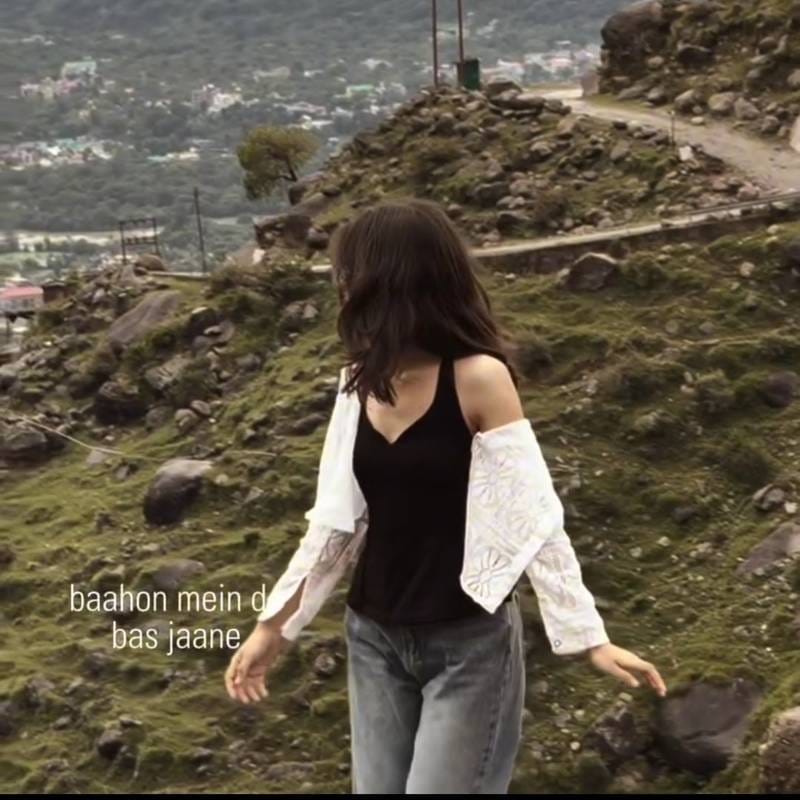
Once imported, the template automatically applies three things to your video :
- A smooth slow-motion effect on your clip
- The trending song added as background audio
- Animated lyrics text that appears in sync with the song
You do not need to add effects, music, or text separately. The template does all of this in one go, and you just need to swap in your own video clip.
Why This Trend Is Going Viral
This trend is spreading fast across Instagram Reels and Facebook Reels for a few simple reasons:
- The song “Baahon Mein De Bas Jaane” has an emotional, romantic feel that instantly makes any clip look more meaningful.
- The slow-motion effect gives even a basic video a cinematic, high-quality look.
- Animated lyrics on screen make the reel feel personal and story-like, which boosts watch time and shares.
- It works on almost any video, from couple moments to solo shots to friend group clips.
- Zero editing skill is needed. One QR code does the entire job in seconds.
Because it is fast, beginner-friendly, and visually emotional, this template is getting reused thousands of times across reels every day.
Requirements Checklist
Before you start, make sure you have the following ready :
- VN Video Editor app installed (Android or iOS)
- The QR code image for this template
- One video clip of your choice (a few seconds is enough)
- A phone with a working camera to scan the QR code
- Stable internet connection to load the template inside VN
VN Template QR Code

Scan this QR code directly inside the VN app to import the “Baahon Mein De Bas Jaane” slow motion lyrics template.
Step-by-Step Guide
- Open the VN app on your phone.
- Tap on the QR code scan icon, usually found on the home screen or template section of VN.
- Scan the QR code given above. VN will automatically load the template.
- Once the template opens, tap on the video clip slot to replace it with your own footage.
- Select any video from your gallery that you want to use for this reel.
- VN will automatically apply the slow-motion effect, the song, and the animated lyrics to your clip using the template settings.
- Preview the reel to check timing and make sure the lyrics sync properly with your clip.
- Tap Export and save the video in the best available quality.
- Upload your finished reel to Instagram or Facebook.
Photos/Clips Needed
- One video clip of any length (short clips of 5 to 15 seconds work best for this trend)
- The clip can be a portrait, couple shot, solo aesthetic video, or even a casual daily-life clip
- No specific pose or shot type is required, since the template automatically adjusts the slow-motion and lyrics timing
Common Mistakes
- Using a very shaky clip: Slow motion makes shakiness more noticeable, so try to use a reasonably stable video.
- Choosing a clip that is too short: If your clip is too short, the slow-motion effect may end before the song and lyrics finish.
- Skipping the preview step: Always preview before exporting to confirm the lyrics are timed well with your video.
- Exporting in low quality: Always export in the highest resolution VN allows for a cleaner, more cinematic result.
- Ignoring lighting: Well-lit clips look far more premium once the slow-motion and lyrics effect is applied.
Pro Tips
- Choose clips with warm or golden-hour lighting for a more emotional, cinematic feel that matches the song’s mood.
- Slightly slower camera movements in your original clip make the slow-motion effect look smoother.
- Try this template with both solo shots and couple shots to see which style fits your page’s aesthetic better.
- Keep your phone camera steady while recording the original clip for the best final result.
- Post the reel with a caption related to the song’s emotion to increase engagement and relatability.
FAQ
1. Which app is needed for this template?
You only need the VN Video Editor app, available free on both Android and iOS.
2. Do I need to add the song separately?
No. The song is already built into the QR code template and gets added automatically.
3. Can I use any video for this template?
Yes, almost any video works. Clips with good lighting and minimal shakiness give the best results.
4. Will the lyrics automatically sync with my video?
Yes, the animated lyrics are already timed with the song inside the template. You only need to preview to confirm it looks right.
5. Is this template free to use?
Yes, scanning and using the QR code inside VN is completely free.
6. Can I use this template for couple reels as well as solo reels?
Yes, this template works well for both. It is currently popular for couple, solo, and even friend group reels.
7. What if the QR code does not scan properly?
Make sure you are using VN’s in-app QR scanner, not your phone’s default camera, since some templates only import correctly through VN’s own scanner.
Conclusion
The “Baahon Mein De Bas Jaane” VN template is one of the easiest ways to turn a simple clip into an emotional, cinematic reel. With just one QR code scan, you get slow motion, trending music, and animated lyrics all in one place, no editing experience required.
Try it with your own footage, follow the steps above, and your reel will be ready to post in just a few minutes.
Joy
Super hero 👏 bahut Kamal ki chij Hai website
Nice pic and video and photos ✨ thank you 👋 send me the photo and video 🙏
Sunil mahakud
Rub this photo