You must have seen this trend on Instagram. A person sits alone on a quiet street at night, headphones on, and a small glass music player floats on the photo showing the song name. It looks like a scene from a movie.
In this article, you get two ready prompts, one for a girl and one for a boy. I will also tell you how they work, what to change, and what mistakes to avoid.
Prompt 1: Girl Sitting on a Roadside Ledge (“Sajni”)
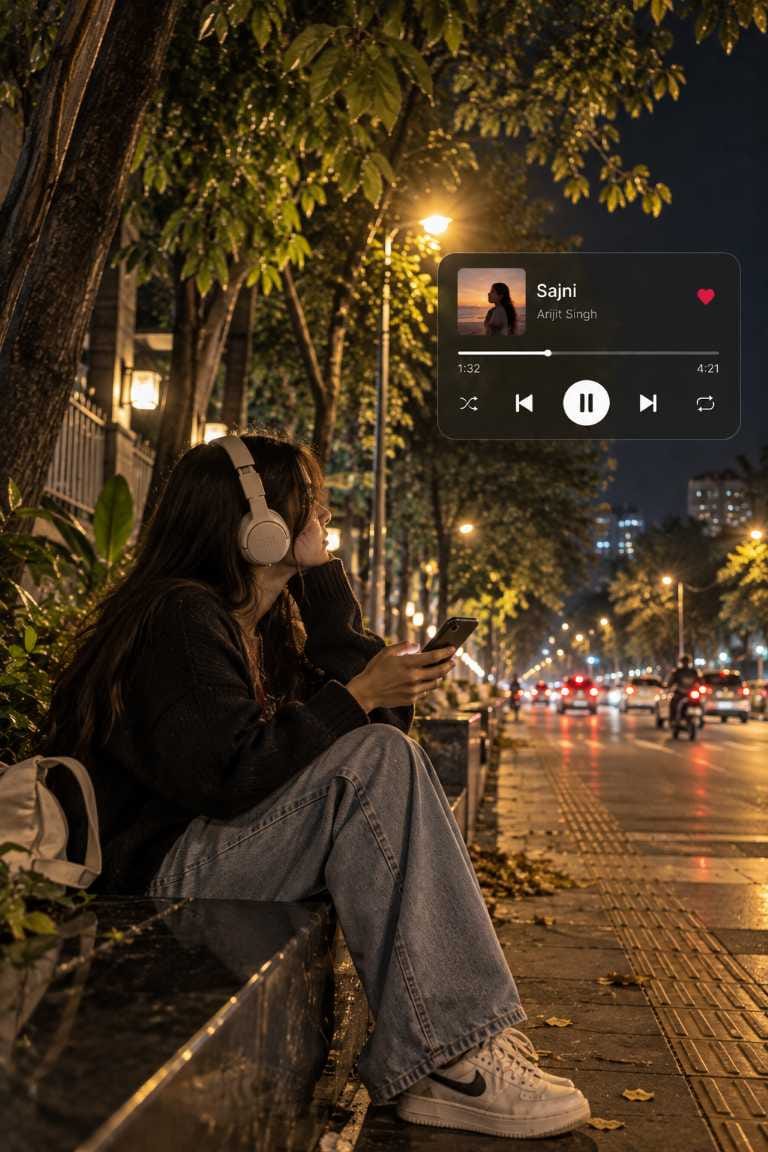
This prompt creates a girl sitting on a black stone ledge beside a tree-lined road. She wears big cream headphones and an oversized black sweater, and she is looking at her phone.
Why this prompt works :
- Warm streetlights: The amber light falls on her hair and sweater. It gives a cozy, lonely mood.
- Wet road: The road reflects car lights, so the photo feels deep and real.
- Side profile face: The face is partly hidden by hair. This makes the photo feel like a candid click, not a posed one.
- Music player: It tells the story in one look. You know what she is listening to.
Prompt 2: Boy Leaning on a Royal Enfield (“Chaleya”)
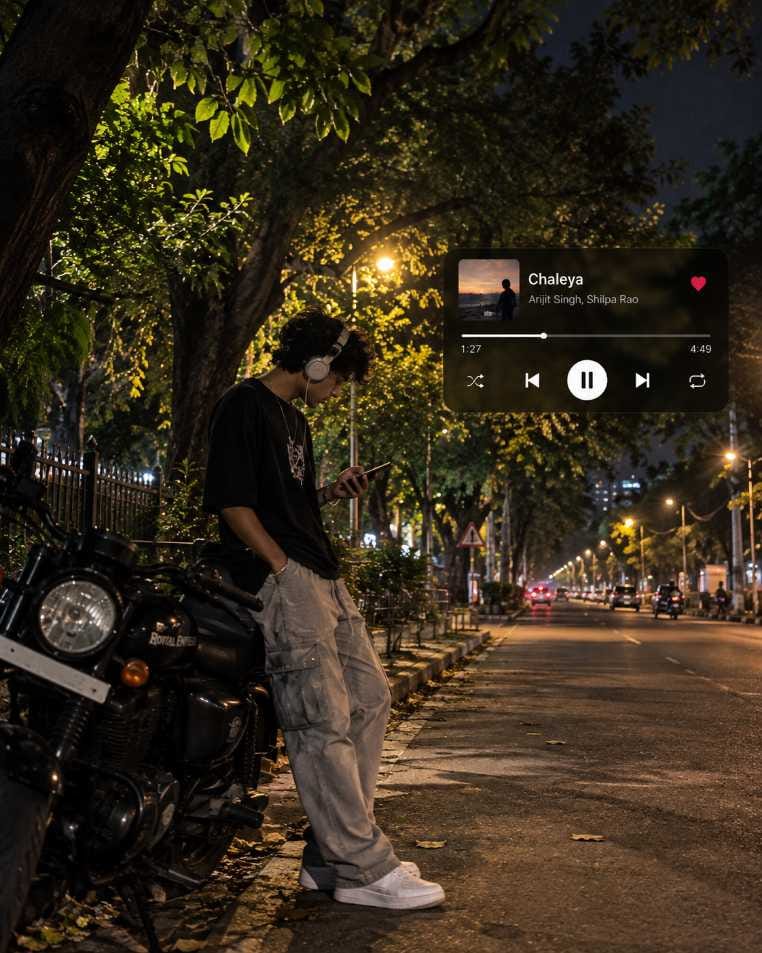
This prompt creates a boy leaning on a black Royal Enfield on an empty night road. He wears a black oversized T-shirt, grey cargo pants and white sneakers. His head is down and he is checking his phone.
Why this prompt works :
- Bike in the foreground: The Royal Enfield gives a strong street look and fills the empty space.
- Face partly hidden: Because his head is down, he looks anonymous. Many people can connect with such a photo.
- Long road: The road goes far into the background. This gives a nice depth to the photo.
- Warm and cool colours: Golden lamps and blue night shadows make the photo look like a movie still.
ChatGPT vs Gemini: Which One to Use?
Both tools can make this style of photo, but ChatGPT is the better choice for this trend. It follows long prompts well and writes the small music player text more clearly.
Gemini also gives a good result. But sometimes it changes small details, like the song name, time or icons. If that happens, run the prompt again or ask it to fix only the text.
Tip: Use 2:3 ratio for the girl and 4:5 ratio for the boy, as mentioned in the prompts. If you want to post as an Instagram Reel cover or story, you can crop later.
What to Change to Get a Different Result
You do not need to write a new prompt every time. Just change a few things in the same prompt:
- Song and artist: Write any song you like. Keep the name short so it fits inside the player.
- Time: Change the current time and total time, for example 2:10 and 3:45.
- Outfit: Try a hoodie, denim jacket or kurta instead of the sweater or T-shirt.
- Bike or place: Replace the Royal Enfield with a scooter or a cycle. Or change the road to a bridge or a quiet lane.
- Weather and light: Make it a cool winter night or a slightly foggy evening. Keep it light, because too much fog spoils the look.
- Player colour: Change the dark glass player to a white glass one for a fresh look.
Common Mistakes and How to Fix Them
1. Wrong text on the music player
AI sometimes spells the song name wrong. Write the exact text again in quotes and ask: “Keep the text in the music player exactly the same.”
2. Bad hands or fingers
This is the most common problem. Generate again, or say “natural hands, five fingers on each hand, holding the phone properly.”
3. Music player covering the face
Tell the AI: “Place the player in the upper-right corner, far from the face.”
4. Face looks too smooth or fake
Add “natural skin texture, no beauty filter, candid photograph.” Also avoid words like “perfect” or “flawless.”
5. Photo looks too bright
Night photos should feel dark and warm. Add “realistic night exposure, deep shadows.”
A Small Tip Before You Post
Always generate 3 to 4 versions and pick the best one. The first result is not always the best. When you find a nice one, save it and use the same prompt again with small changes. This way, your photos will have a similar style, and people will start to recognise your work.
Try both prompts, make them your own, and enjoy the trend.