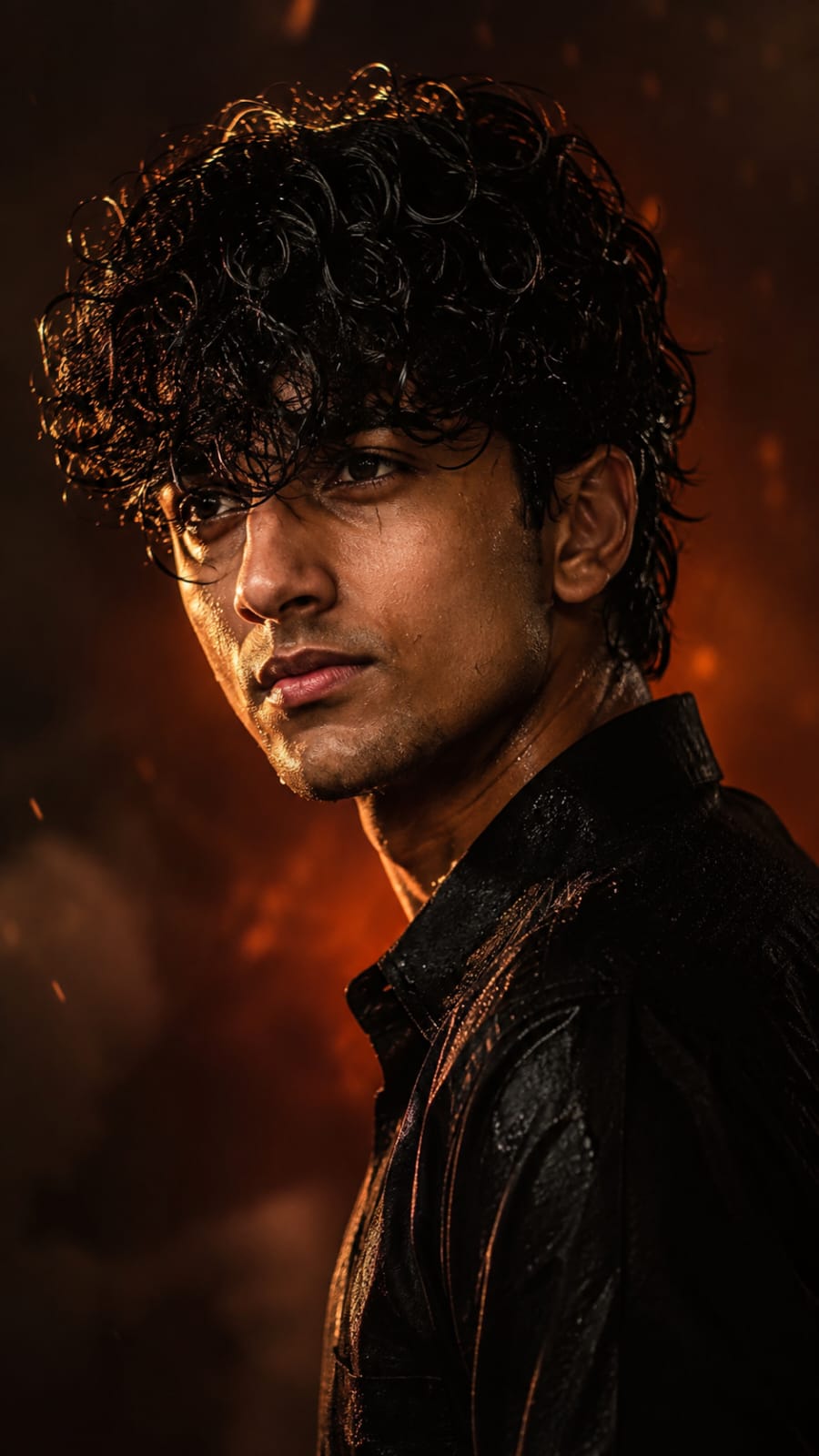
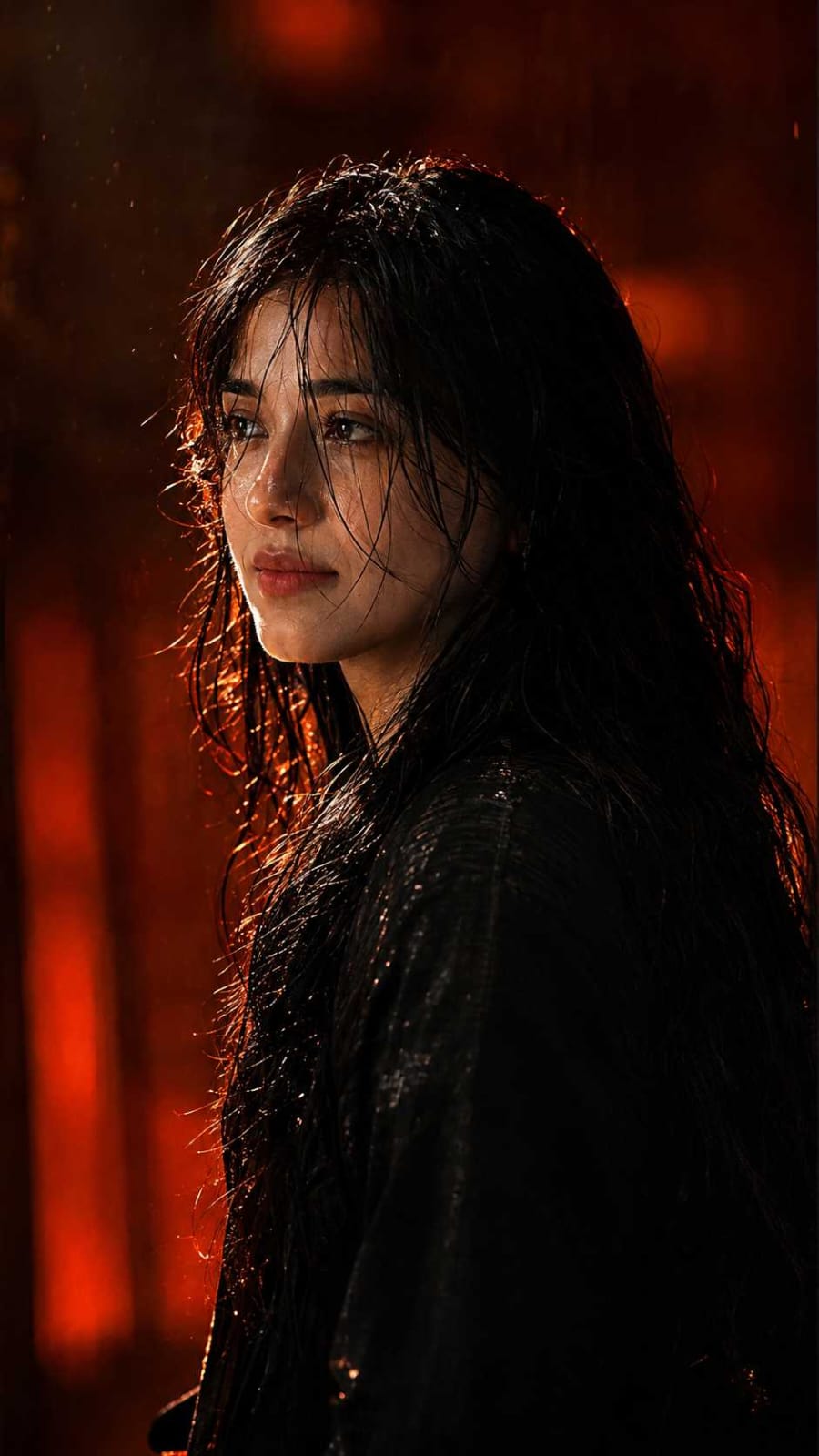
If you are on Instagram these days, you must have seen those dark, cinematic photos with fire-orange lighting and wet, messy hair. Yes, we are talking about the viral Awarapan 2 Image Prompt trend. After the movie Awarapan 2 released, fans could not stop making their own version of this bold, moody look, and now it is everywhere on social media.
The best part of this trend is that you do not need any editing skill or costly software. With one simple Awarapan 2 AI Photo Editing Prompt, both boys and girls can create their own cinematic photo. You just upload your clear photo, use the correct prompt, and let AI do the rest. This is why so many people are searching for this ChatGPT Photo Prompt right now.
At RonyTica, we always bring you the latest and most trending AI photo prompts before anyone else. In this article, we will show you everything about this Awarapan 2 Movie Poster AI Prompt, how it works, which AI tool to use, and how you can create your own viral photo in a few minutes. So let’s get started with Rony Tica’s full guide.
Which AI Supports This Prompt
This Awarapan 2 Photo Prompt works best on ChatGPT. ChatGPT can understand your uploaded photo properly and mix it with the cinematic fire background, wet hair effect, and dramatic side lighting without changing your face.
You can also try this prompt on Gemini AI Photo Prompt tool, but the result may not always match your face as closely as ChatGPT does. So, for the best and most accurate Awarapan 2 AI Photo result, we always recommend using ChatGPT first.
How To Use This Awarapan 2 Image Prompt
Follow these easy steps to create your own Awarapan 2 Image Prompt photo :
⫷RonyTica Prompt Box
Use the uploaded male photo as the ONLY identity and facial reference.
Transform the uploaded photo into an ultra-realistic cinematic portrait while preserving the EXACT identity of the person in the uploaded image.
IDENTITY PRESERVATION — HIGHEST PRIORITY:
– Preserve the person’s exact facial identity.
– Keep the original facial structure, face shape, forehead, eyebrows, eyes, nose, lips, cheeks, jawline, chin, ears and natural facial proportions.
– Preserve the person’s natural skin tone.
– Preserve recognizable facial characteristics and age.
– Do NOT replace the person’s face with another person’s face.
– Do NOT make the person look like a celebrity, model or different individual.
– Do NOT beautify, reshape or feminize/masculinize the face.
– Keep the person immediately recognizable as the same person from the uploaded image.
TRANSFORMATION:
Turn the original photo into a premium dark cinematic movie-style portrait inspired by a high-budget Indian action/drama film.
POSE & COMPOSITION:
– Convert the subject into a dramatic LEFT-facing side-profile or strong 3/4 profile pose.
– The face should occupy the center-right portion of the frame.
– Keep the composition tight: head-and-shoulders / upper-body cinematic portrait.
– Maintain realistic anatomy while naturally adapting the pose.
– If the original photo already has a suitable profile or 3/4 angle, preserve that angle and enhance it rather than forcing an unnatural pose.
– Vertical 9:16 composition.
– Cinematic negative space on the left side.
HAIR TRANSFORMATION:
Give the subject naturally wet, messy black/dark hair.
– Hair should look freshly wet from rain or water.
– Individual strands must be visible.
– Hair should naturally clump together because of moisture.
– Some strands should fall over the forehead and partially across the face.
– Preserve the person’s original hairstyle as much as possible while making it wet and cinematic.
– Do NOT create an unrelated hairstyle that changes the person’s identity.
FACIAL DETAILS:
– Keep the original face exactly recognizable.
– Add realistic moisture and subtle highlights to the skin.
– Preserve natural pores, beard/stubble pattern and facial hair from the source image.
– If the person has a beard, preserve its original shape and density while making it more cinematic.
– If the person is clean-shaven, DO NOT add a heavy beard that changes his appearance.
– Natural eyes with realistic reflections.
– Serious, intense, emotionally restrained expression.
– No smile.
– No exaggerated anger.
CLOTHING:
Transform the clothing into a dark black or charcoal cinematic outfit.
Keep the clothing realistic and masculine.
The outfit should remain secondary to the face.
LIGHTING:
Create dramatic warm cinematic lighting.
– Warm amber/orange key light softly illuminating the face.
– Deep orange/red glow in the background.
– Strong rim light around the hair and side of the face.
– Deep natural shadows around the jaw and neck.
– Subtle highlights on wet hair, forehead, nose, cheekbone and beard.
– High cinematic contrast while preserving facial details.
BACKGROUND:
Replace the original background with a dark, heavily blurred cinematic environment.
Use:
– burnt orange
– deep amber
– dark brown
– subtle red/crimson
– warm atmospheric haze
– soft glowing bokeh
No recognizable objects in the background.
The background should look like a high-budget movie scene.
CAMERA:
Professional cinema camera photography.
85mm portrait lens.
f/1.4–f/1.8 shallow depth of field.
Sharp focus on the visible eye and facial plane.
Creamy cinematic bokeh.
Natural lens compression.
High-end photographic realism.
COLOR GRADING:
Premium cinematic Indian movie color grade.
Warm skin tones combined with dark brown, amber, orange and subtle red shadows.
Rich blacks.
Controlled highlights.
Natural skin colors.
Subtle film grain.
High dynamic range.
No excessive HDR.
REALISM:
Ultra-photorealistic.
8K cinematic photography.
Realistic skin pores.
Individual hair strands.
Individual beard hairs.
Natural eye reflections.
Physically accurate lighting.
Realistic shadows.
Realistic wetness.
Natural skin texture.
No AI-looking artifacts.
IMPORTANT:
The uploaded person’s identity is more important than the reference style.
Copy the CINEMATIC LIGHTING, COLOR, MOOD, WET-HAIR EFFECT, DEPTH OF FIELD and overall visual aesthetic — NOT another person’s face or identity.
The final result must look like:
“The same person from the uploaded photo, transformed into a dark, intense, wet-hair cinematic movie portrait.”
NEGATIVE PROMPT:
different person, changed identity, celebrity face, face replacement, altered facial structure, different nose, different eyes, different jawline, different lips, beautified face, plastic skin, wax skin, excessive skin smoothing, AI face, cartoon, anime, illustration, CGI, 3D render, fake beard, unnecessary beard, unrealistic hairstyle, dry hair, distorted face, deformed eyes, extra eyes, extra ears, asymmetrical face, bad anatomy, unnatural skin tone, overexposure, excessive HDR, oversharpening, flat lighting, low resolution, blurry face, text, logo, watermark, Instagram UI, social media interface
⫷RonyTica Prompt Box
Use the uploaded male photo as the ONLY identity and facial reference.
Transform the uploaded photo into an ultra-realistic cinematic portrait while preserving the EXACT identity of the person in the uploaded image.
IDENTITY PRESERVATION — HIGHEST PRIORITY:
– Preserve the person’s exact facial identity.
– Keep the original facial structure, face shape, forehead, eyebrows, eyes, nose, lips, cheeks, jawline, chin, ears and natural facial proportions.
– Preserve the person’s natural skin tone.
– Preserve recognizable facial characteristics and age.
– Do NOT replace the person’s face with another person’s face.
– Do NOT make the person look like a celebrity, model or different individual.
– Do NOT beautify, reshape or feminize/masculinize the face.
– Keep the person immediately recognizable as the same person from the uploaded image.
TRANSFORMATION:
Turn the original photo into a premium dark cinematic movie-style portrait inspired by a high-budget Indian action/drama film.
POSE & COMPOSITION:
– Convert the subject into a dramatic LEFT-facing side-profile or strong 3/4 profile pose.
– The face should occupy the center-right portion of the frame.
– Keep the composition tight: head-and-shoulders / upper-body cinematic portrait.
– Maintain realistic anatomy while naturally adapting the pose.
– If the original photo already has a suitable profile or 3/4 angle, preserve that angle and enhance it rather than forcing an unnatural pose.
– Vertical 9:16 composition.
– Cinematic negative space on the left side.
HAIR TRANSFORMATION:
Give the subject naturally wet, messy black/dark hair.
– Hair should look freshly wet from rain or water.
– Individual strands must be visible.
– Hair should naturally clump together because of moisture.
– Some strands should fall over the forehead and partially across the face.
– Preserve the person’s original hairstyle as much as possible while making it wet and cinematic.
– Do NOT create an unrelated hairstyle that changes the person’s identity.
FACIAL DETAILS:
– Keep the original face exactly recognizable.
– Add realistic moisture and subtle highlights to the skin.
– Preserve natural pores, beard/stubble pattern and facial hair from the source image.
– If the person has a beard, preserve its original shape and density while making it more cinematic.
– If the person is clean-shaven, DO NOT add a heavy beard that changes his appearance.
– Natural eyes with realistic reflections.
– Serious, intense, emotionally restrained expression.
– No smile.
– No exaggerated anger.
CLOTHING:
Transform the clothing into a dark black or charcoal cinematic outfit.
Keep the clothing realistic and masculine.
The outfit should remain secondary to the face.
LIGHTING:
Create dramatic warm cinematic lighting.
– Warm amber/orange key light softly illuminating the face.
– Deep orange/red glow in the background.
– Strong rim light around the hair and side of the face.
– Deep natural shadows around the jaw and neck.
– Subtle highlights on wet hair, forehead, nose, cheekbone and beard.
– High cinematic contrast while preserving facial details.
BACKGROUND:
Replace the original background with a dark, heavily blurred cinematic environment.
Use:
– burnt orange
– deep amber
– dark brown
– subtle red/crimson
– warm atmospheric haze
– soft glowing bokeh
No recognizable objects in the background.
The background should look like a high-budget movie scene.
CAMERA:
Professional cinema camera photography.
85mm portrait lens.
f/1.4–f/1.8 shallow depth of field.
Sharp focus on the visible eye and facial plane.
Creamy cinematic bokeh.
Natural lens compression.
High-end photographic realism.
COLOR GRADING:
Premium cinematic Indian movie color grade.
Warm skin tones combined with dark brown, amber, orange and subtle red shadows.
Rich blacks.
Controlled highlights.
Natural skin colors.
Subtle film grain.
High dynamic range.
No excessive HDR.
REALISM:
Ultra-photorealistic.
8K cinematic photography.
Realistic skin pores.
Individual hair strands.
Individual beard hairs.
Natural eye reflections.
Physically accurate lighting.
Realistic shadows.
Realistic wetness.
Natural skin texture.
No AI-looking artifacts.
IMPORTANT:
The uploaded person’s identity is more important than the reference style.
Copy the CINEMATIC LIGHTING, COLOR, MOOD, WET-HAIR EFFECT, DEPTH OF FIELD and overall visual aesthetic — NOT another person’s face or identity.
The final result must look like:
“The same person from the uploaded photo, transformed into a dark, intense, wet-hair cinematic movie portrait.”
NEGATIVE PROMPT:
different person, changed identity, celebrity face, face replacement, altered facial structure, different nose, different eyes, different jawline, different lips, beautified face, plastic skin, wax skin, excessive skin smoothing, AI face, cartoon, anime, illustration, CGI, 3D render, fake beard, unnecessary beard, unrealistic hairstyle, dry hair, distorted face, deformed eyes, extra eyes, extra ears, asymmetrical face, bad anatomy, unnatural skin tone, overexposure, excessive HDR, oversharpening, flat lighting, low resolution, blurry face, text, logo, watermark, Instagram UI, social media interface
Open the ChatGPT app on your phone or website on your laptop.
Tap on the photo/attachment icon and upload one clear photo of your face. Make sure your face is visible properly, without any heavy filter.
Copy the full prompt given in the box below this section.
Paste the prompt in the ChatGPT chat box, right after uploading your photo.
Send the message and wait for a few seconds. ChatGPT will start generating your Awarapan 2 style photo.
Once the photo is ready, check the face, hair, lighting, and background properly.
If everything looks good, save the photo to your gallery. If not, you can ask ChatGPT to try again with small changes.
That’s it, This is how easily you can create your own Awarapan 2 AI Photo Editing Prompt result using just your phone.
Tips Before Using This Prompt
Always use a clear, bright photo where your full face is visible.
Avoid group photos or photos with sunglasses, masks, or heavy shadows on the face.
A front-facing or slight side-angle photo works best for this cinematic AI photo prompt.
Higher resolution photo gives a sharper and more realistic final result.
If the first result does not look right, try uploading a different photo and generate it again.
Best Settings For This Prompt
Setting
Recommended Value
Aspect Ratio
9:16 (Mobile Wallpaper Style)
Style
Cinematic, Dramatic Lighting
Background
Fire/Smoke Orange-Red Tone
Hair Look
Wet Hair Effect
Best For
Boys & Girls (Both)
AI Tool
ChatGPT (Best), Gemini (Alternative)
Common Mistakes To Avoid
Using a blurry photo: This is the most common mistake. A low-quality input photo always gives a low-quality AI result.
Editing the prompt text: Changing the given prompt on your own can break the cinematic effect. Use it exactly as given.
Skipping the photo upload: Some users forget to upload their photo first and directly paste the prompt, which does not work correctly.
Not checking the final result: Always zoom in and check your face and hair before sharing the photo, so it looks natural.
Why You Will Love This Prompt
This Awarapan 2 Image Prompt is not just another AI trend, it actually gives a proper movie-poster feel to your normal photo. Since it is a generic prompt, both boys and girls can use the exact same prompt and still get a unique, personal result based on their own face. You don’t need any professional camera, lighting setup, or editing app. With just one photo and ChatGPT, you can create a photo that looks straight out of a Bollywood movie poster. That is exactly why this trend is going so viral on Instagram right now, and RonyTica brings you the easiest way to try it yourself.
FAQ
1. What is the Awarapan 2 Image Prompt trend? It is a viral AI photo trend where people use a ChatGPT prompt to turn their own photo into a cinematic, movie-poster style image inspired by the look of Awarapan 2.
2. Which AI tool is best for this prompt? ChatGPT gives the most accurate and realistic result for this Awarapan 2 AI Photo Editing Prompt. Gemini can also be used as an alternative option.
3. Can girls also use this same prompt? Yes, this is a generic prompt, so both boys and girls can use the exact same prompt. The result depends on the photo you upload.
4. Is this prompt free to use? Yes, you don’t need to pay anything extra. You just need access to ChatGPT and your own clear photo.
5. Why is my generated photo not looking accurate? This usually happens because of a blurry or low-quality input photo. Always use a clear, well-lit photo for the best result.
6. Can I use this prompt on mobile? Yes, you can easily use this Awarapan 2 Photo Prompt on the ChatGPT mobile app, no laptop is needed.
7. Do I need any editing skill to use this prompt? No, you don’t need any editing skill at all. Just upload your photo, paste the prompt, and ChatGPT will handle the rest.
Conclusion
So friends, that was our complete guide on the viral Awarapan 2 Image Prompt trend. From uploading your photo to getting your final cinematic result, we tried to explain every step in the simplest way possible. If you have also seen this trend going viral on Instagram and want to try it with your own photo, don’t wait, just follow the steps above and create your own Awarapan 2 AI Photo today. Keep visiting RonyTica for more such trending AI photo and video prompts before anyone else.




Dmrme
Panha