


Sunset photo. One girl standing near a bridge railing. And slowly, some magical text lines coming on the screen, then the whole photo turning black and white in front of your eyes. This is the “Ek Taraf Dharam Ek Taraf Karam” trend, and right now it is everywhere on Instagram Reels.
If you also want to make this same aesthetic video with your own photo, this article is for you. We will show you the exact template, the steps in VN app, and some tips so your reel also gets that same viral touch. No need for any editing experience. Just follow the steps one by one.
What Is Ek Taraf Dharam Ek Taraf Karam VN Template
This template is a text reveal video. It means one single photo is used for the whole video, and on top of that photo, some text lines slowly appear one after another. Halfway through the video, the color photo changes into black and white, which gives a very deep and emotional feeling.
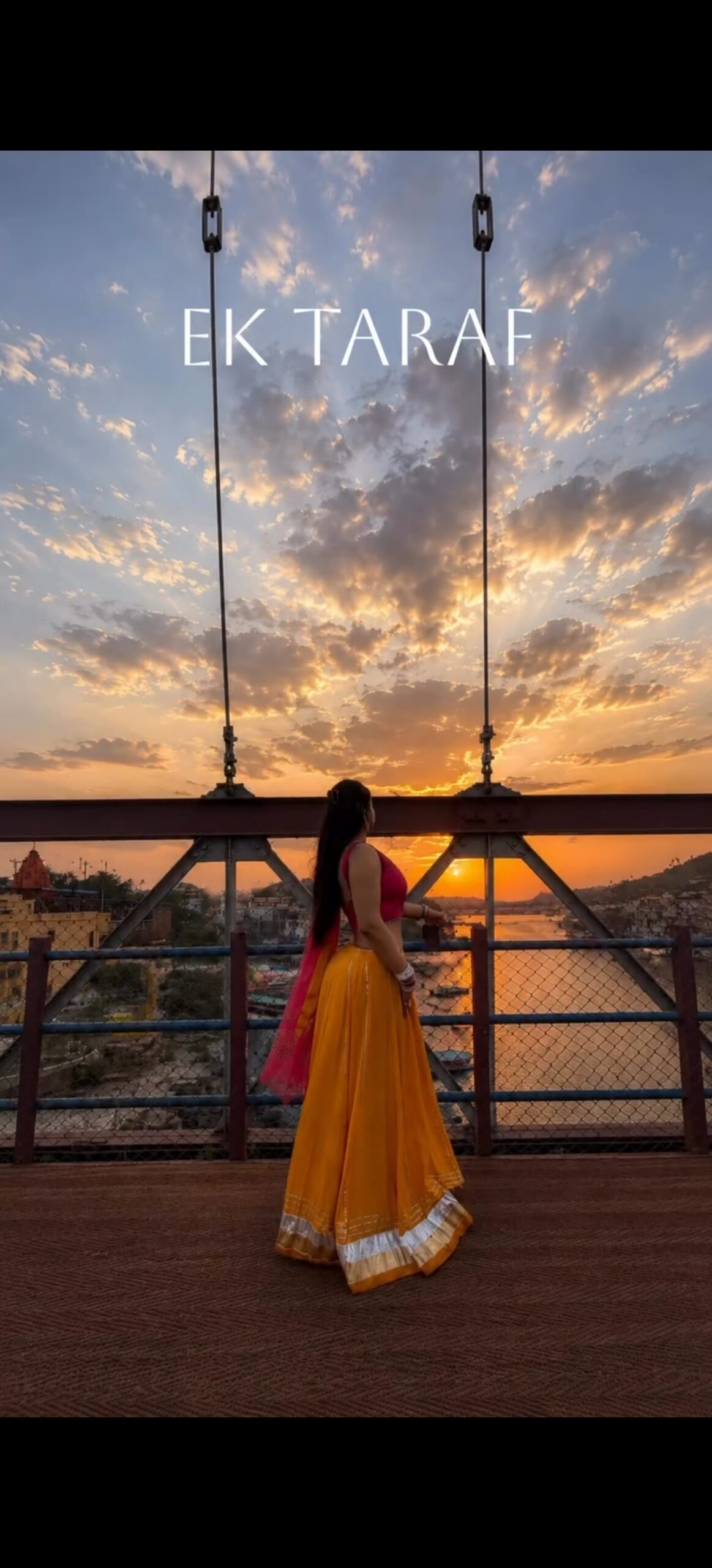
There is also a small trick used here. For a second, one word flashes on the screen (like a glitch), and then it settles into the real word. This tiny glitch effect makes the video feel more premium and cinematic. The whole video is only around 10 to 12 seconds, but it looks very high quality because of the timing and the font style used.
Why This Trend Is Going Viral
People love reels that feel deep and meaningful, not just dance or lip sync. This trend gives a poetic, thoughtful vibe. The color to black and white shift feels like a mood change, almost like the person in the photo is going through some inner feeling. That connects with viewers emotionally.
Also, this trend is very easy to copy but looks very hard to make. That combination is perfect for going viral. People see it, feel “wow how did they make this,” and then they search for the tutorial. That is exactly why this kind of template gets millions of views.
Requirements Checklist For Ek Taraf Dharam Ek Taraf Karam
- VN Video Editor app (free version works fine)
- One good quality vertical photo (9:16 ratio)
- A clean, elegant font (serif style works best, we will tell you where to find it)
- Some free time, around 15 to 20 minutes for editing
- Trending audio (optional, but recommended for more reach)
Template Code

Copy this code and paste it inside VN app using the “Paste Template Code” option on the home screen. This will directly give you the same layout, timing and text animation used in this trend.
Step-by-Step Guide (VN App)
- Open VN app and tap on the plus (+) icon to start a new project.
- Select your one photo and import it. Set the duration to around 10-11 seconds.
- Tap on the photo clip and set it to Ken Burns style zoom, very slow and slight. This adds a small movement so the photo does not feel too static.
- Now go to the “Text” tool. Add your first text line (example: “EK TARAF”) in a serif font, white color, centered near the top of the screen.
- Set a fade-in animation for this text with a short duration, around 0.3 to 0.5 seconds.
- After a second, add your next text line. Keep repeating this for all the words in your caption line.
- For the small glitch effect, add one extra text layer for just 2-3 frames with a different word, right before your main word settles. This creates that flash feeling.
- Halfway through the video, add a black and white filter on the photo layer. Set a smooth transition of around 0.5 seconds so the color change feels natural, not sudden.
- Add your last text lines on top of the black and white part, same style as before.
- Add a soft trending audio in the background, keep the volume low so it does not distract from the text.
- Export the video in 1080p for best quality.
Photos You Need
- Just 1 photo is enough for this whole template
- Orientation: Vertical (9:16), portrait mode
- Best pose: Side profile or back pose, looking away from the camera. This gives a mysterious, aesthetic feel.
- Best time: Golden hour, meaning early morning or evening when the sky has orange and pink colors
- Location idea: Any bridge, rooftop, terrace or open place with a nice sky view works great
Common Mistakes
- Using too many photos or clips, which breaks the single-photo aesthetic of this trend
- Text font that looks too bold or casual, instead of soft and elegant
- Black and white transition happening too fast, which looks jarring instead of smooth
- Loud background music that takes attention away from the text
- Text placed randomly, not aligned properly in the center
Pro Tips
- Post this reel in the evening, between 7 PM to 9 PM, when engagement is usually higher
- Keep your caption short and let the video text do the talking
- Try caption ideas like “Which side are you standing on?” or “Some feelings only the sky understands”
- Use trending audio that matches a slow, emotional mood, not something fast or upbeat
- Add 3-4 relevant hashtags only, do not stuff too many
FAQ
Q1. Can I use this template with any photo?
Yes, but a vertical photo with a nice sky background works best for this aesthetic look.
Q2. Do I need a paid version of VN app for this?
No, the free version of VN app has all the tools needed for this template.
Q3. Why does my black and white transition look sudden?
Check your transition duration. Keep it around 0.5 seconds so the color change feels smooth.
Q4. What font should I use for the text?
A simple serif font works best. Avoid bold or cartoon style fonts, they do not match this aesthetic.
Q5. How long should the video be?
Around 10 to 12 seconds is perfect. Longer than that and viewers may lose interest.
Q6. Can I add more than one photo?
It is not recommended. This trend works because of the single photo focus. More photos will break the effect.
Q7. What kind of audio should I use?
Choose something slow, soft and emotional. Check the trending audio list in VN app or Instagram for matching sounds.
Q8. Will this template work for boys’ photos too?
Yes, this template works for anyone. Just make sure the pose and background match the mood of the trend.
Conclusion
This “Ek Taraf Dharam Ek Taraf Karam” text reveal template is a simple but very powerful way to make your reel stand out. With just one good photo and the steps above, you can create the same aesthetic, emotional video that is going viral right now. Try it out, keep practicing the timing, and your reel will also get that same premium feel.
Pic
Cvi gk tdi unspecified
aachasa photo edit kardo
aacha sa edit kar do
NV sudjzsyu czyjx
Bdfrautyehv. Fujdbfh
Trending photo kaise banaen