


If you open Instagram or Facebook today, you will see one thing everywhere beautiful AI-made birthday posters. People are using a simple Happy Birthday ChatGPT Prompt to turn their normal photo into a magazine-style birthday poster. No design skill is needed. No editing app is needed. Just one photo and one prompt.
At RonyTica, we always try to bring you the newest and most viral AI prompt trends before anyone else. And this Happy Birthday ChatGPT Prompt trend is one of the biggest right now. It is trending on reels, stories, and birthday posts because the result looks like a real professional photoshoot.
In this article, RonyTica brings you two amazing versions of this Happy Birthday ChatGPT Prompt:
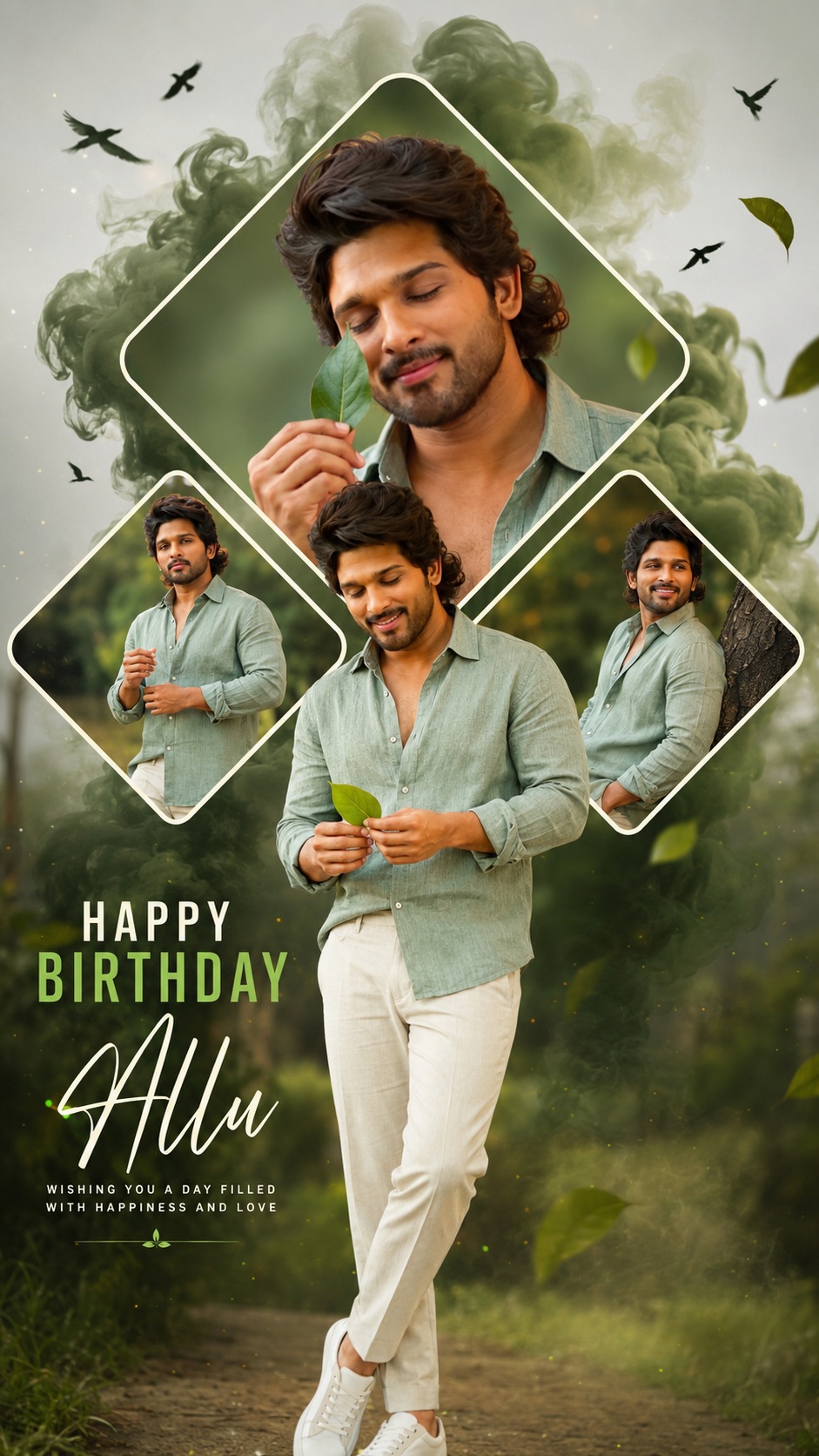
1) A stylish diamond-collage birthday poster for boys, with a nature theme and green smoke effect
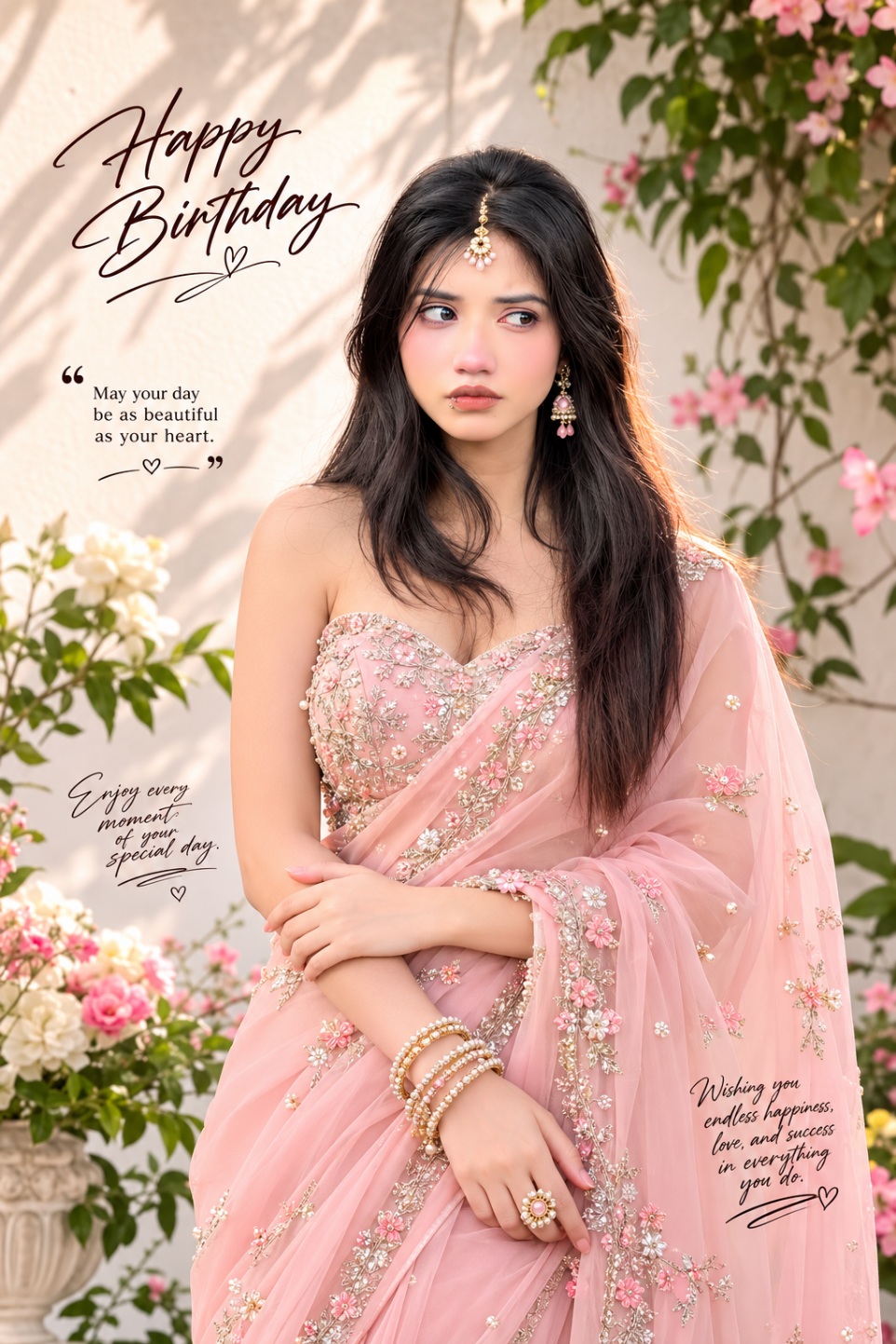
2) A royal saree-style birthday magazine cover for girls, with floral background and premium jewelry look
Both prompts are made for ChatGPT, and both give a super realistic, high-quality output. Let’s understand everything step by step, the RonyTica way simple, clear, and beginner-friendly.
Best AI Tools To Create This Birthday Magic
You do not need many tools for this. This Happy Birthday ChatGPT Prompt works best on:
1) ChatGPT (with image generation) – This is the main and best tool for this prompt. It understands face reference photos very well and keeps the identity close to the original photo.
2) Google Gemini – Gemini can also run similar prompts, but results may look slightly different in lighting and texture.
3) Other AI image tools – Some other AI apps may also support this style, but ChatGPT gives the most realistic and natural result for this birthday poster trend.
RonyTica always recommends starting with ChatGPT first, because most viral birthday posters you see online are made using this same tool.
Step-By-Step Guide For The Boys’ Birthday Poster Look
This first look is a stylish, nature-themed birthday poster. It has a big diamond-shaped photo frame in the center, two small diamond frames on the side, green smoke effect, birds flying in the sky, and a soft outdoor background. The person is shown holding a green leaf, wearing a simple sage-green shirt with cream pants.
Here is how you can use this Happy Birthday ChatGPT Prompt on ChatGPT:
1) Open ChatGPT and start a new chat with image generation on.
2) Upload a clear front-face photo. Good lighting and a simple background photo will always give a better result.
3) Paste the prompt given below in the prompt box.
4) Send the prompt and wait for ChatGPT to generate the image.
5) If the face is not fully matching, ask ChatGPT to keep the face 100% same as the uploaded photo and try again.
Once the poster is ready, you can download it and use it directly on Instagram, Facebook, or WhatsApp status to wish someone a happy birthday in style.
Step-By-Step Guide For The Girls’ Royal Birthday Look
The second look is a royal, magazine-cover style birthday poster. It has a soft pink saree, heavy embroidery work, floral background, and elegant jewelry like a maang tikka and choker. This look feels premium, like a real fashion magazine cover.
Follow these steps for this version of the Happy Birthday ChatGPT Prompt:
1) Open ChatGPT and upload a clear face photo, front-facing if possible.
2) Copy and paste the second prompt in the chat box.
3) Send the prompt and let ChatGPT create the birthday poster.
4) Check the face closely. If needed, tell ChatGPT to preserve the same facial identity without changing skin tone or expression.
5) Once you are happy with the result, download the final image in high quality.
This style works great for birthday wishes for sisters, friends, or any female family member who loves a royal, elegant look.
Pro Tips And Perfect Settings For Best Results
Getting the best result from this Happy Birthday ChatGPT Prompt depends a lot on the photo you upload and small settings you follow. Here are some important tips from RonyTica:
1) Always use a clear, well-lit face photo. Blurry or dark photos give poor face-matching results.
2) Use a photo where the face is looking mostly straight, not too much to the side.
3) Avoid using photos with sunglasses, caps, or heavy filters.
4) If the AI changes the face too much, simply add “don’t change face” at the end of your prompt, just like in the reference prompts.
5) Try generating the image two to three times if the first result is not perfect. AI tools sometimes give a better output on the second try.
6) Keep the aspect ratio mentioned in the prompt (9:16 or 3:4) so the poster looks correct for Instagram Reels, Stories, or WhatsApp Status.
Below is a simple settings table you can follow for both prompts:
| Setting | Boys’ Birthday Poster (Prompt 1) | Girls’ Birthday Poster (Prompt 2) |
|---|---|---|
| Aspect Ratio | 9:16 | 3:4 or 9:16 |
| Best Tool | ChatGPT | ChatGPT |
| Photo Type | Clear front-face photo | Clear front-face photo |
| Background Style | Nature, green smoke effect | Floral, soft luxury background |
| Face Instruction | “Don’t change face” | “Preserve 100% facial identity” |
| Output Use | Instagram Reels, Stories | Instagram Post, Stories |
Following this table will help you get results very close to the trending posters you see on social media.
Mistakes You Must Avoid While Using This Prompt
Many beginners make small mistakes while using this Happy Birthday ChatGPT Prompt, which spoils the final result. RonyTica shares the most common ones so you can avoid them:
1) Uploading a group photo instead of a single clear face photo.
2) Forgetting to mention “don’t change face” in the prompt.
3) Using a very low-quality or pixelated photo as reference.
4) Changing too many details in the prompt at once, which confuses the AI.
5) Not checking the aspect ratio before generating, which makes the poster look cut or stretched.
6) Expecting a perfect result in the very first try without any small edits.
Avoiding these simple mistakes will save your time and give you a much better birthday poster.
Why Everyone Is Falling In Love With This Prompt
This Happy Birthday ChatGPT Prompt is not just another AI trend. It is loved by so many users because:
1) It turns any normal photo into a premium magazine-style birthday poster.
2) No photo editing skill or design software is needed.
3) It works for both boys and girls, with two completely different styles.
4) The output feels personal, festive, and shareable on all social media platforms.
5) It saves money, because you don’t need to hire a designer or photographer for a birthday post.
That is exactly why RonyTica decided to bring this trending prompt to our readers early, before it becomes too common.
Your Questions Answered (FAQ)
Q1) Which AI tool works best for this Happy Birthday ChatGPT Prompt?
ChatGPT with image generation gives the most realistic and accurate result for this prompt.
Q2) Do I need a professional photo to use this prompt?
No, a simple clear face photo taken on your phone is enough. Just make sure the lighting is good.
Q3) Can I use this prompt for a friend’s or family member’s birthday post?
Yes, you can use anyone’s photo with their permission to create a beautiful birthday poster for them.
Q4) Is this Happy Birthday ChatGPT Prompt free to use?
Yes, the prompt itself is free. You only need access to ChatGPT’s image generation feature.
Q5) Why is my face changing after using the prompt?
This usually happens due to a low-quality photo. Use a clear photo and add a line asking the AI to keep the face unchanged.
Final Words From RonyTica
This Happy Birthday ChatGPT Prompt trend is a perfect example of how AI is making creative design easy for everyone. Whether you want a stylish nature-themed poster or a royal saree-style magazine cover, both prompts shared today can help you create something truly special.
We at RonyTica will keep bringing more trending and viral AI prompts like this, so you never miss out on what’s new in the AI photo world. Try both prompts, share your birthday posters, and don’t forget to explore more prompt collections on RonyTica for your next creative idea.




Happy birthday
Hjhhk
Hhtjv
Bn8kebdd