


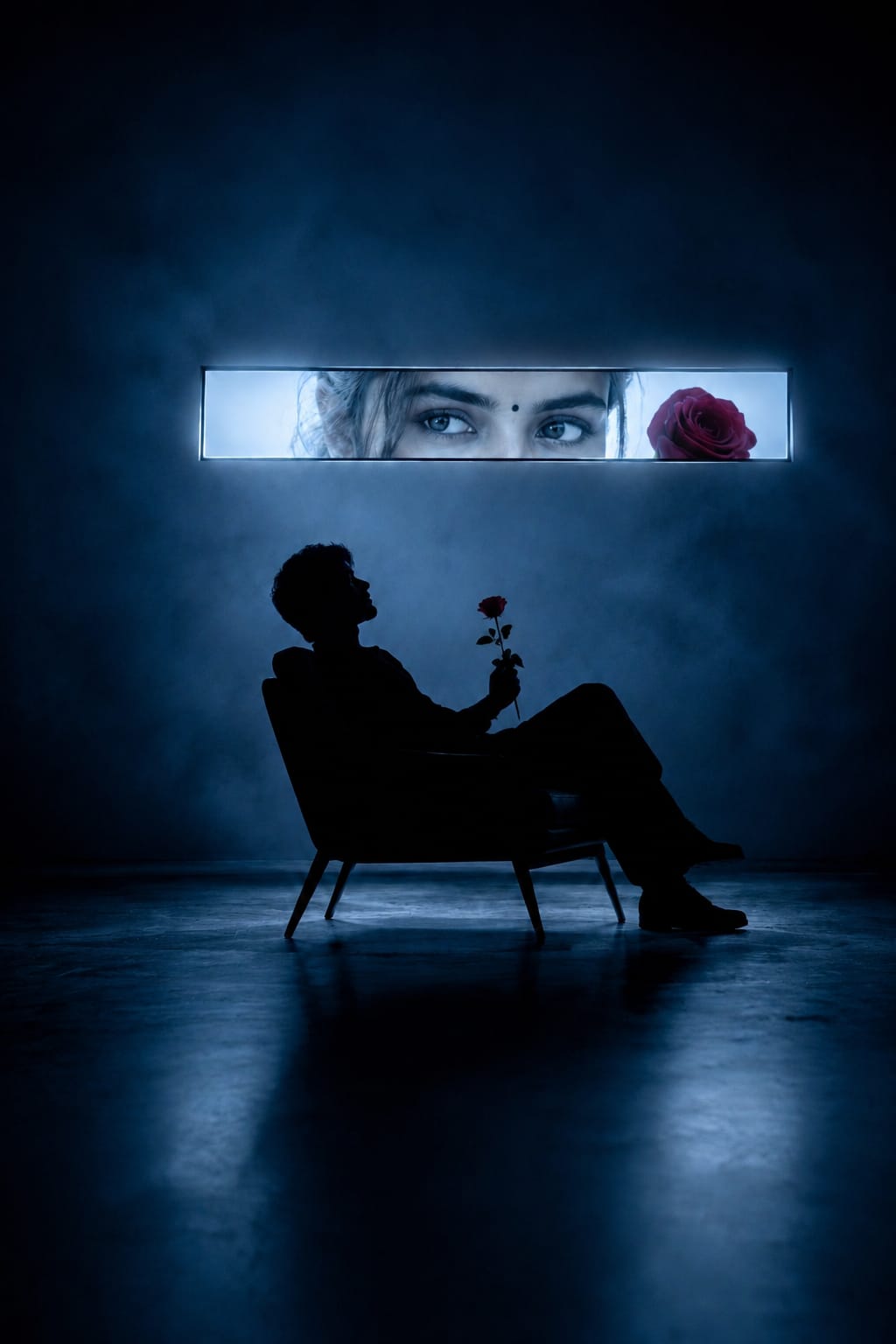
Have you seen those dreamy blue photos on Instagram where a boy sits alone in the dark, holding a rose, while a girl’s eyes glow above him like a movie poster? This is the cinematic crush eye photo prompt, and right now it is one of the most loved AI photo trends online. This picture style feels like a scene from a romantic film. There is soft blue fog, a glowing rectangle showing only the eyes of a girl, and a lonely silhouette sitting on a chair with a red rose in hand. It looks emotional, artistic, and very cinematic.
The best part is, you do not need any camera, model, or studio light to create this photo. You just need ChatGPT and the right prompt. At RonyTica, we always try to bring you the newest and most loved AI photo styles, and this cinematic crush eye photo prompt is one you should not miss. In this article, we will show you how this prompt works, which AI tool to use, and how to get the best result.
Best AI Tool to Create This Look
For this cinematic crush eye photo prompt, ChatGPT (with its image generation feature) works the best. It understands emotional scenes, lighting, and human silhouettes very well, which makes it perfect for this kind of romantic and cinematic photo. You can also try this prompt on other AI image tools like Gemini, but ChatGPT gives the most realistic shadow, fog, and glow effect. That is why we recommend ChatGPT for this trend on RonyTica.
Steps to Create Your Own Version
Making this photo is very easy, even if you are a beginner. Just follow these simple steps:
- Open ChatGPT and start a new chat where you can generate images.
- Upload a clear photo of the person who will be the silhouette (this can be you or your friend).
- Paste the prompt given in our special prompt box on this page. Do not type it yourself, just copy and paste it.
- Wait a few seconds while ChatGPT creates your cinematic image.
- Once the image is ready, download it and check the lighting, rose, and glowing window effect.
- If something looks off, you can ask ChatGPT to fix small details, like the rose position or the glow brightness.
That’s it! In a few simple steps, you get a romantic, movie-style photo ready to share.
Things to Keep in Mind Before You Try This
Before you jump in and try the cinematic crush eye photo prompt, keep these small points in mind:
- Use a clear, well-lit photo as your reference image. Blurry photos give blurry results.
- A side-face or full body photo works better for the silhouette effect.
- Keep the background of your reference photo simple, this helps ChatGPT focus on your body shape only.
- Do not use group photos, only single-person photos give the cleanest silhouette.
- Give ChatGPT a little time to process, since this is a detailed cinematic image.
Ideal Settings for the Best Output
To get the most realistic and cinematic result, here are the settings we suggest:
| Setting | Recommended Value |
|---|---|
| Image Style | Cinematic, realistic photography |
| Aspect Ratio | Portrait (9:16 or 4:5) |
| Lighting | Cool blue tone with soft fog |
| Quality | High detail, 8K style rendering |
| Mood | Emotional, romantic, dramatic |
These settings help ChatGPT understand exactly the kind of mood you want in your final photo.
Mistakes You Should Avoid
Many people do not get the perfect result on their first try. Here are some common mistakes to avoid:
- Using a low-quality or dark reference photo, which confuses the AI.
- Forgetting to mention the mood (romantic, cinematic, emotional) while chatting with ChatGPT.
- Uploading a photo where the face is not clearly visible.
- Expecting a perfect result in one go, sometimes you need to try two or three times.
- Skipping the prompt given in our prompt box and typing your own version, which may not give the same result.
Why This Prompt Deserves a Try
This cinematic crush eye photo prompt is not just another AI trend, it tells a small love story in just one frame. The lonely silhouette, the glowing eyes, and the red rose together create a feeling that touches the heart. It is also very easy to recreate, works well with ChatGPT, and gives you a poster-like photo that looks perfect for Instagram, WhatsApp status, or even as a wallpaper. That is why this trend is spreading so fast, and RonyTica wanted to make sure you don’t miss it.
Common Questions About This Photo Style
1. Can I use this prompt with a normal selfie?
Yes, but a clear side-angle or full body photo gives a better silhouette shape than a close-up selfie.
2. Does this work only for couples?
No, you can also create a solo version showing just the silhouette with the glowing eyes as a symbolic crush moment.
3. Which AI tool gives the best result for this style?
ChatGPT gives the most cinematic and realistic result for this particular photo style.
4. Do I need to be a photography expert to try this?
Not at all. You just need to upload your photo and use the prompt, ChatGPT handles the rest.
5. Can I change the rose to another object?
Yes, but the rose gives a strong romantic meaning, so we recommend keeping it for the best emotional effect.
6. Is this prompt free to use?
Yes, if you already have access to ChatGPT’s image generation feature, this prompt works without any extra cost.
Final Thoughts
The cinematic crush eye photo prompt is a beautiful way to turn a simple photo into an emotional, movie-like moment. With just ChatGPT and a good reference photo, anyone can create this trending look at home.
We hope this guide from RonyTica helped you understand the full process. Try this prompt today, and don’t forget to explore more such trending AI photo ideas only on RonyTica.




Hii
Ajay
Photo generation clips
Rahul
Use the uploaded image as the primary visual reference. A lone silhouette sits quietly holding a single red rose while behind him the glowing horizontal window reveals the eyes of the same woman holding another identical rose beside her face. Blue cinematic ambience, soft fog, subtle reflections, emotional symbolism, premium editorial photography, realistic textures, ultra detailed, 8K masterpiece.
Google
Radhe Radhe 🌸
#2 6,th main ,3rd