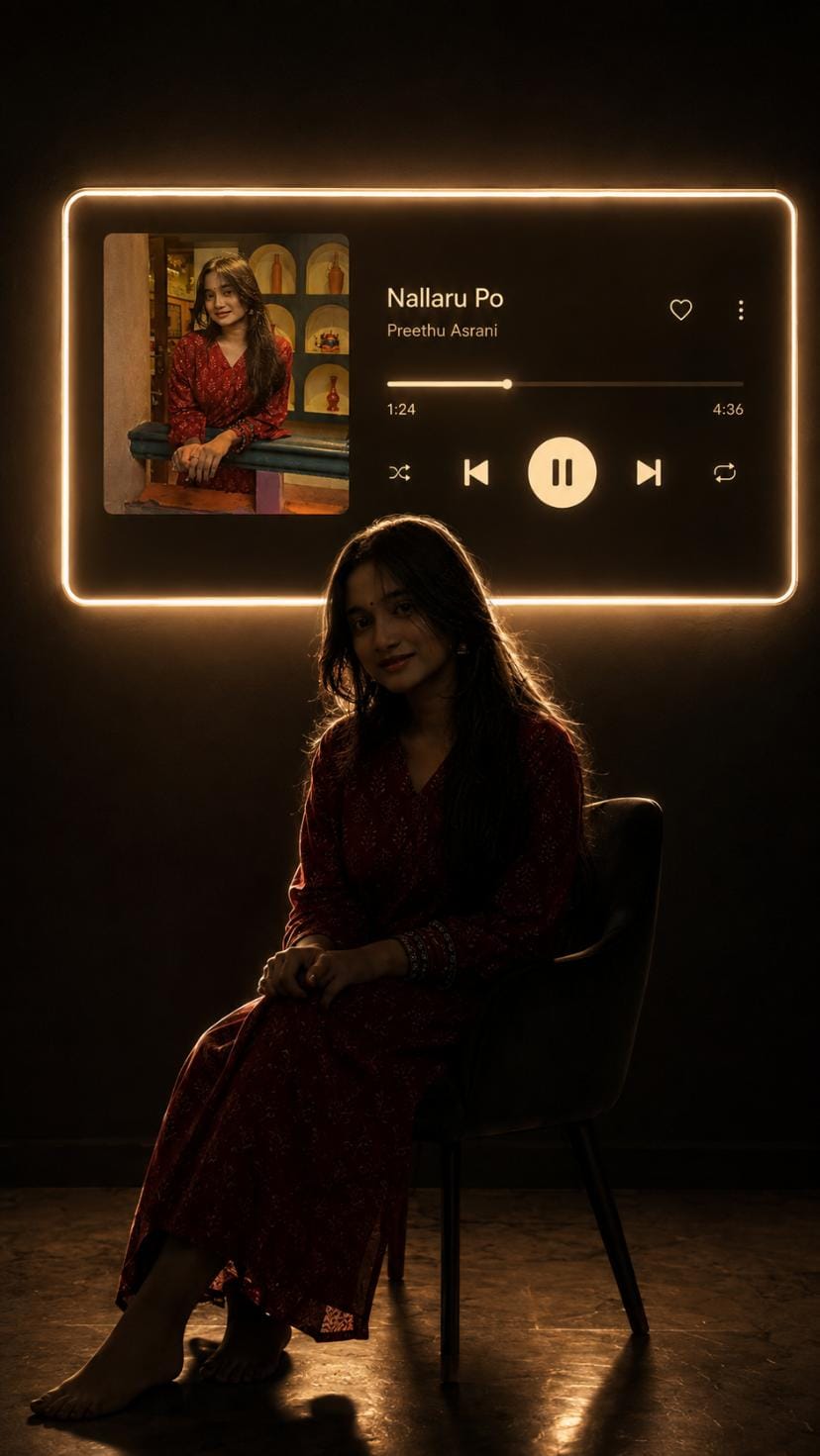
Have you seen those dark and dreamy photos where a person is sitting quietly in a room, and a big glowing music player is shining on the wall behind them? This is the cinematic music portrait girls prompt, and right now it is one of the most viral AI photo prompt trends on Instagram and YouTube Shorts.
This style mixes cinematic lighting, a moody dark room, and a music player wall photo prompt look that feels like a scene from a movie. The best part is that you do not need any editing skill. You just need your own photo and the right prompt, and AI tools like ChatGPT can turn your normal photo into this premium looking portrait.
At RonyTica, we keep bringing you the latest trending AI photo prompts so that you never miss out on what is going viral. In this article, we will show you everything about this cinematic music portrait style, how to use it, and how you can create as many versions of it as you like, with different songs, different rooms, and different moods, using your own photos.
Best AI Tools To Create This Music Player Wall Photo
If you want to try this dark aesthetic portrait prompt, ChatGPT photo editing prompt is the best option right now. ChatGPT can understand your uploaded photo very well and keep your face, hairstyle, and outfit exactly the same while building the cinematic background around you. This is why most creators are using ChatGPT for this trend.
You can also try this style usingGemini AI photo prompt tools. Gemini is also good at keeping your identity safe while adding new backgrounds and lighting effects. Some people also try Midjourney, but for realistic photo editing where your own face stays the same, ChatGPT and Gemini work the best.
Whichever tool you choose, RonyTica will keep the prompt box ready below this article so you can simply copy and use it.
Steps To Create Your Own Cinematic Music Portrait
Making this viral music player wall photo prompt is very simple. Just follow these steps :
⫷RonyTica Prompt Box
Transform my uploaded photo into a cinematic 9:16 vertical portrait inspired by a dark aesthetic music-listening scene.
Keep the exact same person from my uploaded photo — preserve their identity, face, facial features, hairstyle, skin tone, body proportions and clothing. Do not replace or redesign the person.
Place the person sitting naturally on a simple chair in a dark, minimal room, shown mostly as a dramatic silhouette from a side/three-quarter angle. Keep the pose realistic and elegant, with subtle rim lighting outlining the body and hair.
On the wall behind the person, create a large futuristic music-player panel with a soft warm white/golden neon glow around its edges. Inside the panel, show the uploaded/selected album artwork on the left and a realistic modern music-player interface on the right with:
Song: [SONG NAME]
Artist: [ARTIST NAME]
A progress bar, heart icon, menu icon, shuffle, previous, large pause/play button, next and repeat icons.
Make the music-player panel look physically mounted on the wall with realistic glow and light spill onto the room. Keep the background almost completely dark, with subtle shadows and reflections on the floor.
Use realistic photography, cinematic low-key lighting, warm ambient glow, deep blacks, soft shadows, realistic skin texture, natural proportions, subtle film grain, premium editorial aesthetic, high detail, photorealistic, dramatic composition.
Aspect ratio: 9:16 vertical.
⫷RonyTica Prompt Box
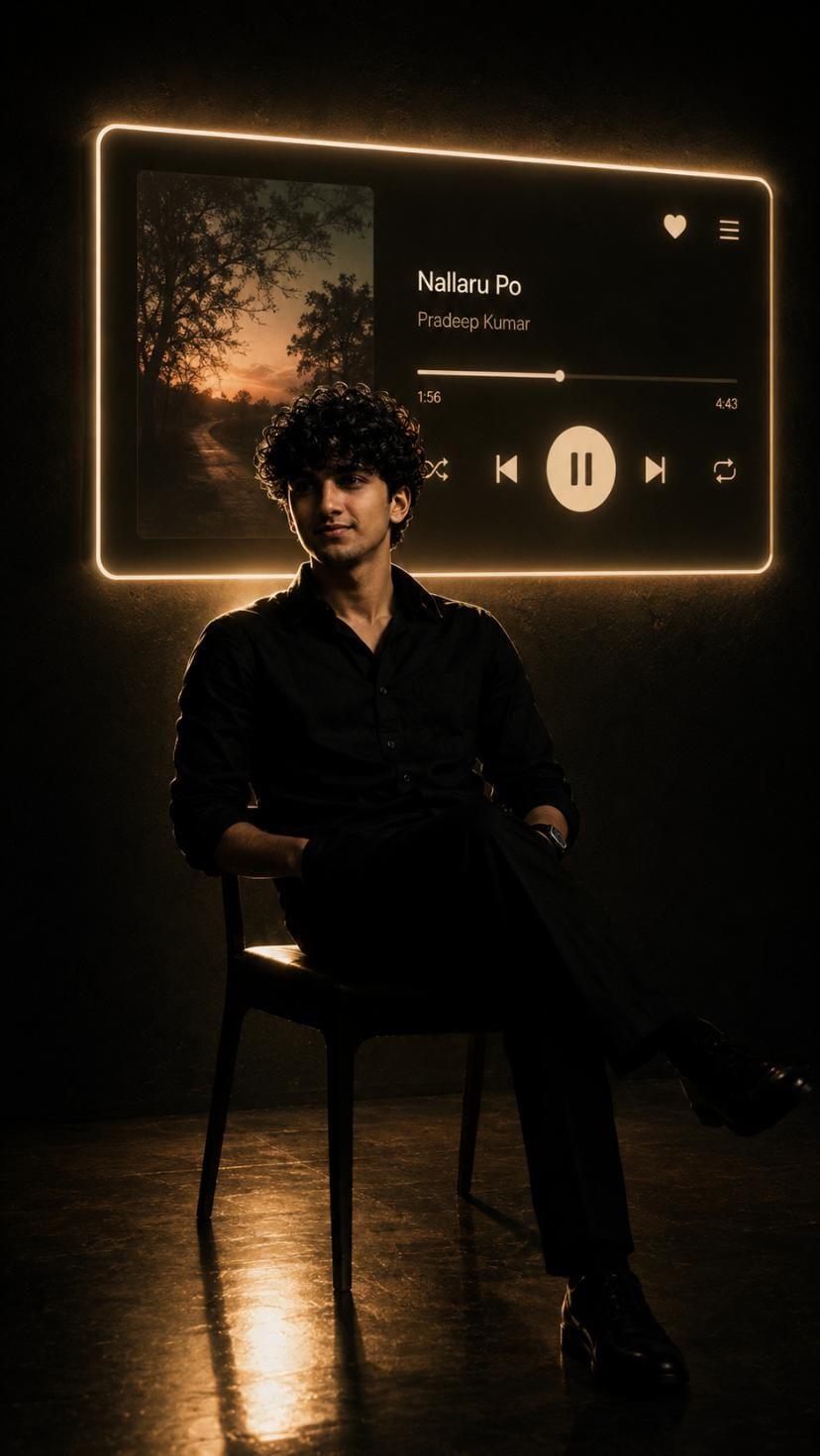
Transform the uploaded photo into a cinematic 9:16 vertical portrait inspired by a dark aesthetic music-listening scene.
IMPORTANT: Keep the entire environment, composition, lighting setup, futuristic music-player panel, background, shadows, floor reflection and overall visual style exactly the same as the reference concept. Only replace the female subject with a male subject and change the clothing.
SUBJECT:
Replace the woman with a young Indian/Bengali man. Preserve the man’s exact identity, face, facial features, hairstyle, skin tone, body proportions and natural appearance from the uploaded male reference photo. Do not alter, beautify, feminize, redesign or replace his face. Keep his facial structure and recognizable features exactly consistent with the reference.
CLOTHING:
Change the outfit completely to a stylish, elegant dark-black premium shirt with a slightly relaxed fit, paired with tailored black trousers. Minimal accessories only, such as a simple wristwatch. The outfit should look realistic, masculine, sophisticated and suitable for a cinematic music-listening scene.
POSE & COMPOSITION:
Place the man sitting naturally on the same simple chair in exactly the same position and composition as the reference scene. Show him mostly as a dramatic side/three-quarter silhouette. Keep the pose realistic, relaxed and elegant. Do not make him look like a different person or change his body proportions.
LIGHTING:
Keep the exact same dark cinematic environment. Use subtle warm white/golden rim lighting outlining the man’s hair, shoulders and body. His face and body should remain mostly in shadow with realistic highlights. Deep blacks, soft shadows and realistic light falloff.
MUSIC PLAYER:
Keep the same large futuristic music-player panel physically mounted on the wall behind him. Preserve its exact placement, proportions and design. Keep the soft warm white/golden neon glow around the edges and realistic light spill onto the dark wall.
Inside the panel:
– Album artwork on the left
– Modern realistic music-player interface on the right
– Song: [SONG NAME]
– Artist: [ARTIST NAME]
– Progress bar
– Heart icon
– Menu icon
– Shuffle
– Previous
– Large pause/play button
– Next
– Repeat
BACKGROUND:
Keep the same minimal dark room, almost completely black background, subtle wall texture, cinematic shadows and realistic floor reflections. Do not change the environment or introduce unnecessary objects.
VISUAL STYLE:
Ultra-realistic photography, cinematic low-key lighting, warm golden ambient glow, deep blacks, subtle rim light, realistic skin texture, natural male anatomy and proportions, subtle film grain, premium editorial photography, dramatic mood, high detail, photorealistic, sophisticated dark aesthetic.
MOST IMPORTANT:
Everything about the environment and composition must remain the same. ONLY change the female subject into the male subject and change the clothing. Do not modify the music-player panel, room, lighting style, camera composition or overall aesthetic.
Aspect ratio: 9:16 vertical.
⫷RonyTica Prompt Box
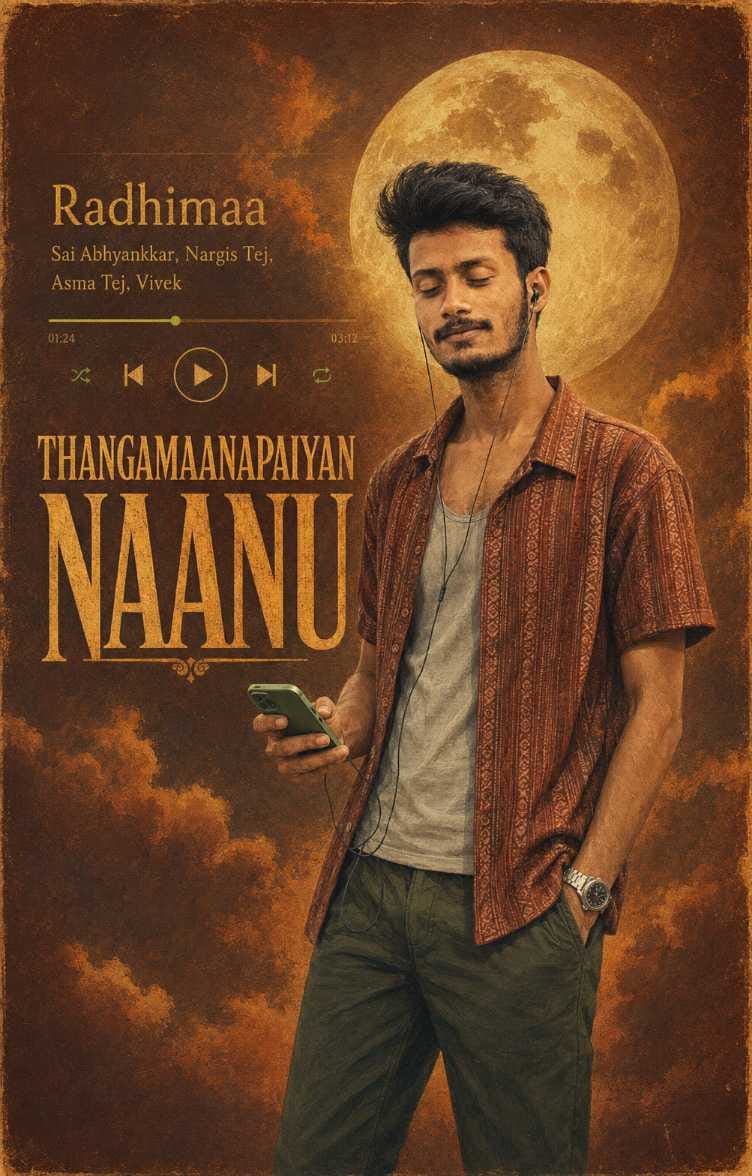
Use the uploaded image as the exact visual reference and recreate the same poster in a premium 4:5 vertical composition.IMPORTANT: Preserve the SAME PERSON, SAME FACE, SAME FACIAL FEATURES, SAME HAIRSTYLE, SAME EXPRESSION, SAME BODY PROPORTIONS, SAME CLOTHING, SAME ACCESSORIES, SAME PHONE, SAME EARPHONES, SAME POSE and SAME OVERALL CHARACTER DESIGN as the reference image. Do not change or beautify the person.Keep the EXACT SAME OUTFIT:patterned rust/brown short-sleeve shirtlight mint/grey inner vestdark green pantsmetallic wristwatchwired earphonessame green smartphoneKeep the EXACT SAME SONG INFORMATION and TEXT from the reference:“Radhimaa”“Sai Abhyankkar, Nargis Tej, Asma Tej, Vivek”Keep the EXACT SAME MAIN TEXT:“THANGAMAANAPAIYAN NAANU”Do not change, translate, replace, or misspell any of the text.Recreate the same vintage illustrated music-poster aesthetic: warm burnt-rust textured paper background, golden-yellow typography, subtle grain, hand-painted cinematic illustration, soft atmospheric clouds, large glowing golden full moon behind the person’s head, warm amber lighting, nostalgic South Indian music-poster mood.Keep the music-player interface on the upper-left side with the progress bar, green progress indicator, previous/play/next and shuffle-style icons, matching the reference composition.The subject should remain positioned on the right side, holding the phone naturally with the wired earphones connected, eyes gently closed and head slightly raised, creating the same relaxed music-listening mood.Maintain the same visual hierarchy and overall composition of the reference, but adapt it cleanly to a 4:5 portrait ratio. Ensure the complete subject, typography, music-player controls, moon and background elements fit naturally inside the frame without cropping important details.High-quality detailed digital painting, realistic facial likeness, natural skin texture, painterly brushwork, vintage film grain, subtle paper texture, warm muted color palette, cinematic lighting, premium album-cover artwork, polished professional poster design.Aspect ratio: 4:5 vertical.No extra people, no extra objects, no watermark, no logo, no additional text, no face alteration, no outfit change.
Open ChatGPT or your chosen AI photo tool.
Upload a clear photo of yourself. A photo where your face and body are visible works the best.
Copy the prompt from the prompt box given in this article.
Change the song name and artist name inside the prompt to your favourite song.
Paste the prompt and send it to the AI tool.
Wait a few seconds while the AI creates your cinematic photo.
Download your final photo and share it on Instagram or WhatsApp status.
This is a very beginner friendly AI photo prompt for girls and boys both. You do not need Photoshop or any editing app for this.
Tips For A Better Result
Before you try this dark aesthetic portrait prompt, keep these small tips in mind :
Use a photo where your face is clearly visible and not blurry.
A photo with good lighting works better than a dark or shadowy photo.
Try to use a photo where you are sitting or standing in a simple pose, this helps the AI place you naturally in the new scene.
Choose a song name and artist name that you actually like, this makes the photo feel more personal.
If the first result does not look perfect, simply generate it again. AI tools often give a slightly different result each time.
Best Settings For This Cinematic Photo Prompt
Use this table as a quick guide while creating your neon frame photo prompt :
Setting
Recommended Option
Aspect Ratio
9:16 (vertical, perfect for Instagram Reels and Stories)
Lighting Style
Dark, low-key, cinematic lighting
Mood
Moody, calm, premium editorial look
Background
Dark minimal room with soft shadows
Glow Colour
Warm golden or white neon glow
Best For
Instagram post, story, reels cover, WhatsApp DP
Common Mistakes To Avoid
Many people make small mistakes while trying this AI photo prompt with song name and artist. Avoid these:
Do not use a very low quality or pixelated photo, the AI cannot fix bad quality on its own.
Do not forget to change the song name and artist name, otherwise your photo will look the same as everyone else.
Do not use group photos, this prompt works best with a single person photo.
Do not skip mentioning the aspect ratio, or your photo may not come out in the correct size for Instagram.
Do not expect the exact same silhouette photo prompt ChatGPT result every time, small changes are normal with AI tools.
Why This Music Player Wall Trend Is So Loved
This cinematic music portrait girls prompt is going viral for many good reasons :
It gives a premium, movie like feel to a normal photo.
You can personalise it with your own favourite song and artist name every single time.
It works perfectly for Instagram reels cover, story, and profile photo.
The dark aesthetic portrait prompt looks classy without needing any expensive photoshoot.
It is very easy to make, even for complete beginners.
This is exactly the kind of viral Instagram photo prompt 2026 trend that helps your profile stand out from regular photos.
Conclusion
The cinematic music portrait girls prompt is one of the easiest ways to turn your simple photo into a viral, premium looking edit. With just one prompt and your favourite song, you can create a dark aesthetic portrait that feels straight out of a movie scene.
Keep checking RonyTica for more trending AI photo prompts like this one. We keep updating our prompt library with fresh, tested prompts so that you always stay ahead in the AI photo trend game. Try this music player wall photo prompt today and share your result with us.
Frequently Asked Questions
Q.1) Which AI is best for this cinematic music portrait prompt?
ChatGPT works the best for this style because it keeps your face and identity accurate. Gemini is also a good option.
Q.2) Can I use my own song name in this prompt?
Yes, you can change the song name and artist name inside the prompt to any song you like. This makes your photo personal and unique.
Q.3) Do I need a professional photo for this trend?
No, a normal clear photo from your phone is enough. Just make sure your face is visible and the photo is not blurry.
Q.4) Is this AI photo prompt free to use?
Most AI tools like ChatGPT offer free access with limited daily generations. You can use the free version to try this trend.
Q.5) Can I create more than one photo with different songs?
Yes, you can use the same prompt structure with different songs, moods, or photos every time you want a new result.
Q.6) What size should I keep for Instagram reels?
Keep the aspect ratio at 9:16, this fits perfectly for Instagram reels cover, stories, and WhatsApp status.
Transform my uploaded photo into a cinematic 9:16 vertical portrait inspired by a dark aesthetic music-listening scene.
Keep the exact same person from my uploaded photo — preserve their identity, face, facial features, hairstyle, skin tone, body proportions and clothing. Do not replace or redesign the person.
Place the person sitting naturally on a simple chair in a dark, minimal room, shown mostly as a dramatic silhouette from a side/three-quarter angle. Keep the pose realistic and elegant, with subtle rim lighting outlining the body and hair.
On the wall behind the person, create a large futuristic music-player panel with a soft warm white/golden neon glow around its edges. Inside the panel, show the uploaded/selected album artwork on the left and a realistic modern music-player interface on the right with:
Song: [SONG NAME]
Artist: [ARTIST NAME]
A progress bar, heart icon, menu icon, shuffle, previous, large pause/play button, next and repeat icons.
Make the music-player panel look physically mounted on the wall with realistic glow and light spill onto the room. Keep the background almost completely dark, with subtle shadows and reflections on the floor.
Use realistic photography, cinematic low-key lighting, warm ambient glow, deep blacks, soft shadows, realistic skin texture, natural proportions, subtle film grain, premium editorial aesthetic, high detail, photorealistic, dramatic composition.







Sumit
Transform my uploaded photo into a cinematic 9:16 vertical portrait inspired by a dark aesthetic music-listening scene.
Keep the exact same person from my uploaded photo — preserve their identity, face, facial features, hairstyle, skin tone, body proportions and clothing. Do not replace or redesign the person.
Place the person sitting naturally on a simple chair in a dark, minimal room, shown mostly as a dramatic silhouette from a side/three-quarter angle. Keep the pose realistic and elegant, with subtle rim lighting outlining the body and hair.
On the wall behind the person, create a large futuristic music-player panel with a soft warm white/golden neon glow around its edges. Inside the panel, show the uploaded/selected album artwork on the left and a realistic modern music-player interface on the right with:
Song: [SONG NAME]
Artist: [ARTIST NAME]
A progress bar, heart icon, menu icon, shuffle, previous, large pause/play button, next and repeat icons.
Make the music-player panel look physically mounted on the wall with realistic glow and light spill onto the room. Keep the background almost completely dark, with subtle shadows and reflections on the floor.
Use realistic photography, cinematic low-key lighting, warm ambient glow, deep blacks, soft shadows, realistic skin texture, natural proportions, subtle film grain, premium editorial aesthetic, high detail, photorealistic, dramatic composition.
Aspect ratio: 9:16 vertical.
Raxa