Have you seen those beautiful purple garden photos on Instagram and YouTube Shorts these days? A person sitting in a garden full of purple lily flowers, wearing a stylish outfit, with small side photos around the main picture, and a cute music player box too? Yes, this is one of the most viral AI photo trends right now, and today we will show you how to make it yourself.
At RonyTica, we always bring you the newest and most trending AI prompts before everyone else. This time we have found a super stylish AI photo prompt idea called the Purple Lily Garden AI photo prompt, and it works for both boys and girls.
You just need one normal photo of yourself, and ChatGPT will do the rest of the magic. In this article, we will explain everything in very simple words, so even a small kid can understand and try it at home.
Tools You Need To Create This Photo
You do not need any big software or paid editing app for this. Just a phone or laptop and access to an AI chat tool is enough.
ChatGPT is the best and easiest tool to create this kind of purple garden photo. You just upload your photo, paste the prompt, and ChatGPT gives you the final image. Gemini can also be used if you want to try a second option, and the result may look slightly different in style. Both tools are free to use with basic features, so you don’t have to spend any money to try this trend.
Step By Step Guide To Use These Prompts
⫷RonyTica Prompt Box
Use the uploaded photo as the PRIMARY and HIGHEST-PRIORITY reference for the person. Preserve the person’s exact facial identity, face shape, eyes, nose, lips, jawline, skin tone, age, hairstyle characteristics, natural facial proportions and recognizable appearance. Do not replace the person with someone else.
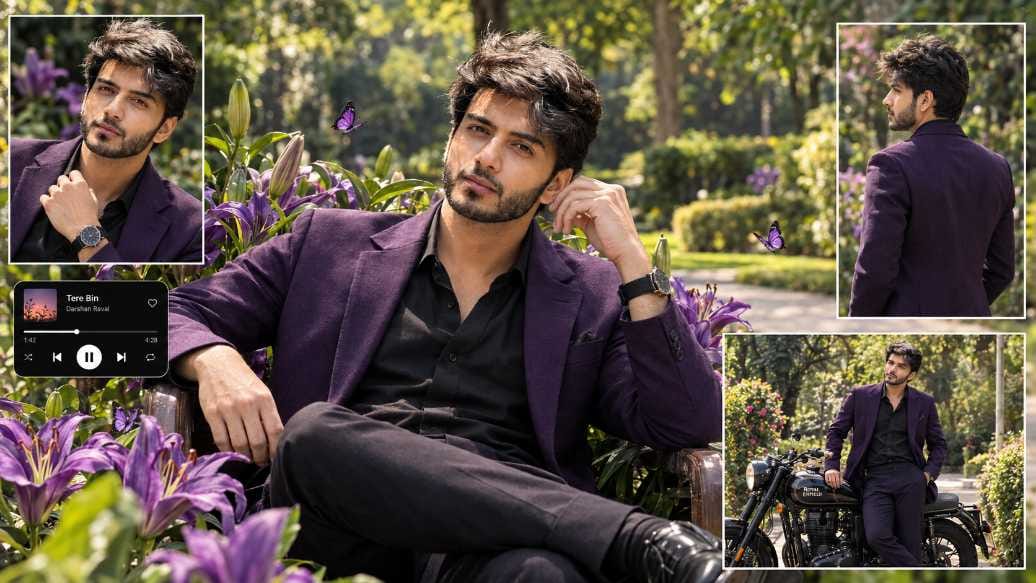
Transform the uploaded photo into an ultra-realistic, premium cinematic 16:9 landscape Indian men’s fashion collage.
Create a stylish hero portrait of the SAME MAN sitting confidently and naturally in a beautiful lush botanical garden surrounded by abundant vibrant royal-purple lilies, green leaves, flower buds and a few delicate purple butterflies.
DRESS & STYLING:
Change the man’s outfit into a premium luxury men’s fashion look: a perfectly fitted matte-black shirt worn with a sophisticated deep royal-purple tailored blazer, matching dark-purple/black tailored trousers, and elegant black leather shoes. Add a premium minimal wristwatch and subtle masculine accessories. The outfit must look expensive, modern, sophisticated and editorial, with realistic fabric texture, natural folds and perfect tailoring.
Keep the man’s original hairstyle and recognizable facial appearance from the uploaded photo. Use subtle cinematic grooming and natural masculine styling without changing his identity.
POSE:
The SAME MAN should be the main central hero subject, sitting in a relaxed yet confident fashion pose. One hand can rest naturally near the face/hair while the other hand rests casually on the thigh or across the lap. Maintain realistic anatomy, natural hands and fingers, accurate body proportions and a confident premium fashion-model attitude.
FLOWER ENVIRONMENT:
Surround the man with large vibrant royal-purple lilies arranged naturally around the chair/subject, creating a dramatic floral frame. Include realistic flower petals, green leaves, stems, unopened buds and a few purple butterflies flying naturally around him.
BACKGROUND:
Create a beautiful landscaped botanical garden with mature green trees, lush grass, soft yellow-green ornamental plants and a light-colored paved pathway in the distance. Use warm natural daytime sunlight filtering through the trees, realistic shadows, cinematic depth of field and soft background bokeh.
IMPORTANT COLLAGE LAYOUT:
• TOP-LEFT INSET:
Add a rectangular close-up photograph of the SAME MAN wearing the same black shirt and royal-purple blazer, showing his upper body, watch and stylish pose. Add a thin elegant white border.
• TOP-RIGHT INSET:
Add a vertical rectangular rear/side-view photograph of the SAME MAN wearing the same outfit, showing his hairstyle, blazer fitting and back/side profile. Add a thin white border.
• BOTTOM-RIGHT INSET:
Add a horizontal cinematic photograph showing the SAME MAN standing beside a premium black classic motorcycle, wearing the same royal-purple and black outfit. The motorcycle should look realistic, stylish and naturally integrated into the scene. Add a thin white border.
• LEFT-MIDDLE:
Add a small black rounded modern music-player interface with subtle album artwork, song title, progress bar and previous/play/next controls, similar to a smartphone music-player widget. Keep it small, clean and visually integrated into the collage.
The central portrait must remain the main focus. Keep all three inset photographs clearly separated and balanced around the hero portrait, closely matching the reference collage structure.
VISUAL STYLE:
Ultra-realistic professional men’s fashion photography, cinematic Indian fashion editorial, luxury magazine aesthetic, premium masculine styling, realistic skin texture, detailed individual hair strands, realistic black and purple fabric, highly detailed purple lily petals, natural sunlight, HDR photography, shallow depth of field, soft cinematic bokeh, realistic shadows, rich royal-purple and black color palette, sophisticated luxury atmosphere, photorealistic, extremely detailed, 8K quality.
IMAGE-TO-IMAGE PRIORITY:
The uploaded photo determines WHO the man is. This prompt determines the new clothing, pose, garden, flowers, motorcycle, collage layout and cinematic styling. Keep the SAME MAN recognizable in the main portrait and every inset image.
Do not create a different person. Do not alter facial identity. Do not feminize the styling. Avoid plastic skin, excessive retouching, cartoon, anime, CGI, illustration, distorted face, unnatural eyes, deformed hands, extra fingers, missing fingers, duplicated limbs, warped anatomy, blurry subject, messy collage, oversized text or random objects.
⫷RonyTica Prompt Box
Use the uploaded photo as the PRIMARY and HIGHEST-PRIORITY reference for the person. Preserve the person’s exact facial identity, face shape, eyes, nose, lips, jawline, skin tone, age, natural facial proportions and recognizable appearance. Do not replace the person with someone else.
Transform the uploaded photo into an ultra-realistic, premium cinematic 16:9 landscape Indian fashion collage.
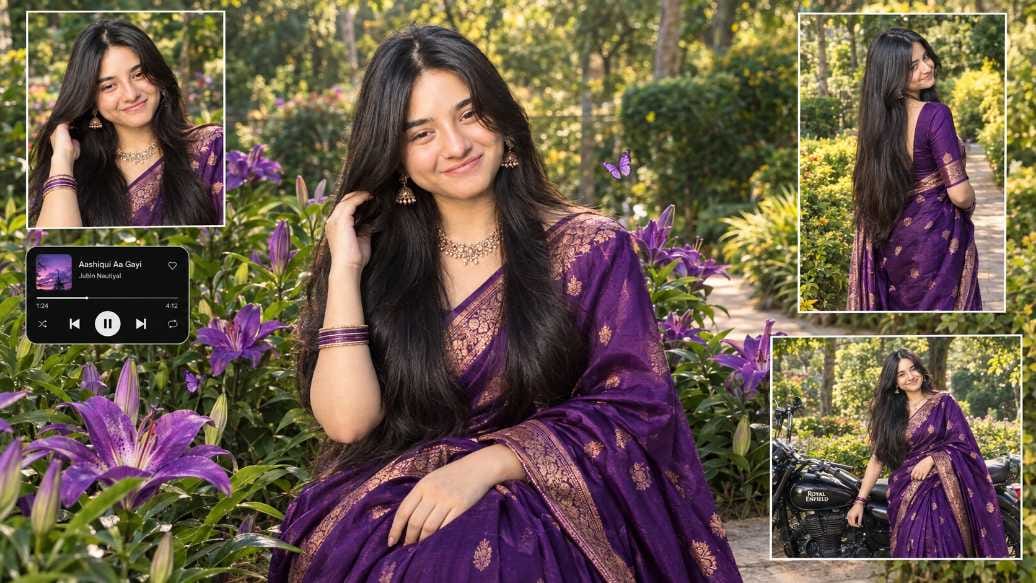
Create a beautiful hero portrait of the SAME PERSON sitting gracefully in a lush botanical garden, surrounded by abundant large vibrant royal-purple lilies, green leaves, flower buds and a few delicate purple butterflies.
Dress the person in a luxurious deep royal-purple silk saree with elegant rose-gold/copper zari embroidery, traditional motifs, rich realistic silk texture and natural graceful draping. Add tasteful traditional Indian jewelry such as an elegant gold necklace, earrings and thin bangles. Keep the person’s original recognizable appearance while naturally adapting the styling.
The main subject should be positioned prominently in the center, with an elegant natural fashion pose: one hand gently touching the hair near the side of the head and the other hand resting gracefully over the saree. Maintain realistic anatomy, natural hands and fingers, realistic body proportions and authentic facial details.
Create a beautiful landscaped garden background with mature green trees, lush grass, yellow-green ornamental plants and a light-colored pathway. Use warm natural daylight, cinematic sunlight, realistic shadows, soft background blur and beautiful depth of field.
IMPORTANT COLLAGE LAYOUT:
• TOP-LEFT: Add a rectangular close-up inset photo of the SAME PERSON wearing the same purple saree, showing the upper body, jewelry, saree details and hand near the hair. Add a thin white border.
• TOP-RIGHT: Add a vertical rectangular rear/side-view inset photo of the SAME PERSON wearing the same purple saree, showing the long hair and elegant back/side saree draping. Add a thin white border.
• BOTTOM-RIGHT: Add a horizontal rectangular inset photo showing the SAME PERSON beside a stylish black classic motorcycle, with the purple saree clearly visible. Add a thin white border.
• LEFT-MIDDLE: Add a small black rounded modern music-player interface with subtle album artwork, song title, progress bar and previous/play/next controls, similar to a smartphone music player. Keep it small and visually integrated.
The central portrait must remain the main focus. Arrange the three inset photos and music-player card in a clean, balanced editorial collage composition closely matching the reference structure.
Ultra-realistic professional photography, cinematic Indian fashion editorial, luxury magazine aesthetic, realistic skin texture, individual hair strands, detailed silk fabric, highly detailed purple lily petals, realistic leaves, natural sunlight, HDR photography, shallow depth of field, soft bokeh, premium cinematic color grading, rich royal-purple tones, warm highlights, realistic shadows, sophisticated atmosphere, photorealistic, extremely detailed, 8K quality.
IMAGE-TO-IMAGE PRIORITY:
The uploaded photo determines WHO the person is. This prompt determines the clothing, pose, garden, flowers, collage layout, motorcycle inset and cinematic styling. Keep the SAME PERSON recognizable throughout every inset image.
Do not create a different person. Do not alter facial identity. Avoid plastic skin, excessive beauty retouching, cartoon, anime, CGI, illustration, distorted face, unnatural eyes, deformed hands, extra fingers, missing fingers, duplicated limbs, warped anatomy, blurry subject, messy collage, oversized text or random objects.
Open the ChatGPT app or website and start a new chat. Upload one clear photo of your face, where your face is fully visible and not covered by sunglasses or a cap. Now copy the full prompt box given above, according to whether you are a boy or a girl, and paste it in the chat along with your photo. Send the message and wait for a few seconds while ChatGPT creates your image.
Once the photo is ready, check it carefully. If any small part looks odd, you can simply ask ChatGPT to fix that one part, like “make the hand position more natural” or “make the face more clear.” This way, you get the perfect final picture.
For more such trending prompts every week, keep visiting RonyTica, where we keep updating new viral styles for our readers.
What Is This Purple Garden Photo Trend
This trend is a mix of many cool things in just one picture. It is not a normal photo. It is more like a small photo collage, made by AI, using your own face.
In the middle, there is one big hero photo of you sitting in a garden, surrounded by purple lily flowers and small butterflies. Around this big photo, there are three-four small photos also of you, taken from different angles, like a close-up shot, a side shot, and a photo standing next to a stylish motorcycle. On one side, there is also a tiny music player box, just like the one we see on our phone screen when a song is playing.
This full picture looks like a fashion magazine cover, and that is why people are loving it so much on Instagram Reels and YouTube Shorts.
Why This AI Photo Style Is Going Viral
There are many reasons why this purple garden style prompt is spreading so fast on social media.
First, the color purple looks very royal and premium in photos, so every picture looks like a movie poster. Second, people love seeing their own face in a stylish, filmy look without going to any studio. Third, this collage style with multiple small photos and a music box feels very creative and different from normal single photos.
Boys are using this trend with a black shirt and purple blazer look, standing near a black motorcycle. Girls are using it with a purple silk saree look, full of gold jewellery. Both versions are getting huge likes and views on Instagram and Facebook pages.
Prompt For Boys — Purple Blazer Garden Look
This prompt is made for boys who want to get that royal purple blazer look with a stylish motorcycle photo included.
In this look, your outfit changes into a black shirt with a deep purple blazer, and you are shown sitting in a garden full of purple lilies. Around the main photo, there are small photos of you in a close-up pose, a side pose, and one photo standing beside a black motorcycle, along with a small music player box on the side.
Prompt For Girls — Purple Saree Garden Look
This prompt is made for girls who want a graceful, royal saree look, matching the same purple garden theme.
Here, your outfit changes into a beautiful deep purple silk saree with golden design work, along with traditional jewellery like a necklace, earrings and bangles. You are shown sitting gracefully among the purple lily flowers, and around the main photo, there are small photos from different angles, plus a photo beside a motorcycle and a small music player box.
Tips For Getting The Best Result
A few small tips can make a big difference in how good your final photo looks. Always use a bright and clear photo of your face, taken in good light, without any blur. Try to use a photo where you are looking straight or slightly to the side, as this helps AI understand your face shape better. If your first result does not look fully correct, don’t worry, just try again or ask ChatGPT to improve specific parts like the hands, hair or background. Also remember, these AI tools may give slightly different results every time, so you can generate the photo two or three times and pick your favourite one.
Conclusion
This Purple Lily Garden AI photo trend is such a fun and easy way to turn your simple photo into a royal, magazine-style picture, without spending money on any professional photoshoot. Whether you try the boy’s purple blazer look or the girl’s purple saree look, both give a super stylish and shareable result for your Instagram, Facebook or YouTube profile.
We hope this guide from RonyTica helped you understand and create this trend easily. Keep visiting RonyTica for more such viral AI photo prompts, video editing templates and trending tech tutorials, all explained in the simplest way possible.
Frequently Asked Questions
Q.1)Is this Purple Lily Garden AI photo prompt free to use?
Yes, you can create this photo using the free version of ChatGPT, though results with a paid plan may sometimes look sharper.
Q.2)Can I use my normal selfie for this prompt?
Yes, any clear photo where your face is visible properly will work well for this prompt.
Q.3)Does this prompt work for both boys and girls?
Yes, we have shared two separate prompts in this article, one for the boy blazer look and one for the girl saree look.
Q.4)Why does my photo look different from the example image?
AI tools like ChatGPT can give slightly different results each time, depending on your original photo and lighting, so small differences are normal.
Q.5)Can I use Gemini instead of ChatGPT for this prompt?
Yes, Gemini can also be used, but ChatGPT usually gives more consistent and realistic results for this kind of prompt.







24
🥳🥳🥳🥳🥳🥳
Ronytica
Radha rani look pic
Bheja
Saree
Gana gavali
Pic send