Karwa Chauth is a day many people want to look their best. Red saree, gold jewellery, mehndi, a sieve and the moon. People love to share that look online. But a real photoshoot is hard. There’s no photographer at home. The phone camera may not be good. And after a full day of fasting, who has the energy to pose?
Here’s the good part. AI can give you that festival look from your own photo, sitting at home. The images below show a rooftop at night, warm diya light, soft moonlight, fairy lights and blurred city lights behind. One is a solo look. Two are couple looks. Copy a prompt, upload your photo, and you’re done. Start with the first one.
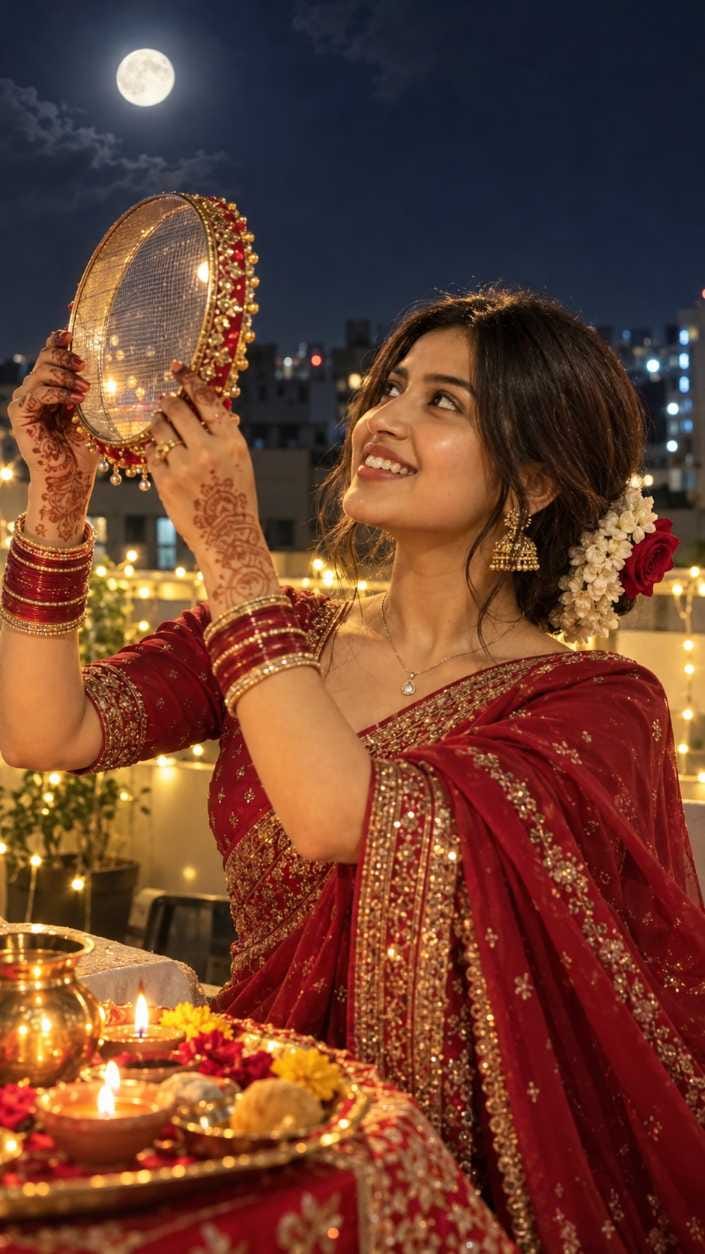
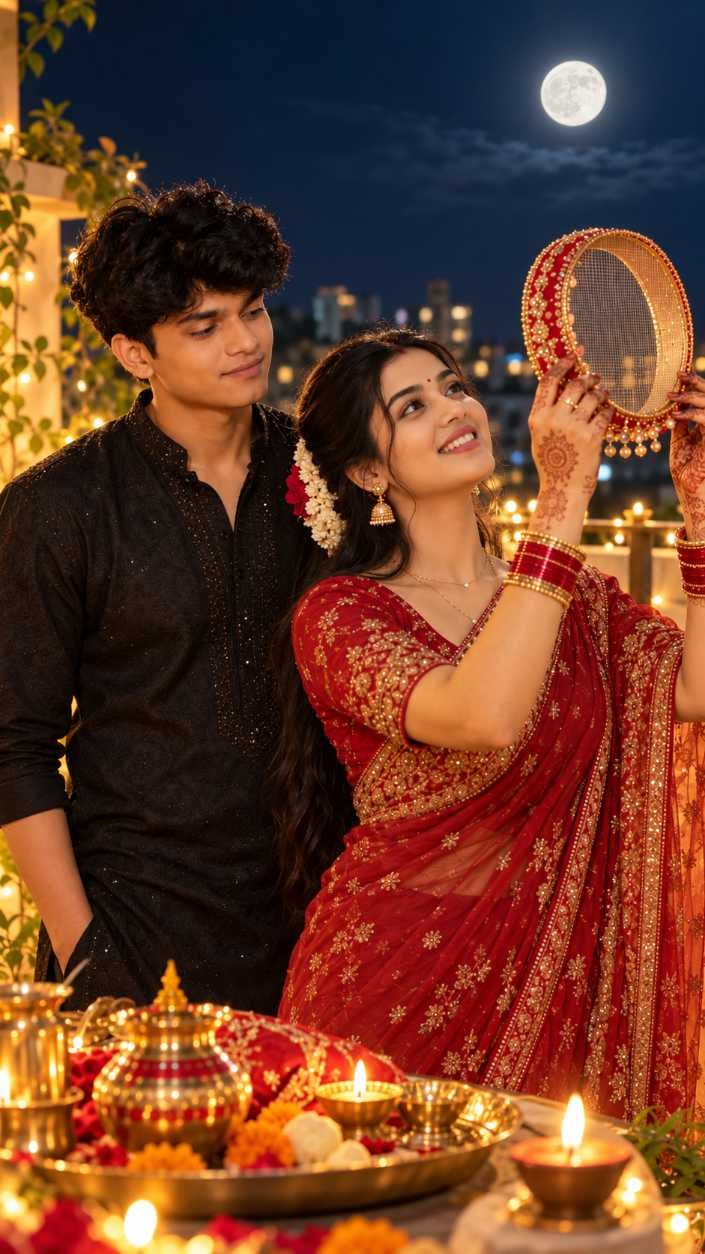
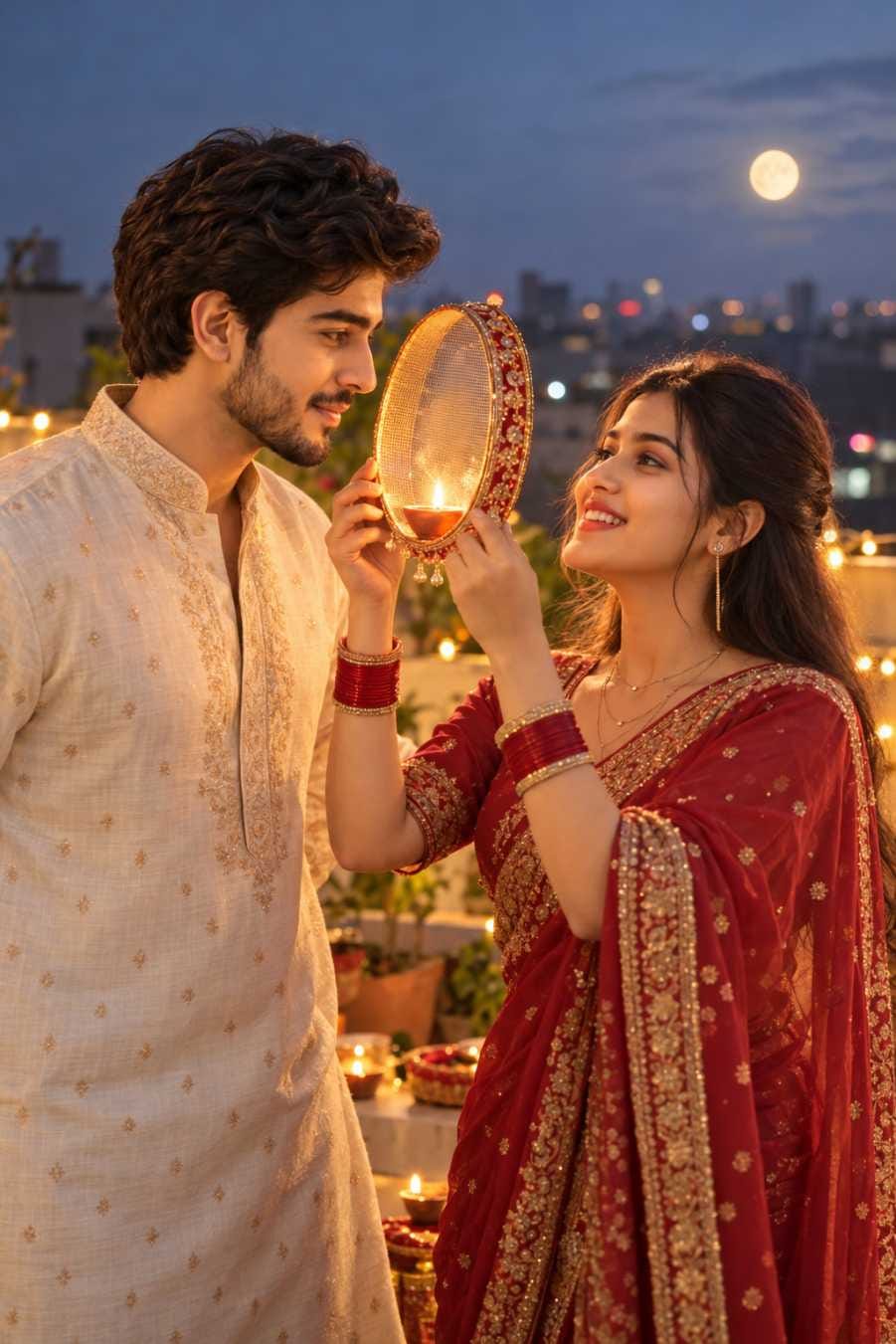
Photo 1 is a solo look with the moon above you. Photo 2 is a romantic couple look at night, with the man behind her. Photo 3 is calmer. It happens at dusk, with the two of you face to face and a diya between you.
The Late-Night Instagram Regret
You fasted all day. You did the puja. You never thought about photos. Then at night you open Instagram and everyone has posted. Wives with husbands, and some girls with their boyfriends. And you feel a bit sad.
You don’t need to feel that way. You can still make a post tonight. It takes a few minutes.
Make Three Looks in Minutes
You can use ChatGPT or Google Gemini. Both work. Here’s how.
⫷RonyTica Prompt Box
Transform my uploaded photo into an ultra-realistic Karva Chauth nighttime photograph. Preserve my exact facial identity, face shape, skin tone, and natural features.
POSE & FACE DIRECTION: Turn my face upward toward the full moon in the sky, with my eyes looking at the moon through a traditional decorated Karva Chauth sieve (channi) held in both hands. Natural side-profile angle, gentle smile, realistic facial expression, graceful traditional pose.
OUTFIT & DETAILS: Elegant deep-red saree with intricate golden embroidery, traditional gold jhumka earrings, red-and-gold bangles, delicate necklace, detailed mehndi on both hands, and black hair styled in a bun decorated with white jasmine flowers and a red rose.
BACKGROUND: Realistic Indian rooftop terrace at night, glowing full moon, distant city buildings with soft bokeh lights, warm fairy lights, and a traditional puja thali with lit diyas, flowers, sweets, and a brass kalash.
LIGHTING & CAMERA: Natural warm diya light illuminating the face from below and one side, cool moonlight, realistic shadows, natural skin texture, authentic smartphone photography, subtle background blur, true-to-life colors, realistic exposure, shot on iPhone 18 Pro Max, 4K HDR, vertical 9:16 composition.
IMPORTANT: Keep the uploaded person’s identity unchanged. Only change the outfit, pose, face direction, lighting, and background. Make it look like a genuine photograph captured on a real iPhone, with no AI-generated appearance, no plastic skin, no excessive beauty filters, no artificial glow, and no cartoon effects.
⫷RonyTica Prompt Box
Transform my two uploaded reference photos into an ultra-realistic, romantic Karva Chauth nighttime couple photograph. Use the first uploaded photo as the exact facial identity reference for the wife and the second uploaded photo as the exact facial identity reference for the husband.
STRICT MOON RULE — EXTREMELY IMPORTANT:
There must be EXACTLY ONE visible moon in the entire image. Show one single, bright, realistic full moon in the actual night sky, positioned in the upper background. The wife must look directly at this same moon through a traditional decorated Karva Chauth sieve (channi). The sieve must contain ONLY its normal fine mesh pattern. Do not place another moon, duplicate moon, circular moon reflection, glowing moon-shaped object, or a second bright circular light inside the sieve. The moon visible through the sieve must be the very same single moon in the sky, not a separate moon. Do not duplicate, mirror, clone, or recreate the moon anywhere else in the image. All other lights must be small, warm, irregular fairy-light bokeh or diya flames, clearly different from the moon.
FACE & IDENTITY PRESERVATION:
Preserve the exact facial identity of both people from their respective uploaded reference photos. Keep their original face shapes, eyes, noses, lips, skin tones, hairstyles, and natural facial features recognizable. Do not replace their faces with AI-generated faces or alter their identities.
POSE & EXPRESSION:
The wife stands in the foreground, holding a beautifully decorated traditional Karva Chauth sieve with both hands. She gently tilts her face upward and looks through the sieve toward the single full moon in the sky. The husband stands lovingly beside and slightly behind her, looking at his wife with a warm, affectionate smile. Their body language should feel natural, intimate, and candid.
WIFE’S OUTFIT:
An elegant deep-red saree with intricate golden embroidery, traditional gold jhumka earrings, a delicate gold necklace, red-and-gold bangles, detailed natural mehndi on both hands, a small red bindi, and long black hair decorated with white jasmine flowers and a red rose.
HUSBAND’S OUTFIT:
A premium black traditional kurta with subtle embroidery, a well-fitted elegant look, natural black hair, and a clean, sophisticated appearance.
BACKGROUND & ENVIRONMENT:
A beautiful Indian rooftop terrace at night. One deep navy-blue sky with exactly one bright full moon. Distant city buildings with subtle, realistic bokeh lights, warm golden fairy lights along the rooftop railing, a few traditional diyas, and tasteful festive decorations.
In the lower foreground, place a traditional Karva Chauth puja thali containing sweets, flowers, a brass kalash, a decorated diya, and other authentic ritual items.
LIGHTING & CAMERA:
Soft, cool natural moonlight illuminates the scene, balanced with warm golden diya light on the couple’s faces. Realistic skin texture, visible natural pores, authentic shadows, accurate skin tones, natural hands and fingers, realistic fabric details, subtle depth of field, and balanced nighttime exposure.
Photographed in the style of a real premium smartphone portrait using an iPhone 18 Pro Max, with realistic 4K HDR detail, natural colors, cinematic composition, and authentic photographic rendering.
PHOTOGRAPHY STYLE:
Ultra-realistic candid Indian couple photography, authentic Karva Chauth atmosphere, romantic nighttime mood, natural imperfections, realistic proportions, beautiful but believable lighting, and a premium DSLR-quality appearance.
NEGATIVE PROMPT — MUST FOLLOW:
Two moons, multiple moons, duplicate moon, double moon, mirrored moon, cloned moon, second moon inside the sieve, artificial moon reflection, moon-shaped fairy light, extra celestial bodies, multiple large glowing circles in the sky, duplicated faces, distorted faces, plastic skin, excessive beauty filters, unnatural hands, extra fingers, distorted sieve mesh, CGI, cartoon, illustration, artificial-looking skin, oversaturated colors, unrealistic lighting.
FINAL VALIDATION:
Before generating the final image, ensure that the entire composition contains exactly ONE moon. The moon must appear only once in the sky. The sieve must not contain a separate moon or moon-like glowing circle. If a second moon appears anywhere, regenerate the image with only one moon.
ASPECT RATIO: Vertical 9:16, suitable for Instagram Reels, Instagram Stories, and YouTube Shorts.
⫷RonyTica Prompt Box
Transform my uploaded photo into an ultra-realistic Karva Chauth rooftop couple photograph. Preserve my exact facial identity, skin tone, hairstyle, and natural body proportions. Recreate the same environment: a dusky blue-grey evening sky, blurred rooftop buildings, distant city lights, and a warm golden-orange diya glow. The husband wears a cream embroidered kurta, while the wife wears a deep maroon-red saree with golden details and red bangles. She holds a single traditional Karva Chauth sieve (channi) with a glowing diya between their faces, smiling lovingly at her husband. Natural expressions, realistic skin texture, cinematic warm lighting, shallow depth of field, soft bokeh, professional DSLR photography, 4K realism. Exactly one sieve and one diya, no duplicated moon, no extra fingers, no artificial AI look. Keep the environment and composition as close to the reference image as possible.
Upload your photo. For photo 1, upload two photos of yourself, one facing the camera and one from the side.
For photo 2, upload one photo of you and one of your husband or boyfriend.
Check the result. If you don’t like it, run the same prompt again.
Why two photos? I noticed that when the face in the photo is turned to the side, the AI can change the face shape, nose or jaw. So I suggest a front photo and a side photo. The AI then sees both angles of your face.
The prompts are made to do a few things. They set the festival scene, the pose with the sieve, the saree and jewellery, and the rooftop at night. They mix cool moon light with warm diya light. They ask for a phone-photo look and a vertical frame. And they tell the AI to keep your face as it is. The couple prompts also say who stands where and which photo gives which face. They ask for only one moon and only plain mesh in the sieve.
Want to change something? You can. Try a maroon, green or pink saree. Try a loose braid or gajra instead of a bun. Move the scene to a balcony or a courtyard. Make the sky blue dusk or cloudy. For the couple, change his kurta to navy, white or maroon, or let him hold the sieve.
Which Look to Post Where
This is the part most people skip. They make three photos and post all of them in one go. Don’t do that.
I’d say post the solo look first if you want a clean, simple post. It’s the easiest one for people to understand. Then use photo 2 as your main couple photo. It shows the whole story: the moon, the sieve, the thali and him close behind you. Photo 3 is softer. Keep it for a second slide or for a story.
Here’s a simple plan.
Look
Best place
Photo 1 (solo)
First slide of a carousel, or a feed post
Photo 2 (couple, night)
Main feed post for your husband or boyfriend
Photo 3 (dusk, face to face)
Second slide or a story
A carousel suits these images because each one looks different but they share the same festival feel. People swipe to see more. For feed posts, use 4:5 portrait, 1080×1350. For reels and stories, use 9:16, 1080×1920. The prompts ask for a vertical frame already, so you shouldn’t need to crop much.
Don’t post the same look everywhere on the same night. Pick one for Instagram and another for Facebook if you like. It feels less repeated.
Caption and Hashtag Ideas
Here are three short captions in three different voices. Sweet : “Fasted all day, saw the moon, found my favourite person. Happy Karwa Chauth.” Funny : “No photographer, no time, no energy. But the moon showed up, so I did too.” Quiet : “Diya, moon and you. That’s enough.”
Put words like Karwa Chauth, saree, moon, sieve and rooftop in your caption. People search for those words.
Hashtags you can use :#KarwaChauthPhoto #KarwaChauthLook #MoonAndSieve #KarwaChauthCouple #RedSareeLook #KarwaChauthVibes #FestiveAIPhoto #RooftopMoonlight #AIPhotoPrompt #GeminiPrompt
Turn the Photos into a Reel
Take the three images and put them in a short reel in the 9:16 size. Show photo 1, then photo 2, then photo 3. Add soft music. Keep any text small so it doesn’t cover the faces or the moon. A reel is a good choice when you have more than one look, because the order tells a small story, from the solo moment to the couple moment.
Mistakes That Spoil the Photo
The face doesn’t match. This can happen in all three. Upload a front photo and a side photo. For photo 3, I’d upload four photos if you can: your front and side, and his front and side. Even then, a mismatch can still happen.
The skin looks too smooth and glowing. This happens in photo 1 even when the prompt asks for natural skin. Run it again and pick the more natural one.
Two moons, or odd hands. In the couple photos, the moon can get doubled, or the hands around the sieve can look strange. Generate again. Don’t post a photo with a strange hand just because you’re tired.
A strange diya inside the sieve. This is for photo 3. Try again until the diya looks right.
For source photos, use good light, a clearly visible face, a plain background, no heavy filter and a clear, sharp image.
I made photos 1 and 2 with both ChatGPT and Gemini, and they came out fairly good in one try. Photo 3 I made with ChatGPT, and it took me three tries before I liked it. The first try wasn’t what I wanted. The third was good enough to post. That’s only my experience, though. Results change each time on both tools, so you can run the same prompt in both and keep the better one.
Be Honest About AI Photos
Say it’s an AI photo, or add a tag like #AIPhotoPrompt. The result may look close to you, but it won’t be a perfect match, and I can’t promise 90% or more every time. A short note in the caption keeps things simple and honest.
Frequently Asked Questions
Q.1)Can I use this without a husband?
Yes. Photo 1 is a solo look. If you want a couple look with a boyfriend, use the same steps as for a husband.
Q.2)Which tool is better, ChatGPT or Gemini?
I used both for the first two photos and got a fairly good result each time. For photo 3 I used ChatGPT. Try both and keep what you like.
Q.3)How many tries will I need?
Photo 3 took me three. Yours might take one or two. Just run it again.
Q.4)What size should I post?
4:5 portrait, 1080×1350, for feed posts. 9:16, 1080×1920, for reels and stories.