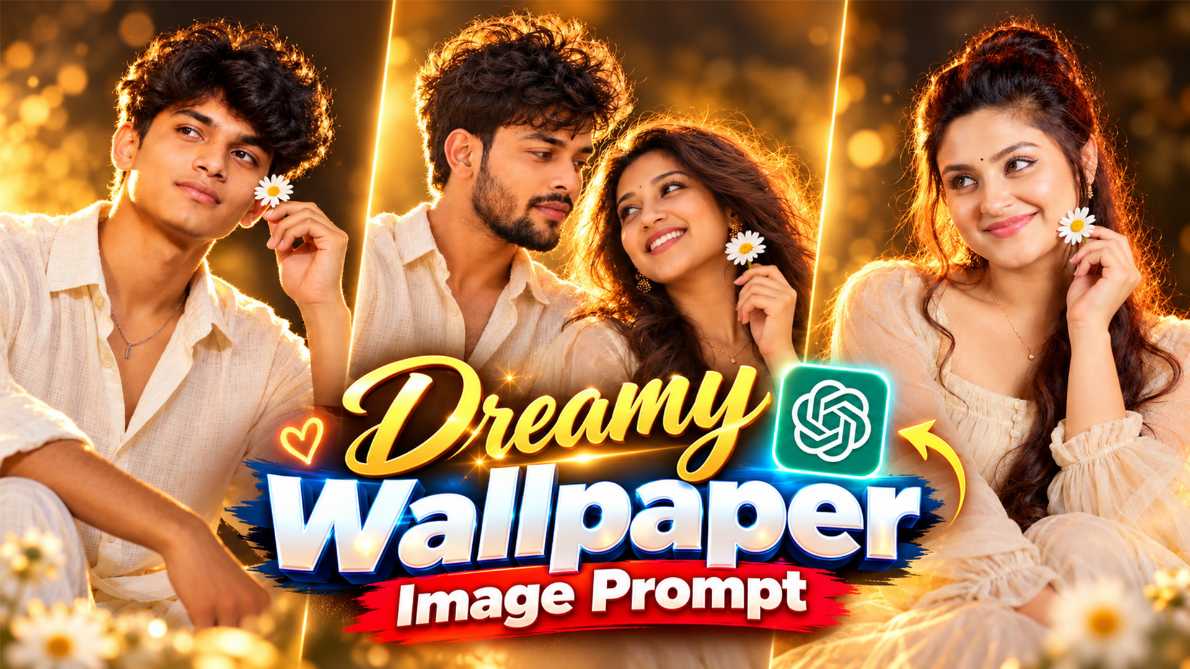
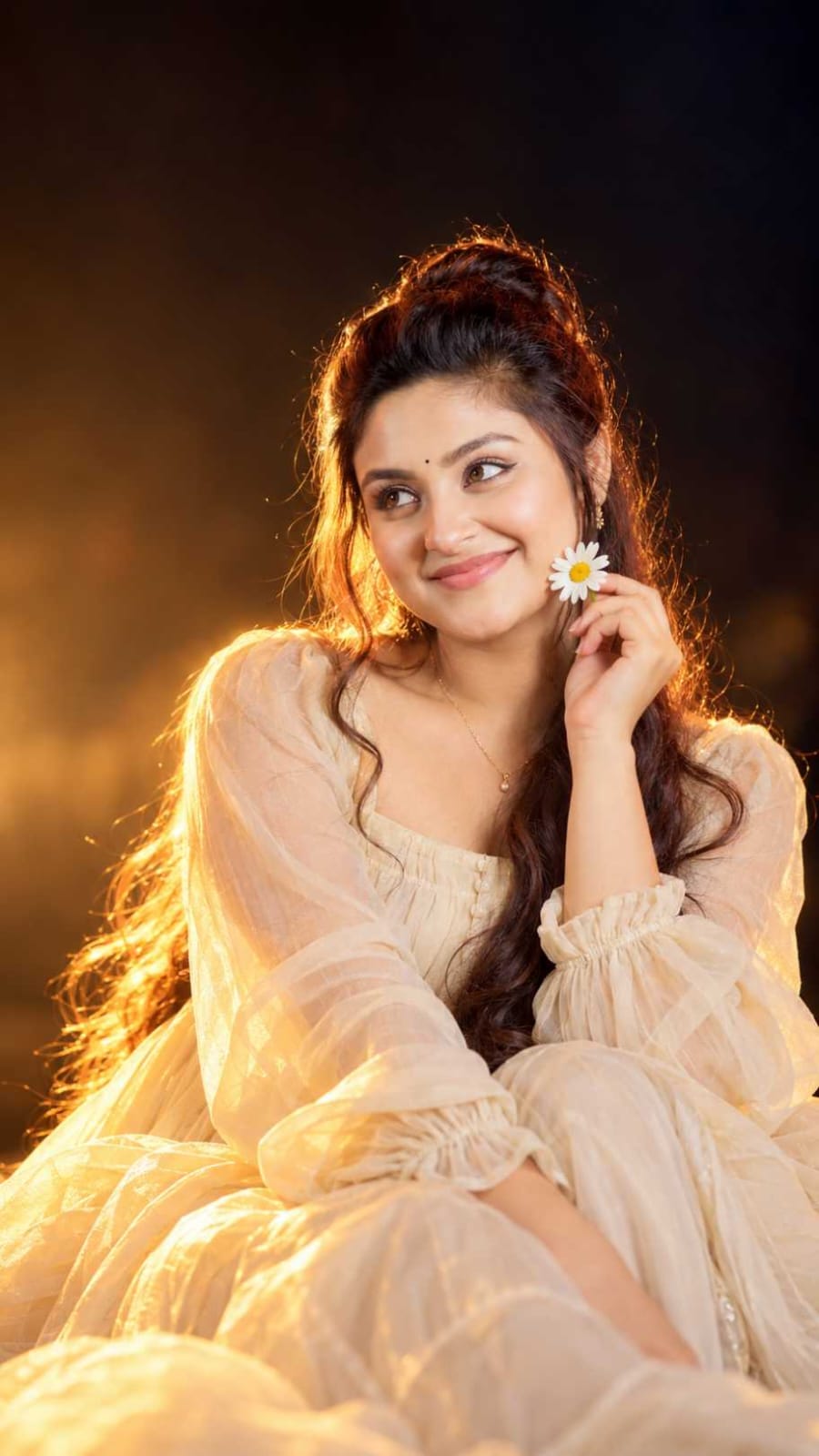
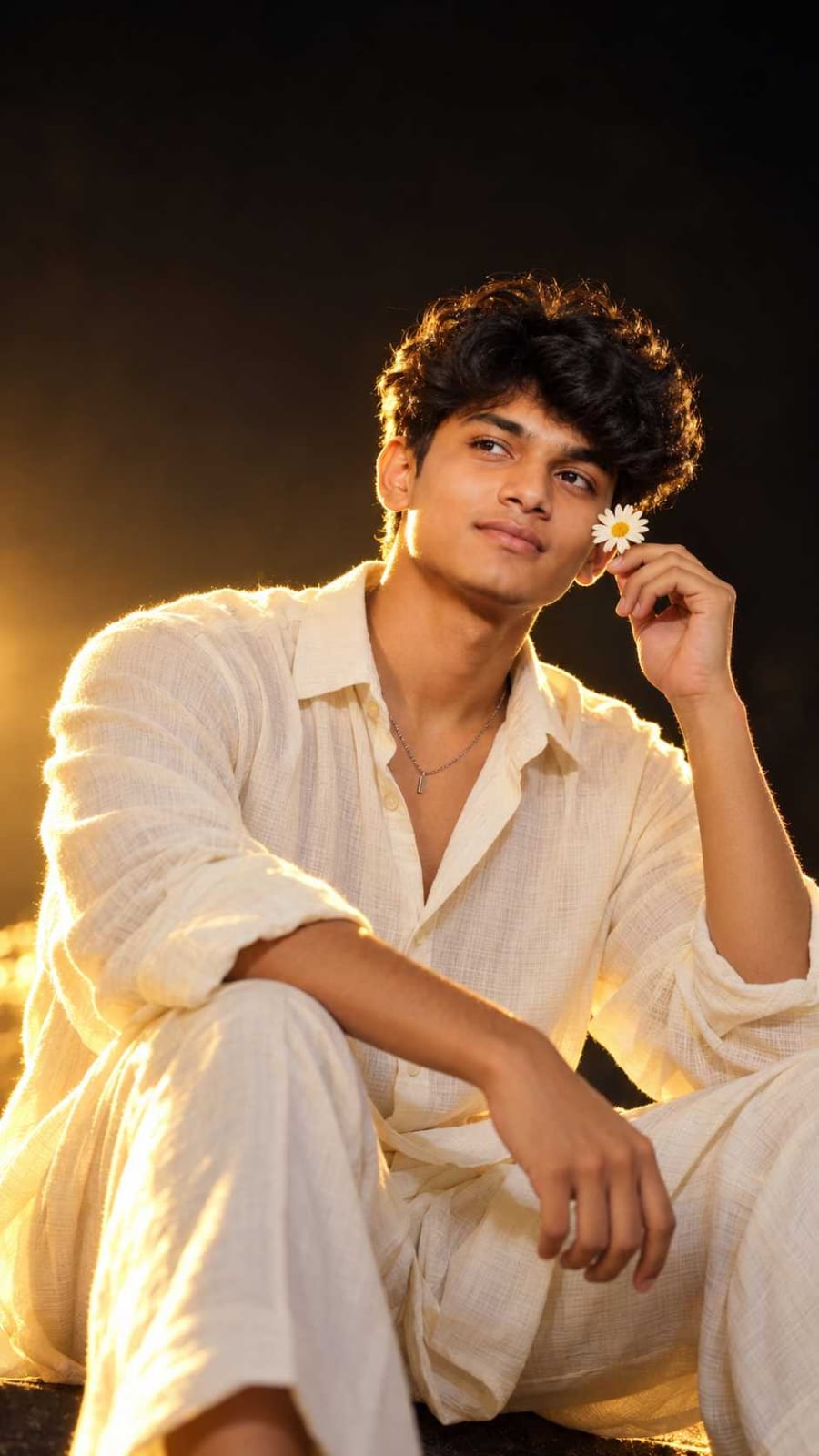
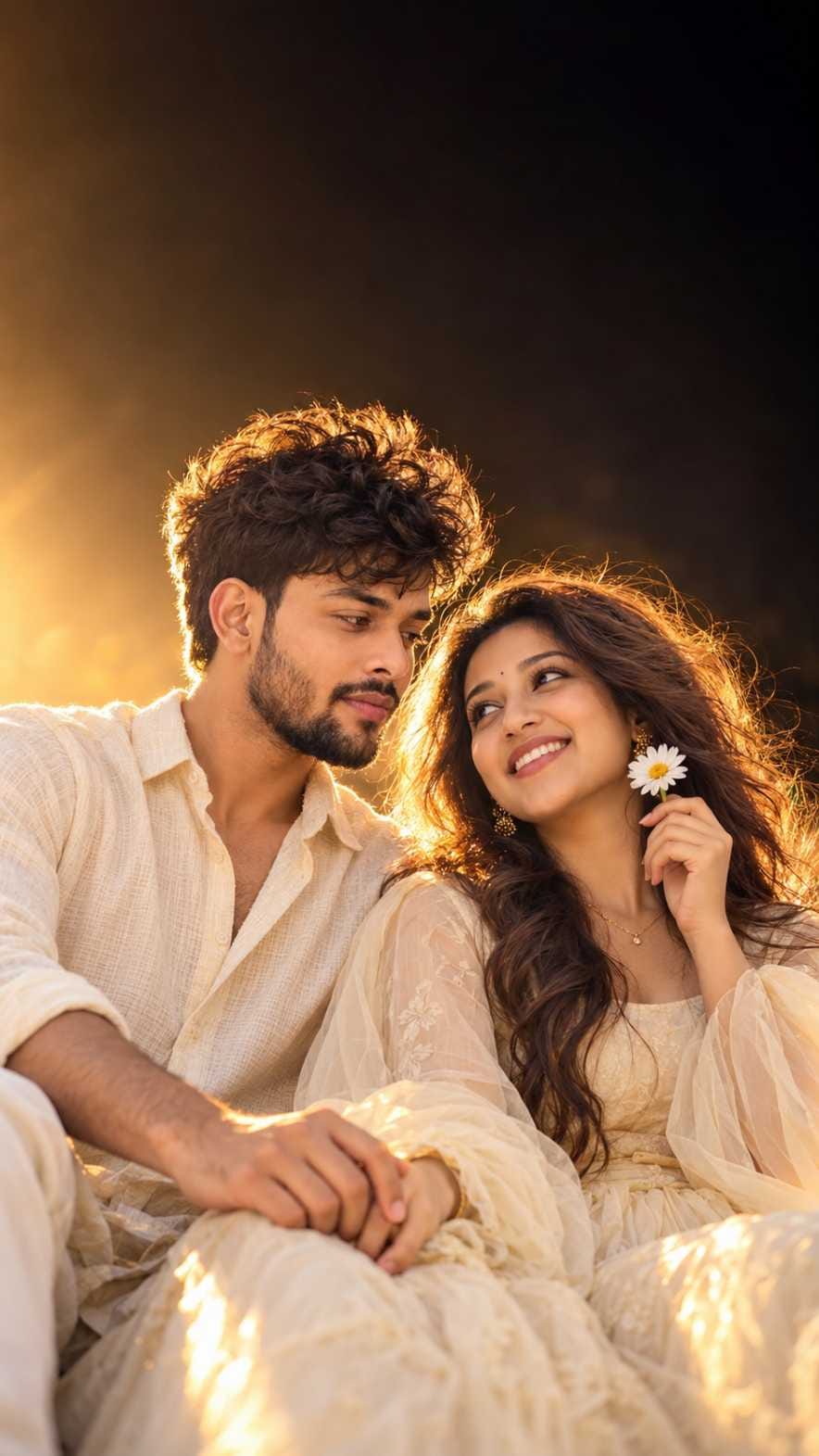
Have you seen those warm, glowing photos on Instagram and Facebook where a person sits in golden light, wears a soft cream outfit, and holds a tiny white daisy near the cheek? The background is deep black, the hair shines at the edges, and the whole picture looks like a real movie still. This is the Golden Hour Daisy Portrait trend, and it is going viral right now.
The best part is that you do not need a camera, a studio, or any editing skill. You only need a simple photo of yourself and the right prompt. In this post, I am sharing three ready-to-use prompts. One is for girls, one is for boys, and one is for couples. Together they make a complete set, so you can try all three styles in one place.
If you are looking for a ChatGPT golden hour photo prompt that gives a cinematic, premium look, this post is for you. The first two prompts are in JSON format, and the third one is in simple text. All of them are made for ChatGPT, and the steps are very easy. Even if you are a beginner, you can finish the whole process in a few minutes.
Which AI Tool Works Best for This Prompt?
ChatGPT is the best choice for these prompts. It reads long and detailed instructions well, and it handles lighting, outfit, and background details nicely. That is why the golden glow, the cream fabric, and the dark background come out so clean in most results.
You can also try the same prompts in Gemini if you like. Many people use Gemini for AI photo prompts these days, and it can give good results too. But the results may be a little different, so ChatGPT is still my first suggestion. Both tools have free and paid plans, and the daily image limit can change from time to time. If ChatGPT stops making images for the day, you can wait a few hours and try again.
⫷RonyTica Prompt Box
Make image
{
“image_design”: {
“format”: “vertical cinematic portrait photography”,
“aspect_ratio”: “9:16”,
“resolution”: “1536×2730”,
“style”: “ultra-realistic cinematic Indian beauty portrait, warm golden-hour studio photography, premium editorial aesthetic”,
“quality”: {
“detail”: “extremely high detail”,
“texture”: “natural skin texture, realistic hair strands, realistic fabric texture”,
“sharpness”: “sharp subject with detailed eyes, hair and clothing”,
“rendering”: “photorealistic, cinematic, professional DSLR photography”
},
“composition”: {
“framing”: “vertical medium-to-full portrait”,
“camera_angle”: “slightly above eye level”,
“subject_position”: “center-right of frame”,
“head_position”: “upper-middle area”,
“body_position”: “lower-right and lower-center area”,
“negative_space”: “large dark negative space above and to the left of the subject”,
“visual_balance”: “subject occupies the lower two-thirds while the upper frame remains mostly dark and minimal”
},
“subject”: {
“gender”: “female”,
“appearance”: “young South Asian woman”,
“expression”: “soft, gentle, dreamy expression with a subtle closed-mouth smile”,
“gaze”: “looking slightly toward the upper-left side of the frame”,
“pose”: “seated casually in an elegant relaxed pose”,
“face”: {
“makeup”: “soft natural makeup”,
“eyes”: “large expressive dark eyes with subtle black eyeliner”,
“eyebrows”: “naturally shaped defined eyebrows”,
“lips”: “soft natural pink lips”,
“forehead”: “small black round bindi”,
“skin”: “warm natural South Asian skin tone with smooth but realistic texture”
}
},
“hair”: {
“color”: “dark black-brown”,
“style”: “long voluminous naturally wavy hair”,
“parting”: “slightly side-parted”,
“front”: “soft loose strands framing the face”,
“length”: “very long hair falling over the right shoulder and chest”,
“texture”: “individual realistic hair strands”,
“lighting”: “strong golden rim light creating glowing highlights around the hair”
},
“accessories”: {
“earrings”: “small delicate golden floral earrings”,
“necklace”: “minimal thin gold chain with a tiny pendant”,
“nose”: “very subtle small nose ornament”,
“bindi”: “small black circular bindi”
},
“pose_details”: {
“left_hand”: “raised gently toward the face”,
“hand_position”: “holding a small white daisy flower close to the cheek”,
“flower”: {
“type”: “small white daisy”,
“petals”: “white petals”,
“center”: “yellow center”,
“placement”: “beside the lower cheek”
},
“body”: “seated with relaxed shoulders and elegant natural posture”,
“overall_pose”: “soft romantic feminine portrait pose”
},
“outfit”: {
“type”: “flowing feminine dress”,
“color”: “warm ivory champagne cream”,
“material”: “lightweight translucent chiffon/organza-like fabric”,
“design”: “long flowing dress with loose voluminous sleeves”,
“neckline”: “soft square/scoop neckline with subtle gathered detailing”,
“sleeves”: “long oversized sheer puff sleeves with gathered cuffs”,
“skirt”: “large flowing fabric folds spreading across the lower frame”,
“fabric_behavior”: “soft flowing folds with realistic translucent highlights”,
“lighting_response”: “fabric illuminated strongly by warm golden light”
},
“lighting”: {
“primary_light”: “strong warm golden backlight from the lower-left/rear side”,
“rim_light”: “bright golden rim light around hair, shoulders and dress edges”,
“fill_light”: “soft warm frontal fill illuminating the face naturally”,
“highlight”: “golden highlights on hair, skin and cream fabric”,
“shadow”: “deep cinematic shadows in the background”,
“lighting_style”: “dramatic golden-hour backlighting with soft cinematic glow”,
“effect”: “subtle dreamy bloom and natural lens glow”
},
“background”: {
“color”: “deep black with very subtle warm brown tones”,
“style”: “minimal dark studio background”,
“details”: “no visible objects, no scenery, no distracting elements”,
“gradient”: “very subtle warm brown-to-black gradient around the subject”,
“depth”: “completely blurred and unobstructed”
},
“color_palette”: {
“dominant”: [
“deep black”,
“warm golden yellow”,
“ivory cream”,
“champagne”,
“soft skin tones”
],
“overall_tone”: “warm, luxurious, dreamy and cinematic”
},
“camera”: {
“camera_type”: “professional full-frame DSLR/mirrorless camera”,
“lens”: “85mm portrait lens”,
“aperture”: “f/1.8”,
“depth_of_field”: “shallow depth of field”,
“focus”: “sharp focus on eyes and face”,
“background_blur”: “strong cinematic bokeh”,
“exposure”: “slightly low-key background with correctly exposed subject”,
“photography_style”: “premium fashion/editorial portrait photography”
},
“post_processing”: {
“color_grading”: “warm cinematic golden color grade”,
“contrast”: “medium-high cinematic contrast”,
“highlights”: “soft glowing highlights”,
“shadows”: “deep rich shadows”,
“skin_retouching”: “subtle natural skin retouching without plastic skin”,
“glow”: “soft golden bloom around illuminated edges”,
“vignette”: “very subtle cinematic vignette”,
“film_look”: “premium cinematic film photography aesthetic”
},
“composition_priority”: [
“large dark negative space in upper-left”,
“woman positioned center-right”,
“face as primary focal point”,
“eyes sharply focused”,
“white daisy beside cheek”,
“long flowing hair over right shoulder”,
“golden rim light around hair”,
“cream flowing dress filling lower frame”,
“deep black background”
],
“negative_prompt”: [
“low resolution”,
“blurry face”,
“over-smoothed skin”,
“plastic skin”,
“deformed hands”,
“extra fingers”,
“missing fingers”,
“distorted eyes”,
“asymmetrical face”,
“duplicate flower”,
“extra jewelry”,
“messy background”,
“text”,
“logo”,
“watermark”,
“oversaturated colors”,
“harsh artificial skin”,
“flat lighting”,
“cartoon”,
“anime”,
“3D render”
]
}
}
⫷RonyTica Prompt Box
Make image
{
“image_design”: {
“format”: “vertical cinematic portrait photography”,
“aspect_ratio”: “9:16”,
“resolution”: “1536×2730”,
“style”: “ultra-realistic cinematic young South Asian male portrait, warm golden-hour studio photography, premium editorial aesthetic”,
“quality”: {
“detail”: “extremely high detail”,
“texture”: “natural skin texture, realistic hair strands, realistic fabric texture”,
“sharpness”: “sharp subject with detailed eyes, hair and clothing”,
“rendering”: “photorealistic, cinematic, professional DSLR photography”
},
“composition”: {
“framing”: “vertical medium-to-full portrait”,
“camera_angle”: “slightly above eye level”,
“subject_position”: “center-right of frame”,
“head_position”: “upper-middle area”,
“body_position”: “lower-right and lower-center area”,
“negative_space”: “large dark negative space above and to the left of the subject”,
“visual_balance”: “subject occupies the lower two-thirds while the upper frame remains mostly dark and minimal”
},
“subject”: {
“gender”: “male”,
“appearance”: “young South Asian man”,
“expression”: “soft, calm, slightly dreamy expression with a subtle natural smile”,
“gaze”: “looking slightly toward the upper-left side of the frame”,
“pose”: “seated casually in an elegant relaxed pose”,
“face”: {
“makeup”: “natural clean masculine appearance”,
“eyes”: “expressive dark eyes with subtle natural definition”,
“eyebrows”: “naturally thick and well-shaped eyebrows”,
“lips”: “natural pink lips”,
“skin”: “warm natural South Asian skin tone with realistic skin texture”,
“facial_structure”: “defined masculine jawline and natural facial proportions”
}
},
“hair”: {
“color”: “dark black-brown”,
“style”: “medium-length naturally textured slightly wavy hair”,
“parting”: “slightly side-parted”,
“front”: “soft loose strands framing the forehead”,
“texture”: “individual realistic hair strands”,
“lighting”: “strong golden rim light creating glowing highlights around the hair”
},
“accessories”: {
“earrings”: “none”,
“necklace”: “minimal thin silver or gold chain with a tiny pendant”,
“wrist”: “minimal elegant bracelet or watch”,
“other”: “no excessive accessories”
},
“pose_details”: {
“left_hand”: “raised gently toward the face”,
“hand_position”: “holding a small white daisy flower close to the cheek”,
“flower”: {
“type”: “small white daisy”,
“petals”: “white petals”,
“center”: “yellow center”,
“placement”: “beside the lower cheek”
},
“body”: “seated with relaxed shoulders and natural masculine posture”,
“overall_pose”: “soft romantic cinematic male portrait pose”
},
“outfit”: {
“type”: “flowing lightweight masculine outfit”,
“color”: “warm ivory champagne cream”,
“material”: “lightweight soft cotton/chiffon-like fabric”,
“design”: “premium loose-fit cream shirt with relaxed styling”,
“neckline”: “simple open collar”,
“sleeves”: “long loose sleeves with natural folds”,
“lower_body”: “matching cream trousers or flowing fabric visible in the lower frame”,
“fabric_behavior”: “soft natural folds with realistic translucent golden highlights”,
“lighting_response”: “fabric illuminated strongly by warm golden light”
},
“lighting”: {
“primary_light”: “strong warm golden backlight from the lower-left/rear side”,
“rim_light”: “bright golden rim light around hair, shoulders and clothing edges”,
“fill_light”: “soft warm frontal fill illuminating the face naturally”,
“highlight”: “golden highlights on hair, skin and cream clothing”,
“shadow”: “deep cinematic shadows in the background”,
“lighting_style”: “dramatic golden-hour backlighting with soft cinematic glow”,
“effect”: “subtle dreamy bloom and natural lens glow”
},
“background”: {
“color”: “deep black with very subtle warm brown tones”,
“style”: “minimal dark studio background”,
“details”: “no visible objects, no scenery, no distracting elements”,
“gradient”: “very subtle warm brown-to-black gradient around the subject”,
“depth”: “completely blurred and unobstructed”
},
“color_palette”: {
“dominant”: [
“deep black”,
“warm golden yellow”,
“ivory cream”,
“champagne”,
“soft natural skin tones”
],
“overall_tone”: “warm, luxurious, dreamy and cinematic”
},
“camera”: {
“camera_type”: “professional full-frame DSLR/mirrorless camera”,
“lens”: “85mm portrait lens”,
“aperture”: “f/1.8”,
“depth_of_field”: “shallow depth of field”,
“focus”: “sharp focus on eyes and face”,
“background_blur”: “strong cinematic bokeh”,
“exposure”: “slightly low-key background with correctly exposed subject”,
“photography_style”: “premium fashion/editorial portrait photography”
},
“post_processing”: {
“color_grading”: “warm cinematic golden color grade”,
“contrast”: “medium-high cinematic contrast”,
“highlights”: “soft glowing highlights”,
“shadows”: “deep rich shadows”,
“skin_retouching”: “subtle natural skin retouching without plastic skin”,
“glow”: “soft golden bloom around illuminated edges”,
“vignette”: “very subtle cinematic vignette”,
“film_look”: “premium cinematic film photography aesthetic”
},
“composition_priority”: [
“large dark negative space in upper-left”,
“young man positioned center-right”,
“face as primary focal point”,
“eyes sharply focused”,
“white daisy beside cheek”,
“medium-length textured hair”,
“golden rim light around hair”,
“cream outfit filling lower frame”,
“deep black background”
],
“negative_prompt”: [
“female”,
“woman”,
“feminine facial features”,
“long feminine hair”,
“low resolution”,
“blurry face”,
“over-smoothed skin”,
“plastic skin”,
“deformed hands”,
“extra fingers”,
“missing fingers”,
“distorted eyes”,
“asymmetrical face”,
“duplicate flower”,
“extra jewelry”,
“messy background”,
“text”,
“logo”,
“watermark”,
“oversaturated colors”,
“harsh artificial skin”,
“flat lighting”,
“cartoon”,
“anime”,
“3D render”
]
}
}
⫷RonyTica Prompt Box
Create an ultra-realistic cinematic vertical couple portrait of a young South Asian couple, in a premium romantic editorial photography style. Use a 9:16 vertical composition, 1536×2730 resolution, photorealistic professional DSLR/mirrorless quality, extremely high detail, natural skin texture, realistic individual hair strands, realistic fabric texture, and sharp focus on both faces and eyes.
Composition: Frame the couple in a vertical medium-to-full-body portrait, photographed from slightly above eye level. Position the couple toward the center-right/lower two-thirds of the frame, leaving a large dark negative space above and toward the upper-left. Keep the upper portion minimal, dark, and cinematic. The couple should have a natural intimate connection, with their shoulders gently touching and their bodies slightly turned toward each other.
The male subject is a young South Asian man with a warm natural South Asian skin tone, expressive dark eyes, naturally thick defined eyebrows, and a naturally defined masculine jawline. He has dark black-brown, medium-length, slightly wavy textured hair with visible individual strands and subtle golden rim highlights. His expression is calm and romantic with a subtle natural smile, looking affectionately toward the girl. Dress him in a premium relaxed-fit warm ivory cream shirt made from soft lightweight fabric, with minimal elegant masculine styling.
The female subject is a young South Asian woman with a warm natural South Asian skin tone, large expressive dark eyes, soft natural makeup, natural soft pink lips, and a small black circular bindi. She has long, naturally wavy, voluminous dark black-brown hair with loose strands catching the golden rim light. Her expression is soft, dreamy, and gently smiling while looking affectionately toward the boy. She wears small delicate golden earrings and a minimal thin gold chain with a tiny pendant. Dress her in an elegant flowing warm ivory/champagne cream dress made from lightweight chiffon or organza-like fabric, featuring soft voluminous sleeves.
Pose the couple naturally and romantically, sitting or standing closely beside each other. The boy is slightly turned toward the girl and gently holds her hand. The girl is slightly turned toward him and delicately holds a small white daisy near her cheek. Their shoulders gently touch. Their body language should feel subtle, affectionate, relaxed, elegant, candid, and emotionally connected.
The flower should be a small realistic white daisy with clean white petals and a yellow center, delicately held near the girl’s cheek.
Lighting should feature strong warm golden-hour backlighting coming from the lower-left/rear side, creating a bright golden rim light around both subjects’ hair and shoulders. Add soft warm frontal fill light across both faces while maintaining deep cinematic shadows in the background. Create beautiful golden highlights on their skin, hair, and clothing, with a dreamy cinematic glow, subtle natural bloom, and warm lens flare/glow.
The background should be deep black with subtle warm brown tones, completely minimal and free of distracting objects. Create a smooth warm-brown-to-black gradient with strong cinematic subject separation and shallow depth of field.
Use a luxurious color palette consisting of deep black, warm golden yellow, ivory cream, champagne, and natural warm skin tones. The overall mood should feel romantic, warm, luxurious, dreamy, intimate, elegant, and cinematic.
Camera style: professional full-frame DSLR or mirrorless camera, 85mm portrait lens, f/1.8 aperture, shallow depth of field, strong cinematic bokeh, sharp focus on both faces and eyes, premium romantic fashion/editorial photography.
Post-processing should include a warm cinematic golden color grade, medium-high cinematic contrast, soft glowing highlights, deep rich shadows, subtle natural skin retouching while preserving realistic skin texture, soft golden bloom around illuminated edges, a very subtle cinematic vignette, and a premium cinematic film photography aesthetic.
Priority: young South Asian couple as the main subjects, large dark negative space in the upper-left, both faces clearly visible, natural romantic eye contact, subtle affectionate body language, white daisy near the girl’s cheek, strong golden rim lighting around both subjects, flowing cream and ivory outfits, deep black cinematic background.
Avoid: single person, extra person, third person, duplicate subjects, deformed hands, extra fingers, missing fingers, distorted eyes, asymmetrical faces, unnatural body proportions, plastic skin, over-smoothed skin, blurry faces, low resolution, messy background, text, logo, watermark, oversaturated colors, flat lighting, cartoon, anime, 3D render.
How To Use These Prompts (Step-by-Step)
Follow the steps below for the Girl and Boy prompts. They are in JSON format, so please do not edit anything inside them. Just copy the full text and paste it as it is.
Prompt 1: Golden Hour Daisy Portrait Prompt for Girls
Open ChatGPT on your phone or computer.
Tap the plus (+) icon and upload one simple, clear photo of yourself. A front-facing selfie in good light works best.
In the message box, first type make Image.
Right after that, paste the full JSON prompt below. Do not change any word inside it.
Send the message and wait a few seconds for your photo.
If you like the result, save it. If not, press regenerate and try again.
Prompt 2: Golden Hour Daisy Portrait Prompt for Boys
Open a new chat in ChatGPT.
Upload one simple, clear photo of the boy. Make sure the face is visible and not covered by sunglasses or a cap.
Type make Image in the message box first.
Now paste the full JSON prompt below, exactly as it is.
Send it and wait for the image to be ready.
Download your favourite result.
Prompt 3: ChatGPT Couple Photo Prompt (Romantic Golden Hour Style)
Open a fresh chat in ChatGPT.
Upload one clear photo of both people together. If you do not have one, you can try without a photo, but the faces will then be new and random.
Type make Image first.
Paste the full couple prompt below without any change.
Send the message and wait for the result.
If one face looks different from the original, regenerate once or twice. Couple photos sometimes need a second try.
Tips Before Using the Prompt
First, always use a clear photo. The better your starting photo, the better your final result will be. A photo with soft light, a straight face, and no heavy filter gives ChatGPT a good base to work with. Blurry or very dark photos often give weak results. Second, start a new chat for every prompt. If you use the same chat again and again, ChatGPT may mix the old details with the new ones. A fresh chat keeps the output clean. Third, keep an eye on the daisy and the hands. This is a daisy flower AI photo prompt, so the small white flower near the cheek is an important part of the look. Sometimes AI makes two flowers or adds an extra finger. If that happens, just regenerate. It is a very common thing and not a problem with your prompt.
Fourth, do not remove anything from the JSON. Many beginners delete lines they do not understand, and then the final photo loses its golden glow. Paste the full JSON prompt as it is. If you are new to this, the JSON prompt for ChatGPT image making may look strange, but it works like a detailed order form. The more clearly it is written, the better ChatGPT follows it. Lastly, remember that AI can never copy a face one hundred percent. A small difference in the face is normal. If you want a closer match, try a different original photo.
Best Settings for the Best Result
The table below shows the settings that give the cleanest golden hour result. Most of these are already written inside the prompts, so you only need to take care of the photo you upload and the final check.
Setting
Recommended Choice
Why It Matters
Aspect Ratio
9:16 (vertical)
Perfect for Instagram DP, Reels cover, and WhatsApp status
Resolution
High quality, 1536×2730 as written in the prompt
Keeps hair, fabric, and skin details sharp
Your Input Photo
Clear, front-facing, soft light
Helps ChatGPT keep your face closer to the original
Lighting Style
Warm golden backlight with soft glow
Gives the cinematic golden hour look
Outfit Colour
Ivory, cream, or champagne
Catches the golden light beautifully
Background
Deep black with a slight warm brown tone
Makes the face and the daisy stand out
Focus
Sharp eyes and face
Gives the premium portrait feel
Skin Texture
Natural, not over-smooth
Avoids the plastic skin look
Chat Type
New chat for every prompt
Prevents mixing of old and new details
Common Mistakes to Avoid
The most common mistake is writing in the wrong order. Many people paste the prompt first and forget to type “make Image” before it. Please type the words first, and then paste the prompt. This small step helps ChatGPT understand that you want a picture and not a text reply.
The second mistake is uploading a bad photo. A photo with sunglasses, a mask, a very tight crop, or heavy filters will confuse the AI. Use a simple photo where your face is clear.
The third mistake is changing the prompt too much. If you replace the outfit, the lighting, and the background all at once, you will lose the trend look. If you want to experiment, change only one small thing at a time, like the outfit colour.
Another mistake is expecting a perfect result on the first try. AI image tools are not always exact. You may see an extra finger, a double flower, or a slightly different face. Just regenerate, and most of the time the next result looks much better. In the couple prompt, some users also see a third person appear in the photo or one face come out very different. If this happens, upload a clearer couple photo and try again in a new chat.
Why You Will Love This Prompt
This prompt gives you a photo that looks like it came from a professional studio shoot. The warm golden light, the shining hair edges, and the soft cream outfit all feel rich and dreamy. It is a cinematic portrait prompt that works for different people, so everyone in the family can try it.
It is also very easy to use. You do not need to learn editing. You only upload a photo, type two words, paste the prompt, and wait. That is all. Another good thing is that you get a full set. Girls can use the first prompt, boys can use the second, and couples can use the third. The three photos also look good together, so you can post them as a matching series on your profile.
If you love romantic AI portraits, you will enjoy the couple version the most. The soft smiles, the daisy near the cheek, and the golden glow make a lovely romantic couple AI prompt for anniversaries, birthdays, or just for fun. The vertical size also makes it perfect for Instagram DP, Facebook stories, and WhatsApp status. So you can create it once and use it everywhere.
Conclusion
The Golden Hour Daisy Portrait is one of the most beautiful AI photo trends right now, and you can create it in just a few minutes. With the right ChatGPT golden hour photo prompt, a clear photo, and the simple “make Image” step, you can get a warm, cinematic portrait that looks truly premium. Try the Girl prompt, the Boy prompt, and the Couple prompt one by one, and see which one you like the most. If the first result is not perfect, do not worry. Just regenerate and keep trying.
If you enjoyed this post, share it with your friends and family so they can create their own golden hour photos too. And keep visiting RonyTica for more trending AI photo prompts, video prompts, and easy tech tutorials.
Frequently Asked Questions (FAQ)
Q.1)What is the Golden Hour Daisy Portrait trend?
It is a popular AI photo style where a person is shown in warm golden light, wearing a cream outfit and holding a small white daisy near the cheek. The background is dark and clean, so the face and the golden glow stand out. People create it with ChatGPT using a detailed prompt and one simple photo.
Q.2)Is this prompt free to use?
Yes, the prompts on this page are free to copy and use. ChatGPT may have daily limits on image creation in its free plan. If you reach the limit, you can try again later or use a paid plan.
Q.3)What should I write before pasting the JSON prompt?
Type “make Image” first, and then paste the full JSON prompt right after it. Upload your photo before you send the message. This is the easiest way to get the result.
Q.4)Can I use these prompts in Gemini?
You can try them in Gemini as well, and many users do. But these prompts were made with ChatGPT in mind, so the results may look a little different. ChatGPT is the safer choice.
Q.5)Why does the face in my result look a little different?
AI tools cannot copy a face perfectly every time. Small changes are normal. Try a clearer, front-facing photo, use a new chat, and regenerate a couple of times. This usually improves the result.
Q.6)Can I use my own photo for the couple prompt?
Yes. Upload one clear photo of both people together, then type “make Image” and paste the couple prompt. Make sure both faces are clearly visible in the photo.
[…] in the frame, so the bike doesn’t float around. Then it describes the street: hanging lights, warm golden light, a cinematic colour grade, a tall 9:16 layout, and a camera and lens […]


[…] in the frame, so the bike doesn’t float around. Then it describes the street: hanging lights, warm golden light, a cinematic colour grade, a tall 9:16 layout, and a camera and lens […]