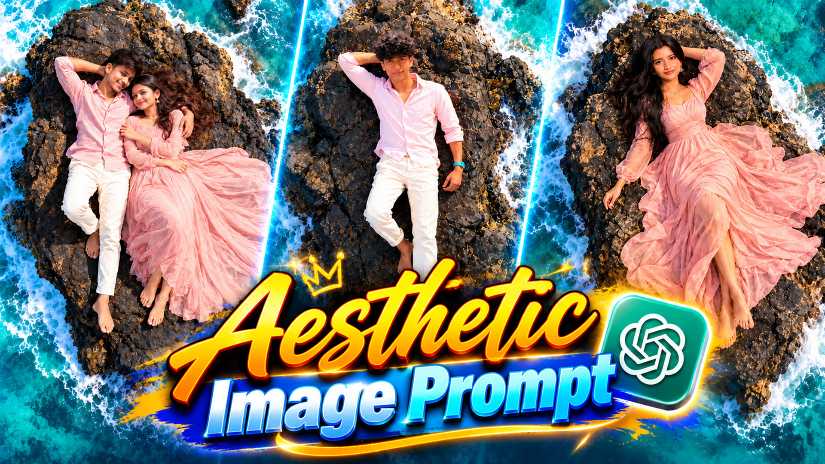
Why Everyone Is Making Drone View Photos Right Now
Have you seen those photos on Instagram where a person lies on a rocky island in the middle of a bright blue sea? The photo looks like a drone took it from high above. The waves crash around the rock, the water shines like glass, and the person looks calm and stylish. Many people think it needs a costly trip and a drone. It does not. You can make this look from your own photo in a few minutes.
This is the Drone View AI Photo Prompt trend, and it is one of the most trending AI photo prompt 2026 styles on Instagram and Reels. In this post, RonyTica explains how this style works, which AI tool gives the best result, and how you can make your own picture. It works for boys, for girls, and for couples too. If you were looking for a simple ChatGPT photo prompt copy paste guide for this style, you are in the right place.
Which AI Tool Gives the Best Result for This Prompt
ChatGPT is the best choice for this style. The newer ChatGPT image tools are very good at keeping your face looking like you, and this matters a lot here. A ChatGPT photo editing prompt like this one needs the tool to hold your face, your outfit, and the sea around you all at once. ChatGPT does this well, and that is why we suggest it first. If you want to try the latest ChatGPT Images 2.0 prompt style, this is a good one to start with.
You can also use Gemini. Many people search for a Gemini photo prompt copy paste for this trend, and it does work there too. The result may look a little different, so you may need to try two or three times. For couples, a Gemini AI photo prompt for couples can work well if you upload clear photos of both people.
⫷RonyTica Prompt Box
Make image
{
“image_design”: {
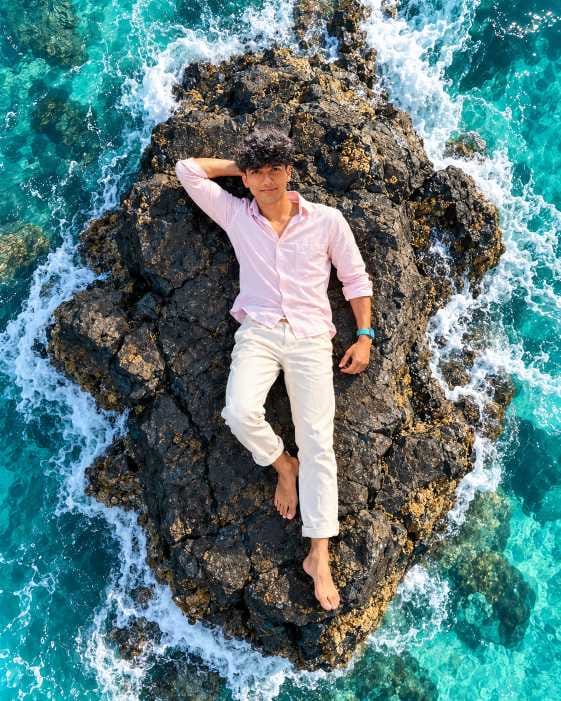
“format”: “vertical cinematic solo male photograph”,
“aspect_ratio”: “4:5”,
“style”: “ultra-realistic cinematic aerial photography, luxury tropical travel aesthetic”,
“camera_angle”: “top-down aerial drone view, directly above the subject”,
“identity_reference”: {
“reference”: “use the uploaded boy photo as the primary identity reference”,
“identity_preservation”: “preserve the boy’s recognizable facial identity, facial proportions, eyes, eyebrows, nose, lips, jawline, hairstyle, skin tone and natural facial features”,
“pose_rule”: “do not copy the original pose or background from the reference image”
},
“subject”: {
“gender”: “male”,
“composition”: “single boy lying alone on a large rugged black volcanic rock surrounded by turquoise ocean”,
“position”: “centered naturally on the rock with the full body visible from head to feet”,
“pose”: “lying comfortably on his back in a relaxed cinematic pose”,
“expression”: “natural confident soft smile”,
“gaze”: “looking directly toward the camera”,
“hair”: “natural dark hair, neatly styled”,
“facial_hair”: “preserve the natural beard or clean-shaven appearance from the reference”,
“outfit”: {
“shirt”: “light pastel pink long-sleeve button-up shirt”,
“pants”: “off-white or very light cream trousers”,
“style”: “minimal elegant luxury resort fashion”,
“fit”: “natural relaxed fit”
},
“pose_details”: {
“left_arm”: “resting naturally beside the body”,
“right_arm”: “bent comfortably with the hand resting behind the head”,
“legs”: “naturally positioned with a relaxed slight separation”,
“feet”: “barefoot”
}
},
“environment”: {
“location”: “isolated rugged volcanic rock formation surrounded by tropical ocean”,
“rock”: {
“color”: “charcoal black and dark gray”,
“texture”: “rough naturally cracked volcanic stone with subtle golden-brown mineral details”
},
“ocean”: {
“color”: “vivid turquoise and cyan blue”,
“water”: “crystal-clear tropical seawater”,
“waves”: “white foamy waves crashing naturally around the rock”,
“motion”: “dynamic swirling ocean patterns surrounding the subject”
}
},
“lighting”: {
“type”: “bright natural tropical daylight”,
“quality”: “soft yet crisp sunlight”,
“shadows”: “realistic natural shadows”,
“highlights”: “subtle highlights on face, hair, clothing, rock and ocean”
},
“photography”: {
“camera”: “high-end professional drone camera”,
“lens”: “wide-angle aerial lens”,
“perspective”: “true top-down overhead perspective”,
“depth”: “sharp subject and highly detailed environment”,
“dynamic_range”: “high dynamic range”,
“color_grading”: “cinematic teal ocean tones with warm natural skin tones”,
“realism”: “photorealistic natural skin, realistic clothing folds and authentic ocean movement”,
“quality”: “8K ultra-realistic cinematic photography”
},
“mood”: “luxurious, peaceful, adventurous, stylish and cinematic”,
“negative_prompt”: [
“woman”,
“couple”,
“second person”,
“multiple people”,
“duplicate subject”,
“extra limbs”,
“extra fingers”,
“deformed hands”,
“warped feet”,
“bad anatomy”,
“face distortion”,
“different identity”,
“blurry face”,
“plastic skin”,
“cartoon”,
“anime”,
“3D render”,
“unnatural ocean”,
“incorrect aerial perspective”,
“cropped body”,
“text”,
“watermark”,
“logo”
]
}
}
⫷RonyTica Prompt Box
Make image
{
“image_design”: {
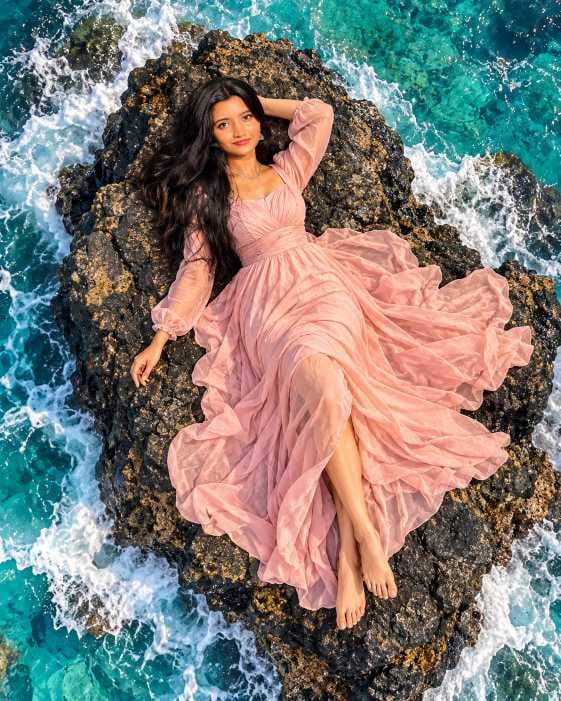
“format”: “vertical cinematic solo female photograph”,
“aspect_ratio”: “4:5”,
“style”: “ultra-realistic cinematic aerial photography, luxury tropical travel aesthetic”,
“camera_angle”: “top-down aerial drone view, directly above the subject”,
“identity_reference”: {
“reference”: “use the uploaded girl photo as the primary identity reference”,
“identity_preservation”: “preserve the girl’s recognizable facial identity, facial proportions, eyes, eyebrows, nose, lips, jawline, hairstyle, skin tone and natural facial features”,
“pose_rule”: “do not copy the original pose or background from the reference image”
},
“subject”: {
“gender”: “female”,
“composition”: “single girl lying alone on a large rugged black volcanic rock surrounded by turquoise ocean”,
“position”: “centered naturally on the rock with the full body visible from head to feet”,
“pose”: “lying comfortably on her back in a relaxed elegant cinematic pose”,
“expression”: “soft natural confident smile”,
“gaze”: “looking directly toward the camera”,
“hair”: “long, voluminous naturally wavy hair flowing naturally around her head”,
“outfit”: {
“type”: “elegant flowing maxi dress”,
“color”: “soft pastel blush pink”,
“fabric”: “lightweight airy chiffon-like fabric”,
“details”: “long sleeves with a beautifully flowing layered skirt”,
“style”: “luxury tropical resort fashion”
},
“pose_details”: {
“one_arm”: “resting naturally beside the body”,
“other_arm”: “bent comfortably with the hand resting behind the head”,
“legs”: “naturally positioned with a relaxed slight separation”,
“dress”: “spread naturally across the volcanic rock with elegant flowing fabric folds”,
“feet”: “barefoot”
}
},
“environment”: {
“location”: “isolated rugged volcanic rock formation surrounded by tropical ocean”,
“rock”: {
“color”: “charcoal black and dark gray”,
“texture”: “rough naturally cracked volcanic stone with subtle golden-brown mineral details”
},
“ocean”: {
“color”: “vivid turquoise and cyan blue”,
“water”: “crystal-clear tropical seawater”,
“waves”: “white foamy waves crashing naturally around the rock”,
“motion”: “dynamic swirling ocean patterns surrounding the subject”
}
},
“lighting”: {
“type”: “bright natural tropical daylight”,
“quality”: “soft yet crisp sunlight”,
“shadows”: “realistic natural shadows”,
“highlights”: “subtle highlights on face, hair, dress, rock and ocean”
},
“photography”: {
“camera”: “high-end professional drone camera”,
“lens”: “wide-angle aerial lens”,
“perspective”: “true top-down overhead perspective”,
“depth”: “sharp subject and highly detailed environment”,
“dynamic_range”: “high dynamic range”,
“color_grading”: “cinematic teal ocean tones with warm natural skin tones”,
“realism”: “photorealistic natural skin, realistic hair, fabric folds and authentic ocean movement”,
“quality”: “8K ultra-realistic cinematic photography”
},
“mood”: “luxurious, peaceful, elegant, adventurous and cinematic”,
“negative_prompt”: [
“man”,
“boy”,
“couple”,
“second person”,
“multiple people”,
“duplicate subject”,
“extra limbs”,
“extra fingers”,
“deformed hands”,
“warped feet”,
“bad anatomy”,
“face distortion”,
“different identity”,
“blurry face”,
“plastic skin”,
“cartoon”,
“anime”,
“3D render”,
“unnatural ocean”,
“incorrect aerial perspective”,
“cropped body”,
“text”,
“watermark”,
“logo”
]
}
}
⫷RonyTica Prompt Box
Make image
{
“image_design”: {
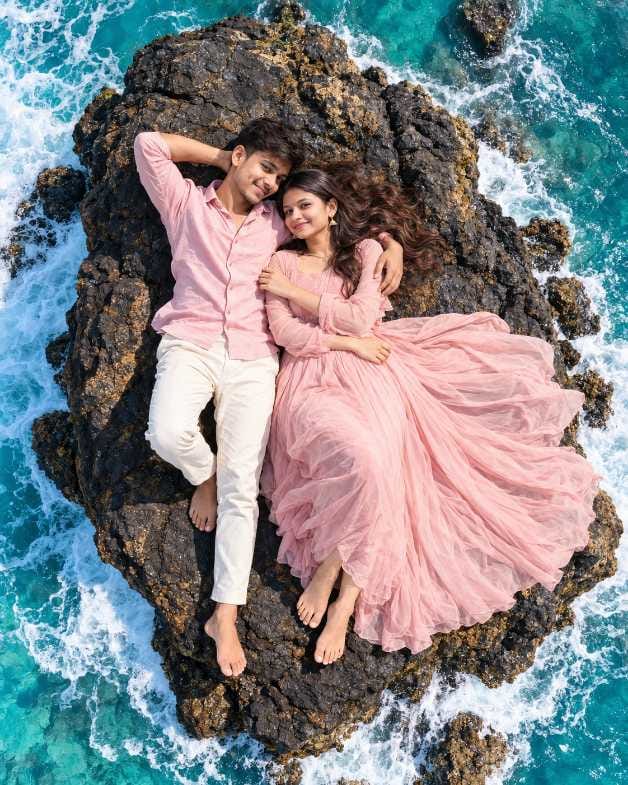
“format”: “vertical cinematic couple photograph”,
“aspect_ratio”: “4:5”,
“style”: “ultra-realistic cinematic aerial photography, romantic luxury travel aesthetic”,
“camera_angle”: “top-down aerial drone view, directly above the subjects”,
“composition”: {
“subjects”: “a romantic couple lying together on a large rugged black volcanic rock surrounded by turquoise ocean water”,
“positioning”: “couple centered on the rock, full bodies visible from head to feet”,
“framing”: “vertical composition with ocean and waves naturally surrounding the rock”,
“symmetry”: “balanced overhead composition with the rock forming a natural central frame”
},
“female_subject”: {
“pose”: “lying comfortably on her back beside the male subject”,
“expression”: “soft, natural, happy smile”,
“gaze”: “looking directly toward the camera”,
“hair”: “long, voluminous, naturally wavy brown hair spread softly around her head”,
“outfit”: {
“type”: “elegant flowing maxi dress”,
“color”: “soft pastel blush pink”,
“fabric”: “lightweight, airy, flowing chiffon-like fabric”,
“details”: “long sleeves, deep natural folds, layered flowing skirt”
},
“feet”: “barefoot”
},
“male_subject”: {
“pose”: “lying beside the female subject in a relaxed romantic pose”,
“expression”: “warm natural smile”,
“gaze”: “looking directly toward the camera”,
“hair”: “short, naturally styled dark hair”,
“facial_hair”: “neatly trimmed beard”,
“outfit”: {
“shirt”: “light pastel pink long-sleeve button-up shirt”,
“pants”: “off-white or very light cream trousers”,
“style”: “minimal elegant resort fashion”
},
“feet”: “barefoot”,
“body_language”: “one arm gently around the female subject while the other arm rests behind his head”
},
“environment”: {
“location”: “isolated rugged volcanic rock formation in the middle of a tropical ocean”,
“rock”: {
“color”: “charcoal black and dark gray”,
“texture”: “rough, naturally cracked volcanic stone with subtle golden-brown mineral textures”
},
“ocean”: {
“color”: “vivid turquoise and cyan blue”,
“water”: “crystal-clear tropical seawater”,
“waves”: “white foamy ocean waves crashing naturally around the rock”,
“motion”: “dynamic swirling water patterns surrounding the couple”
}
},
“lighting”: {
“type”: “bright natural daylight”,
“quality”: “soft but crisp tropical sunlight”,
“shadows”: “natural realistic shadows beneath the subjects and rock textures”,
“highlights”: “subtle highlights on skin, hair, clothing and ocean surface”
},
“photography”: {
“camera”: “high-end professional drone camera”,
“lens”: “wide-angle aerial lens”,
“depth”: “sharp subjects and detailed environment”,
“detail_level”: “extremely high detail”,
“dynamic_range”: “high dynamic range”,
“color_grading”: “cinematic teal and warm skin-tone color grading”,
“realism”: “photorealistic, natural skin texture, realistic fabric folds and water movement”
},
“mood”: “romantic, dreamy, luxurious, peaceful and adventurous”,
“quality”: “8K ultra-realistic cinematic photography”,
“negative_prompt”: [
“low resolution”,
“blurry faces”,
“distorted anatomy”,
“extra fingers”,
“extra limbs”,
“duplicate people”,
“floating body parts”,
“artificial skin”,
“plastic texture”,
“deformed hands”,
“warped feet”,
“oversaturated colors”,
“cartoon”,
“illustration”,
“3D render”,
“unnatural water”,
“incorrect aerial perspective”,
“cropped bodies”,
“text”,
“watermark”,
“logo”
]
}
}
How to Make Your Own Drone View Photo Step by Step
It takes only a few minutes. Follow these steps on your phone or computer.
Open ChatGPT on your phone or computer and start a new chat.
Pick one clear photo of yourself. For a couple photo, pick one clear photo of each person.
Upload the photo (or both photos) in the chat.
Go to the prompt box on this RonyTica page and copy the prompt that matches you: boy, girl, or couple.
Paste the prompt in the chat, right with your uploaded photo.
Press send and wait for ChatGPT to make the image.
If the face does not look like you, send the same prompt again. A new try often gives a better face.
Download the photo you like best and share it. RonyTica has more prompts like this on the site.
Easy Tips to Follow Before You Start
The photo you upload decides how good your result will be. Use a photo where your face is clear and the light is good. A front-facing photo works best. Do not use a photo with sunglasses, a heavy filter, or a very dark room. If your face is hidden, the AI has to guess, and then the photo may not look like you. For a drone view couple photo prompt, both photos should have the same kind of light and quality. If one photo is bright and the other is dark, the faces may look uneven in the final image. Also, keep your phone gallery ready, because you may want to try a few times. Good same face AI photo prompt results often come on the second or third try, so do not stop after the first one.
Best Settings for a Clean and Realistic Result
You do not need to change many things. Just keep a few small points in mind. The table below shows what works best for this top view AI photo prompt.
Setting
What to Choose
Why It Helps
AI Tool
ChatGPT (Gemini as second choice)
Keeps your face and the scene steady
Photo to Upload
Clear, front-facing, good light
Helps the AI copy your face properly
Photo Shape
Vertical (portrait)
Looks perfect on Instagram and Reels
Camera Angle
Straight from the top
Gives the real aerial view AI photo prompt feel
Light
Bright daylight
Makes the sea colour look rich and fresh
Tries
Two to three times
Gives you more faces and poses to pick from
Common Mistakes People Make With This Prompt
The biggest mistake is uploading a blurry or small photo. The AI cannot make a sharp face from a poor picture. The second mistake is changing the prompt too much. This style works because every small part is set well, like the angle, the light, and the sea. If you change too many words, you may lose the real drone look.
Another mistake is using one photo for a couple prompt. For a couple, always upload both photos. Many people also give up after one bad try. AI is not perfect, and sometimes the hands or feet look a little odd. Just run it again. And lastly, do not add text or logos to the prompt, as they can spoil the clean look of the sea photo.
Why You Will Love This Prompt
This style looks rich and dreamy, but you make it from your own sofa. The blue-green sea, the white waves, and the dark rock look beautiful together. Most people feel this is a real travel photo, which is why it gets so many likes. It is a great Instagram viral AI photo prompt for a new profile picture, a Reels cover, or a WhatsApp DP. It also feels personal. Boys, girls, and couples can all make their own version, so it is perfect for sharing with friends. A simple lying on rock photo prompt like this looks calm, stylish, and very natural. And because the sea scene looks like a holiday, it is also a nice idea for a birthday post or an anniversary post. RonyTica keeps adding fresh prompts like this, so you can come back for more styles.
Final Words Before You Try It
The drone view photo trend is simple, stylish, and fun. With a clear photo and the right prompt, you can make a holiday-style picture of yourself without leaving home. Use ChatGPT for the best result, try Gemini if you like, and do not worry if the first try is not perfect. Run it again, and you will get a photo you love.
We hope this Drone View AI Photo Prompt guide helped you. Try it today, share your photo on Instagram, and visit RonyTica again for more viral AI photo prompts, new trends, and easy guides.
Questions People Ask About This Prompt
Q.1) How do I make a drone view photo with ChatGPT?
Upload your clear photo in ChatGPT, paste the prompt, and send it. In a few moments, ChatGPT will make a top view photo of you with the sea around you. If you are new to this, the steps above will guide you.
Q.2) Can I use this prompt in Gemini?
Yes. You can use this drone view AI photo prompt in Gemini too. The result may be a little different from ChatGPT, so try a few times and pick the best one.
Q.3) Does ChatGPT keep my face the same?
Most of the time, yes, if your uploaded photo is clear. Sometimes the face changes a little. If that happens, send the prompt once more. This is normal with every AI tool.
Q.4) How do I make a couple photo with two photos in ChatGPT?
Upload both photos in the same chat, then paste the couple prompt. Make sure both faces are clear and have similar light. This helps the ChatGPT couple photo prompt keep both faces right.
Q.5) Is this prompt good for boys and girls?
Yes. There is a separate version for boys, for girls, and for couples. You can use a good AI photo prompt for boys or an AI photo prompt for girls from this page and get a result in your own style.
Q.6) Is it free to use?
You can try ChatGPT for free, but your daily limit depends on your plan. If you reach the limit, wait a little and try again later.