

You have seen those cream-colour “Peace Within” posters on your feed. A photo on top, a soft river design below. Here are two prompts to make one with your own photo.
IMAGE 1: Two-part poster. Top shows a young person with short dark curly hair on a rock by a river, in a cream sweatshirt. Bottom is a cream design with the “Peace Within” title, a river strip and four birds.
IMAGE 2: Two-part poster. Top shows a smiling woman with long wavy hair and closed eyes on a rock by a river. Bottom has a cream design, a green-grey title, birds and sage-green water.
Prompt 1 is written in a flowing paragraph style. It sets exact colours, sizes and positions. Try it if you like to control every small detail.
Prompt 2 is written as a neat list. It is easier to read and edit. Try it if you want to change one thing at a time.
Both make a 3:4 vertical poster. The top half keeps your original photo. The bottom half is a cream paper-style design with a big title, a painted river strip and birds. Your same person is placed in the river strip.
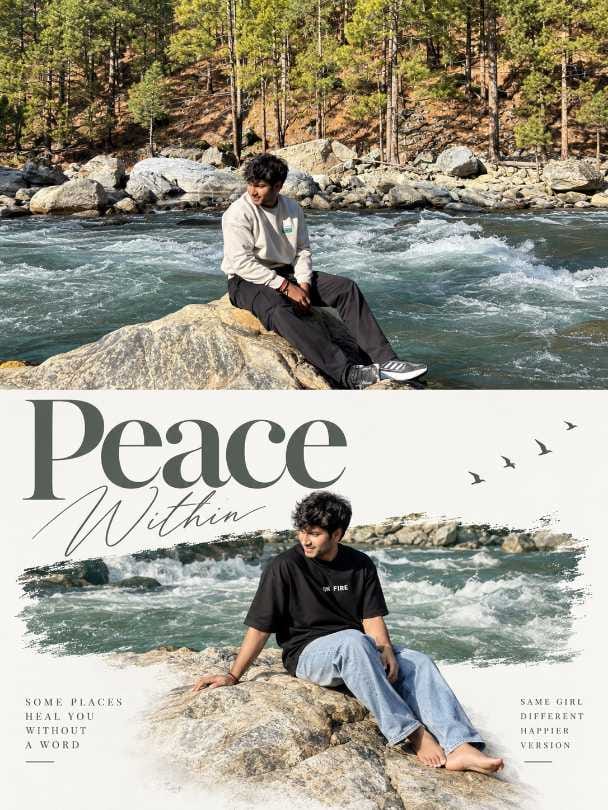
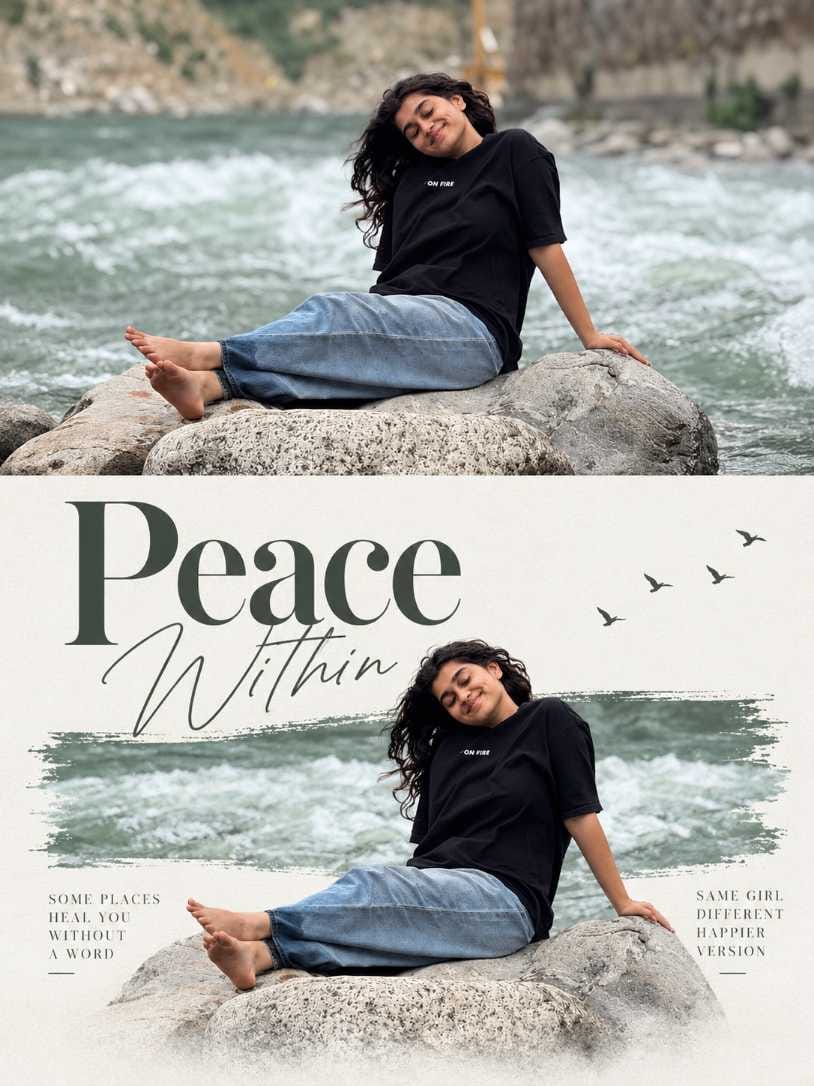
How to use this prompt
- Open Gemini or ChatGPT.
- Upload your photo first.
- Paste the prompt in the same message.
- Send it and wait for the poster.
- If something looks off, ask for one small fix at a time.
- Save the final image in the best quality you can.
How the prompt works
The prompt does three jobs.
First, it sets the shape. A 3:4 vertical poster, split into two equal halves.
Second, it tells the AI to leave the top photo as it is. Only the bottom half gets a new design.
Third, it describes the design. A big serif title, a thin script word, a painted river band, small birds and tiny side captions. It also puts the same person into the river strip, so the rock fades into the cream paper.
Because the colours and positions are fixed, the result looks like a real editorial poster and not a random picture.
Keep the face the same and make it look real
Faces can change when the AI redraws a person. Here is what I do.
My trick is to write a line telling the AI not to change the face and to use the same character as in my photo. Then, to make the photo look real, I say it should look like it was shot on an iPhone 17 or 18.
Add both lines at the end of the prompt. Simple.
Also check the written details against your photo. Prompt 1 talks about long wavy hair and closed eyes. If your photo has short curly hair and open eyes, the AI gets confused. It may change the person. Edit those words so they match you.
What to change and what you get
| What you change | What usually happens |
|---|---|
| Headline words and colour | The poster gets your own message and mood |
| Cream background colour | Warmer or cooler paper feel |
| Paper grain strength | Stronger grain looks old and printed, lighter looks clean |
| River strip colours | Blue-green feels fresh, sunset tones feel warm |
| Clothes colour | Changes the whole colour match of the poster |
| Number of birds | Fewer birds feel quiet, more birds feel busy |
Change one thing at a time. Then you know what caused the difference.
Which photo to upload
- Use soft, even light. Harsh shadows on the face confuse the AI.
- Keep the face fully visible. No hand or hair covering it.
- Pick a plain or simple background.
- Do not use a heavy filter. Use the natural photo.
- Use a clear, sharp photo, not a tiny or blurry one.
- A full-body or sitting pose works best for this poster.
Common mistakes and fixes
Face does not match. Add the same-face line from the tip above. Upload a clearer photo.
Written details clash with your photo. Fix the hair and eye details in the prompt so they match you.
Bare feet or fingers look bent. Ask the AI to redo only the feet and hands on the rock. Or try again.
Rock edge looks rough against the cream. Ask for a softer fade between the rock and the paper.
Text has spelling errors. Tell the AI the exact headline spelling and ask it to fix only the text.
Gemini vs ChatGPT
Both tools can make this poster. I tried both with the same photo and the same prompt.
- Face match: Gemini kept my face very close to the photo. ChatGPT was also good, but the face changed a little in one try. Adding the same-face line helped in both tools.
- Text and spelling on the poster: Gemini wrote the title “Peace Within” clearly. The small side captions had a spelling mistake once. ChatGPT also did well here. If any word is wrong, ask the tool to fix only the text.
- Cream paper look and river strip: Gemini gave a soft cream paper feel and a nice painted river strip. ChatGPT gave a similar look, but the rock edge was a bit rough once. I asked for a softer fade and it was fixed.
- Speed and number of tries: Gemini made a good poster in 2 tries. ChatGPT took 3 tries. Both were fast.
My advice: start with Gemini first. If you do not like the face or the look, try the same prompt in ChatGPT.
Post it on Instagram and Facebook
Which format? Start with a single post. The poster is one clear picture, so people understand it fast. A carousel works well if you made both styles. A reel is good if you want to show the making.
Sizes:
- Feed post: 4:5 portrait, 1080×1350.
- Reels and stories: 9:16, 1080×1920.
The poster is 3:4, so crop a little to reach 4:5. Keep the title and the person inside the middle. Do not cut the birds or the title edge.
Three caption ideas:
- Calm voice: “Sitting by the river, nothing to prove. Peace within.”
- Fun voice: “Made this poster with AI in a few minutes. Which style do you like, 1 or 2?”
- Short voice: “Find your quiet.”
Words to put in the caption so people can find it: peace poster, AI poster, AI photo prompt, Gemini prompt, ChatGPT prompt. Write them in a normal sentence, not just as a list.
Hashtags:
#PeaceWithin #TrendingPosterPrompt #AIPosterDesign #GeminiPrompt #ChatGPTPrompt #AIPhotoEditing #RiverAesthetic #CreamPosterDesign #PeacefulVibes #AIPhotoPrompt
I do not know the best time to post for your page. Check your own Insights and see when your people are online.
Make a carousel or a reel
Two-poster carousel: Put poster 1 first and poster 2 second. The change in style makes people swipe. You can add your original photo as the last slide.
Short reel: Show your original photo first, then the finished poster. Use the 9:16 size. Keep the text inside the middle so the app buttons do not cover it.
Share your own photo safely
- Use only your own photo, or one where the person said yes.
- Do not post photos of children without a parent’s okay.
- Remove location tags if the photo shows where you live.
Frequently Asked Questions
Yes. Just fix the hair, clothes and eye details in the prompt so they match your photo.
The AI redrew it. Add the same-face line, upload a clearer photo, and remove details that clash with the photo.
Yes. Write your own words and give the spelling clearly.
It depends on your plan and the tool’s limits. Check inside Gemini or ChatGPT.

Mar photo
aashis singh
Piyush