Got a good outdoor photo and want it to look like a travel magazine page? This mountain photo prompt does that. Here is the first one.
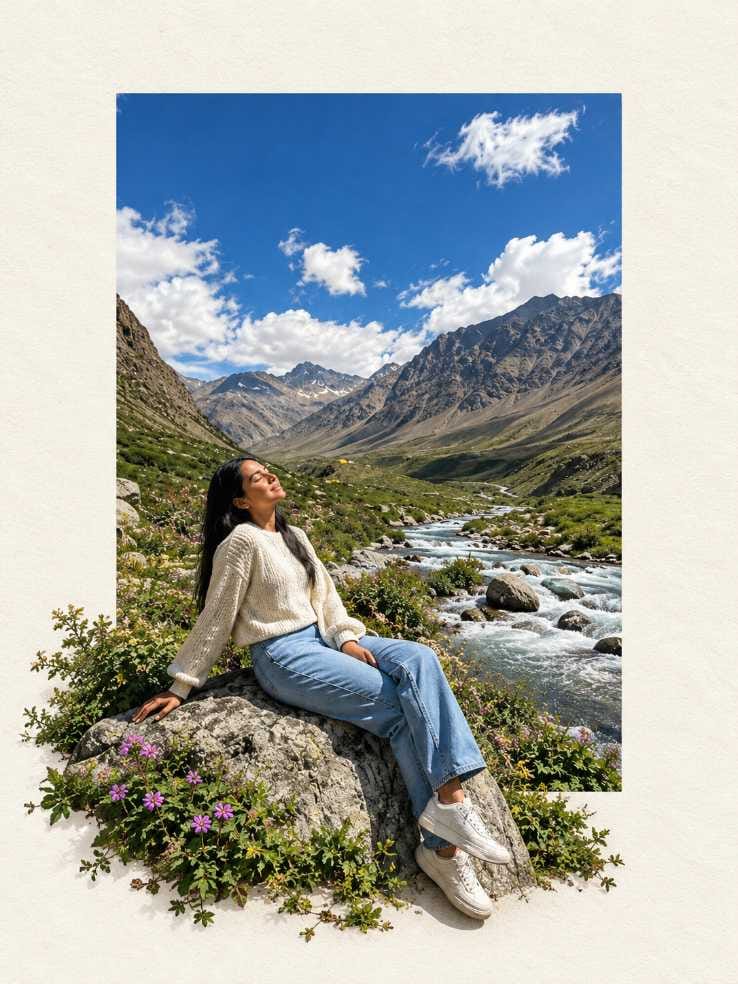
IMAGE 1: Woman in cream sweater sitting on a grey rock, face tilted up, inside a tall photo frame on warm off-white paper, with rock and flowers spilling over the bottom edge
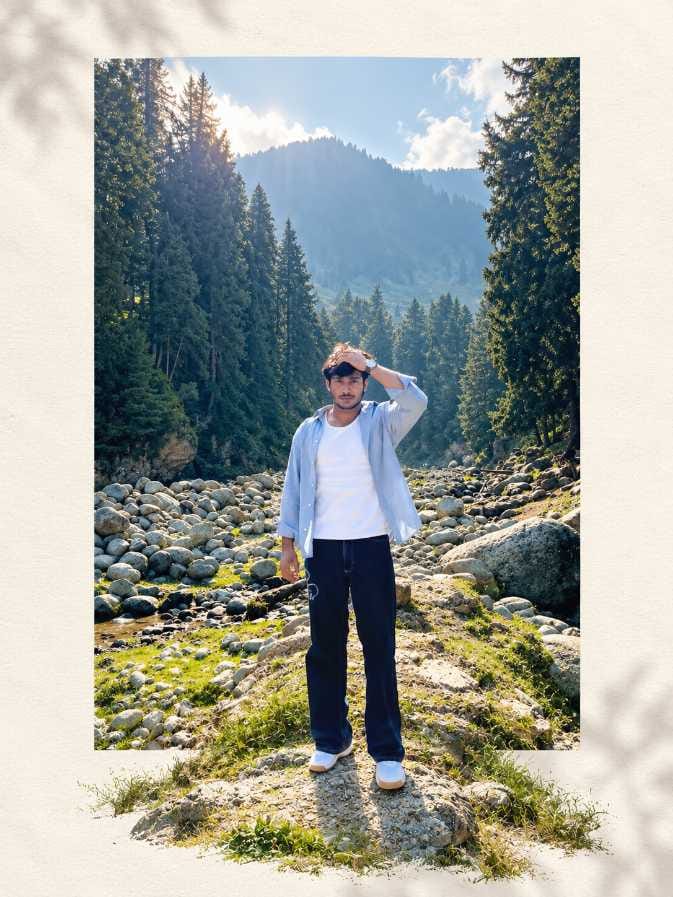
IMAGE 2: Young man with a short beard on a grassy riverbed, in a vertical frame on ivory textured paper, with grass and rocks breaking out at the bottom
Prompt 1 uses a warm off-white paper and lets the person, rock and flowers come out of the frame. Prompt 2 uses ivory textured paper and is stricter about keeping everything unchanged. It also bans added objects, people and text.
⫷RonyTica Prompt Box
{
“task”: “Transform the uploaded photograph into a premium minimalist editorial collage.”,
“style_reference”: [
“Luxury travel magazines”,
“Contemporary fashion editorials”,
“Artistic outdoor photography”,
“Minimalist Swiss-inspired art direction”
],
“canvas”: {
“aspect_ratio”: “3:4”,
“orientation”: “Vertical”,
“background”: {
“color”: “Warm ivory / off-white”,
“texture”: “Subtle natural paper texture”,
“negative_space”: “Generous”,
“visual_style”: “Clean, refined, premium, minimalist”
}
},
“composition”: {
“main_photo”: {
“source”: “Uploaded photograph”,
“placement”: “Centered horizontally and slightly above the vertical midpoint”,
“shape”: “Large vertical rectangle”,
“edges”: “Clean and sharply defined”,
“scenery”: “Keep the original landscape recognizable”,
“subject_overlap”: “Allow the main subject to naturally extend beyond the bottom edge of the rectangular photograph into the ivory background”
},
“foreground_cutouts”: {
“enabled”: true,
“elements”: [
“Flowers”,
“Grass”,
“Foliage”,
“Rocks”
],
“instructions”: “Where compositionally appropriate, allow existing foreground elements to extend beyond the rectangular photo frame as realistic photographic cutouts.”,
“realism”: “Natural edges, accurate textures, realistic depth, and soft believable shadows”
},
“layout”: {
“alignment”: “Asymmetrical but visually balanced”,
“focal_point”: “Original main subject”,
“depth”: “Subtle layered photographic depth”,
“visual_hierarchy”: “Clear subject separation with generous negative space”
}
},
“subject_preservation”: {
“source”: “Original uploaded photograph”,
“identity”: “Preserve the exact original identity”,
“face”: “Preserve facial features and natural appearance”,
“expression”: “Unchanged”,
“hair”: “Preserve original hairstyle, texture, and shape”,
“clothing”: “Preserve original outfit, colors, and details”,
“pose”: “Preserve original body position and posture”,
“proportions”: “Maintain accurate original proportions”,
“distinctive_details”: “Preserve all recognizable characteristics”,
“beautification”: false,
“redesign”: false,
“stylization”: false,
“important_instruction”: “Do not crop off important parts of the subject or artificially alter their appearance.”
},
“environment_preservation”: {
“landscape”: “Preserve the original scenery and recognizable environmental details”,
“lighting”: “Maintain the original lighting conditions”,
“textures”: “Preserve realistic natural textures”,
“atmosphere”: “Retain the original photographic mood”,
“color_integrity”: “Keep colors natural and faithful to the source”
},
“art_direction”: {
“photographic_style”: “Photorealistic premium travel editorial”,
“design_language”: “Minimalist Swiss-inspired editorial design”,
“color_palette”: [
“Warm ivory”,
“Muted earthy tones”,
“Natural greens”,
“Dusty blues”,
“Soft neutral colors”
],
“film_grain”: “Subtle and natural”,
“cutout_edges”: “Realistic and carefully blended”,
“shadows”: “Soft, subtle, and physically believable”,
“overall_mood”: “Elegant, artistic, understated, premium, and authentic”
},
“restrictions”: {
“text”: false,
“typography”: false,
“logos”: false,
“watermarks”: false,
“extra_subjects”: false,
“unrelated_objects”: false,
“illustration”: false,
“cartoon_effects”: false,
“hdr_effects”: false,
“oversaturation”: false,
“artificial_glow”: false,
“plastic_textures”: false,
“unrealistic_shadows”: false,
“artificial_subject_redesign”: false,
“unnecessary_background_changes”: false
},
“quality_requirements”: {
“photorealism”: “High”,
“subject_fidelity”: “Maximum”,
“environment_fidelity”: “Maximum”,
“composition_quality”: “Premium editorial standard”,
“texture_quality”: “Natural and detailed”,
“edge_quality”: “Clean, realistic photographic cutouts”,
“final_result”: “A sophisticated minimalist editorial collage that looks professionally art-directed while preserving the authenticity of the original photograph.”
}
}
⫷RonyTica Prompt Box
Transform the uploaded photograph into a premium minimalist editorial collage inspired by luxury travel magazines, contemporary fashion editorials, artistic outdoor photography, and Swiss-inspired minimalist design.
FORMAT & COMPOSITION:
Create a strict 3:4 vertical canvas with a warm ivory/off-white background, subtle natural paper texture, and generous negative space. Place a large, clean-edged vertical rectangular crop of the original photograph in the center, slightly above the vertical midpoint. Keep the original scenery recognizable inside the rectangle. Allow the main subject to naturally overlap and extend beyond the bottom edge of the rectangular photograph into the ivory background, creating a realistic layered photographic collage effect.
NATURAL FOREGROUND CUTOUTS:
Where appropriate, allow existing flowers, grass, foliage, and rocks from the original photograph to extend beyond the rectangular photo frame. Maintain realistic photographic cutout edges, authentic textures, natural depth, and subtle, physically believable shadows. Do not invent foreground elements that are absent from the original photograph.
SUBJECT PRESERVATION:
Preserve the exact original subject, identity, facial features, expression, hairstyle, hair texture, clothing, colors, body proportions, pose, and posture. Do not beautify, redesign, stylize, or artificially modify the subject. Maintain the original appearance and ensure that no important body parts are unintentionally cropped out.
ENVIRONMENT & COLOR PRESERVATION:
Preserve the original landscape, scenery, environmental details, lighting conditions, atmosphere, and natural photographic textures. Keep the original colors faithful to the source image. Maintain realistic greens, muted earthy tones, dusty blues, and soft neutral colors wherever they naturally occur. Do not unnecessarily change the background or replace the original environment.
ART DIRECTION:
Create an elegant, photorealistic premium travel editorial with minimalist Swiss-inspired art direction. Use asymmetrical yet visually balanced composition, sophisticated spacing, clear subject separation, subtle photographic depth, and refined layering. Keep the original subject as the primary focal point. Add only subtle, natural film grain if appropriate. All shadows and cutout edges must look authentic and physically believable.
STRICT RESTRICTIONS:
No text, typography, logos, watermarks, additional people, extra subjects, unrelated objects, illustrations, cartoon effects, HDR effects, oversaturation, artificial glow, plastic textures, unrealistic shadows, artificial subject redesign, or unnecessary background changes.
FINAL OUTPUT:
A high-resolution, photorealistic 3:4 vertical minimalist editorial collage that looks professionally art-directed while preserving the original photograph’s authenticity. The final image must retain the original subject’s identity, appearance, scenery, lighting, and natural colors. Only transform the composition into an elegant editorial collage; do not change the original photograph’s visual identity.
Why This Look Stands Out in the Feed
Most outdoor photos look the same on a feed. This one has a clean paper background and a person stepping out of the picture. The eye stops for a second. That is all you need.
Pick the Right Photo to Start
The source photo decides most of the result. Keep these points in mind :
Use a photo with soft, even light. Harsh shadows on the face often look odd after editing.
Show the face clearly. Don’t use a photo where it is half hidden or very small.
Pick a photo with some open ground or grass at the bottom. The break-out effect needs something to spill over the edge.
Skip heavy filters. Upload a natural photo, so the colours stay close to the real ones.
Use the original file, not a screenshot or a photo sent over a chat app.
Save Sizes for Post, Reel and Story
This part decides how your image looks after you post it. Many people make a nice image and then lose the effect because the app crops it.
For a normal feed post on Instagram or Facebook, use 4:5 portrait, which is 1080×1350. This image is already tall, so 4:5 fits it well. It takes more room on the phone screen than a square one.
For a reel or a story, use 9:16, which is 1080×1920. You can ask for this when you make the image. The prompt lets you change the aspect ratio, so say 9:16 in your request if you plan to use it as a story. Don’t make a 4:5 image and stretch it later. The person will look thin and the paper will look odd.
Which format should you pick? Here is my advice :
Single post : Best for one strong image. The effect is simple, so one photo does the job. Carousel : Good if you make both looks. Put the best one first. Add the original photo as the last slide, so people see the before and after. Reel : Good for a short motion video made from the image. See the steps below.
If you only have time for one, post the single 4:5 image first. It is the easiest and it shows the frame break clearly.
Keeping the result sharp
Save the original file from ChatGPT or Gemini. Don’t take a screenshot.
Zoom in on the face and the cutout edges before you post.
If the result looks soft, run the same prompt again with the same photo. A second try often gives a cleaner result.
If it is still blurry, upload a larger source photo and try once more.
Don’t resize it many times. Each save can lose some detail.
What to Change and What You Get
Change this
What usually happens
Paper colour (soft grey, pale beige, light blue)
Changes the whole mood. Light blue feels cool, beige feels warm.
Size of the photo rectangle
A smaller frame gives more empty space and a cleaner look.
What breaks out (flowers, grass, rocks)
Changes what spills over the bottom edge.
Shadow strength and paper grain
Stronger shadows make it look more real. None makes it flat.
Colour mood (golden or cool muted)
Warm feels sunny. Cool feels calm and misty.
Aspect ratio (4:5 or 9:16)
Decides if it fits a post or a story.
Change one thing at a time. Then you know what caused the change.
Caption Ideas and Hashtags
Here are three captions in different voices. Funny: “My phone said mountains. My editor said magazine cover.” Calm: “Eyes closed. Sun on my face. Nothing to do.” Short and direct: “Stepped out of the frame.”
Put useful words in the caption so people can find it. Words like “mountain photo,” “nature photo edit,” “AI photo prompt,” “travel magazine look” and “ChatGPT” or “Gemini” help. Write them in a natural sentence, not as a long list.
Some are broad and some are very specific. Use both kinds.
Mistakes That Hurt Reach
The face does not match you. This can happen with both prompts. Fix it by using a clear, front-facing photo and trying again.
Pasted-on edges. The flowers, rocks and feet can look cut out. Ask for softer shadows, or pick a photo with simpler ground.
Hands drift. In the second look, hands can change. Check them before you post.
Wrong size. A stretched image looks cheap. Make it in the right ratio from the start.
Too many hashtags. Stick to the ten above.
Turn It into a Reel
1) Open Google Flow or any video editor app and add your finished image. 2) Make a slow zoom in, or a slow upward move, so the frame feels alive. 3) Keep it short, add soft music, and export in 9:16.
Last Look Before Posting
Check these five things :
The face looks like you.
The cutout edges look clean when you zoom in.
The size is 1080×1350 or 1080×1920.
It is the original file, not a screenshot.
The caption has a few search words.
Frequently Asked Questions
Q.1)Can I use this prompt in both ChatGPT and Gemini?
Yes. You can use your photo with either tool and compare.
Q.2)What if my photo has no grass or rocks at the bottom?
The break-out part may look weak. Choose a photo with some ground in front of the person.
Q.3)Should I post a single image or a carousel?
Start with a single post. Use a carousel if you have two looks or want to show the before photo.
Q.4)Can I change the background colour?
Yes. Soft grey, pale beige and light blue all work.